Wandurance
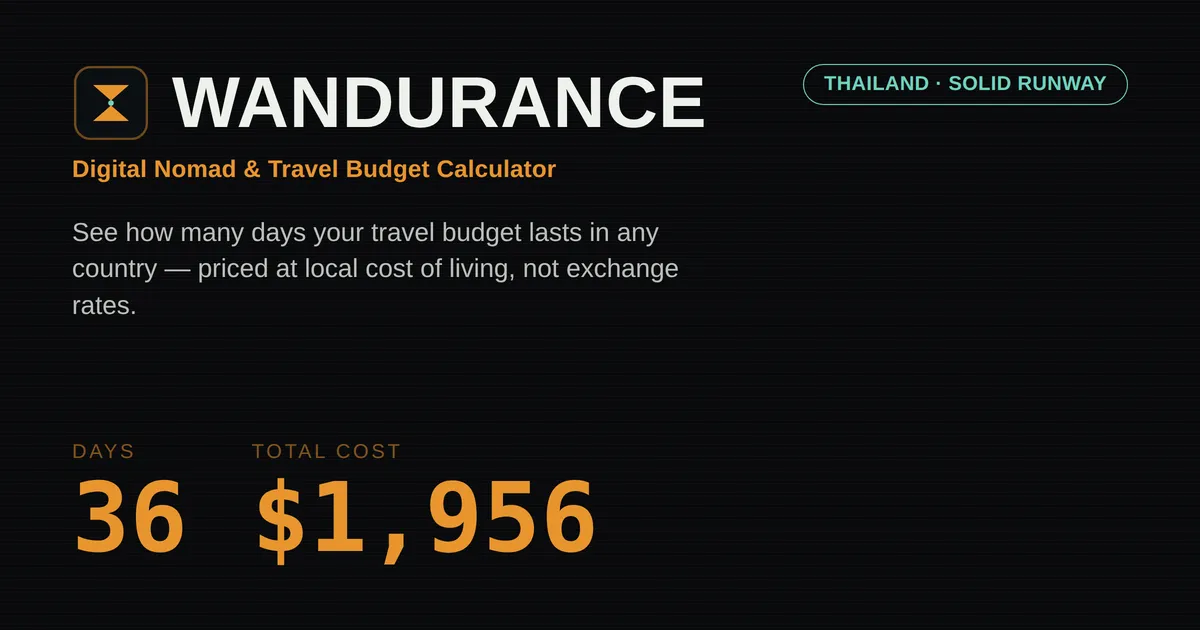
Wandurance digital nomad budget calculator uses purchasing power parity to show how long travel money lasts in 190+ countries.
Overview
Wandurance is a free, browser-based budget calculator built for the growing population of remote workers, backpackers, and long-term travelers who need a quick, realistic answer to the question: how many days will my money last in a given country? Unlike simple currency converters that only translate dollar amounts into local denominations, Wandurance builds its estimates on purchasing power parity (PPP). This means it scales daily costs for accommodation, food, local transport, and a basic medical buffer to each destination's actual price level, rather than relying on the nominal exchange rate. The tool covers more than 190 countries, requires no signup, and runs entirely in the client, so user data never leaves the device. This positions Wandurance between generic cost-of-living databases and manual spreadsheet planning, offering a middle ground that is both faster than building a budget from scratch and more grounded than a rough currency conversion. For digital nomads weighing Chiang Mai against Mexico City, or a backpacker trying to stretch a fixed pot of savings across Southeast Asia, the tool delivers an immediate, shareable runway estimate that can inform flight bookings, visa timelines, and monthly budgets before a single dollar is committed.
The visual design leans into the airport departure-board aesthetic, with a dark panel, amber digits, and flip animations that make the result feel tangible rather than abstract. The data underlying the calculator is periodically checked against World Bank price-level indicators, so the estimates track real-world inflation rather than staying frozen at a static moment. That means the tool is not a toy; it is a practical planning instrument for people who need to know whether a $2,000 fund will last 36 days or 50 days in Thailand, and how that changes when they switch from hostel dorms to guesthouse rooms. For a deeper dive into the methodology and limitations, the budget-friendly destinations table provides a quick snapshot of how far a $3,000 budget stretches in popular nomad countries, from India at roughly 111 days to Portugal at about 42 days. The entire experience is free, ad-free, and protected by a clear privacy policy that states no analytics or trackers are used. In a corner of the travel tech market filled with gated calculators and lead-generation tools, Wandurance stands out as a straightforward utility that respects the user's time and data.
Key Features
PPP-Based Daily Cost Model: At the core of Wandurance is a cost model that multiplies a set of baseline daily expenses (accommodation, food, local transport, and a basic medical-care buffer) by a country-specific price-level index. The index is periodically compared against World Bank data, so the estimates track real-world inflation rather than staying frozen. This is fundamentally different from a currency converter. A traveler heading to Thailand with $2,000 might see 36 days on the calculator, while a simple exchange-rate calculation would suggest a different, less accurate number because it does not account for the fact that goods and services in Thailand are cheaper relative to the US. The PPP approach directly answers the question of how long a budget lasts on the ground. It also makes cross-country comparisons meaningful: comparing two countries using exchange rates alone is misleading, whereas comparing them with PPP gives a truer sense of relative affordability.
Lifestyle Tiers: The calculator includes three preset lifestyle tiers: Frugal, Normal, and Lavish. Each tier adjusts the baseline daily costs to match typical spending patterns. Frugal is modeled on hostel dorm beds, street food, and public transit, making it suitable for backpackers and budget gap-year travelers. Normal uses guesthouse accommodation and sit-down meals at local restaurants, which is the default and often the most relevant for digital nomads who need a balance of comfort and cost. Lavish assumes hotel stays, restaurants, and occasional taxi rides, catering to those who prefer more comfort or are traveling for a special occasion. The tier buttons are visual and easy to toggle, and the daily cost estimate updates immediately. This allows users to see, for example, that switching from Frugal to Normal in Vietnam might add $10 per day, which over a 30-day stay represents $300, a meaningful difference when planning a tight budget.
City Cost Level Toggle: A single country-level price index can be misleading because a capital city like Bangkok or Mexico City is almost always more expensive than a rural town in the same country. Wandurance addresses this with a simple toggle that adjusts the index based on whether the traveler plans to stay in a "Capital / hub city" or a "Smaller city / town." This is explicitly a coarse adjustment, not a per-city dataset, but it provides a more realistic baseline for the majority of digital nomads who gravitate toward well-known hubs. The tool also displays a short disclaimer explaining that the index is a national average and that actual costs in specific neighborhoods will vary. For users who know they will be in a smaller town, this toggle can lower the daily estimate enough to make a destination fit within a budget that would otherwise be too tight in the capital.
Multi-Stop Trip Planner: The multi-stop planner is one of the most useful features for anyone planning a route that crosses several countries. Instead of calculating each leg in isolation, travelers can stack destinations in the order they intend to visit, assign a day count to each stop, and see a running total of the expected cost against their overall budget. The planner uses the same lifestyle and city cost settings as the main calculator, so switching from Normal to Frugal updates every row simultaneously. This makes it easy to test different itineraries and decide whether a three-week detour through Vietnam fits within the same envelope as a two-week stay in Japan. The planner also shows a summary line that turns green when the total fits under budget and red when it exceeds the budget, giving immediate feedback as the user adjusts day counts.
Destination Comparison Tool: Alongside the planner, Wandurance offers a side-by-side comparison feature. Users can add up to several countries and see each one's estimated daily cost and total number of days on the same budget. This is particularly helpful when a traveler is torn between two or three potential bases. For example, a user with a $3,000 budget might compare India, Nepal, Indonesia, Vietnam, and Colombia to see which stretches the money longest. Each comparison row includes a searchable country selector, so it is trivial to swap destinations without resetting the entire calculation. The comparison tool is designed to sit directly below the main results, so users can quickly add a country they see in the destinations table and evaluate it without navigating away.
Advanced Daily Cost Overrides: For travelers who already know local prices or have specific requirements, the "Adjust daily costs" panel allows manual overrides of accommodation, food, local transport, and medical expenses. The override fields are pre-filled with the default values for the selected country and lifestyle, but a user can change any of them. The main board recalculates immediately, and the total cost and days are based on the custom figures. This feature bridges the gap between a generic calculator and a fully bespoke budget model. For instance, a user who knows they will stay in a $30-per-night hotel can enter that exact amount and see how it affects the overall runway. The advanced panel also includes a reset button to revert to the calculated defaults, and a status message explains whether the current values are auto-filled or user-modified.
Shareable Links, Print, and Offline Use: Wandurance generates a shareable URL that encodes the current budget, destination, lifestyle, and city cost settings. Copying this link allows a traveler to send an exact result to a partner or a friend, who can then open it and see the identical numbers. The app also provides a "Print / save as PDF" button that produces a clean, print-friendly page with the departure-board result and breakdown, which is useful for record-keeping. Since the entire app is client-side, it continues to function offline after the initial page load, a practical benefit for trips where Wi-Fi is unreliable or nonexistent. The print stylesheet hides the controls and content sections, leaving only the board and the breakdown, so the printed output is focused and readable.
How It Works
The user journey begins on the Wandurance homepage, where a control panel sits to the left of a dark departure-board display. The first step is entering a total travel budget in US dollars into the "Travel budget" field, which accepts decimal input and automatically formats with commas. Next, the user clicks the "Destination" search box and types the name of a country. Wandurance uses a combobox with autocomplete, filtering through a list of more than 190 countries. Selecting a country sets the cost index and loads the default daily cost estimates for the chosen lifestyle. By default, the lifestyle tier is set to "Normal," but the user can switch to "Frugal" or "Lavish" by clicking the corresponding button. Below that, a two-button radio group lets the user choose between a "Capital / hub city" and a "Smaller city / town" adjustment. There is also an optional checkbox labeled "Include coworking & connectivity," which, when enabled, adds a daily allowance for a coworking desk and a local SIM/data plan.
Once these inputs are set, the results panel updates in real time. The main metric displayed is the estimated number of days the budget will last, shown in large flip-digit animation, alongside the corresponding total cost. A small note below the metrics explains what the calculation assumes, such as whether a coworking fee is included. If the destination has a visa warning for US passport holders, a separate note appears to prompt further research. The user can then explore further by opening the "Adjust daily costs" accordion to manually tweak any category. The daily cost breakdown is presented as a horizontal stacked bar chart, with each category (accommodation, food, transport, medical, coworking) shown in a different color and listed with its dollar value and percentage of the total.
For a multi-country plan, the user can scroll to the multi-stop trip planner, add stops using the same country search, specify the number of days per stop, and see a running total that highlights whether the route fits within the initial budget. The comparison tool follows the same pattern, allowing additional countries to be added for side-by-side evaluation. The final step is sharing or saving: a "Copy shareable link" button encodes the entire current state into the URL, and a "Print / save as PDF" button outputs a minimal, black-and-white-friendly version of the result. Because all calculations happen in the browser, there is no loading time when changing inputs, and the interface feels immediate. The entire workflow is designed to be completed in under a minute, making it easy to iterate on different budget scenarios or compare a couple of countries before a conversation with a travel partner.
Use Cases
Digital nomad choosing a base: A software developer has $5,000 saved for a two-month remote work stint. They open Wandurance and compare Lisbon, Bangkok, and Mexico City using the comparison tool. The calculator shows daily costs of $70, $54, and $61 respectively, meaning the $5,000 would cover roughly 42, 55, and 49 days in those cities. The developer decides on Bangkok, where the money lasts nearly two weeks longer, and uses the advanced panel to add a coworking allowance to verify that the total still fits under a comfortable $2,500 per month. This decision, made in a few minutes, avoids an expensive mistake that could have cut the trip short.
Backpacker planning a route: A gap-year traveler has $3,000 for a three-month trip through Southeast Asia. They set the lifestyle to Frugal and open the multi-stop planner. They add Thailand, Vietnam, and Indonesia with 20, 25, and 18 days respectively. The planner sums the cost for each stop and shows a running total. With the Frugal tier, Thailand costs roughly $27 per day, Vietnam $38, and Indonesia $37, bringing the estimated total to about $2,400, leaving a $600 buffer for unexpected expenses or an extra stop. They adjust the day counts and see how each change affects the remaining budget, ultimately settling on a plan that fits both their time off and their savings.
Remote retiree checking monthly expenses: A retired couple is considering moving to Colombia for six months. They enter $1,500 as their monthly budget in the main calculator. Setting the lifestyle to Normal and the city cost level to "Capital / hub city" (they plan to live in Medellín or Bogotá) produces a daily estimate of around $50, which converts to roughly $1,500 per month. The medical buffer included in the calculation reassures them that routine clinic visits are covered, and they use the adjust panel to increase the accommodation estimate to account for a one-bedroom apartment rather than a guesthouse. The result gives them a concrete figure to compare with their pension income.
Freelance designer comparing coworking options: A freelance web designer wants to know whether paying for a coworking membership is worth it versus working from a hostel. They toggle the "Include coworking & connectivity" option for Thailand and see the daily cost jump from $54 to $64, an extra $10 per day. Over a 30-day stay, that is $300, which they decide is acceptable for reliable Wi-Fi and a dedicated desk. The comparison tool lets them check whether Vietnam or Indonesia offers similar connectivity for less, and they discover that Vietnam with coworking is $48 per day, saving them $160 over the same 30-day period. They switch their plans accordingly.
Group trip coordination: A couple is planning a three-country honeymoon. They use the comparison tool to shortlist Portugal, Mexico, and Argentina, then switch to the multi-stop planner to map out the route. By changing the city cost level for each stop (Portugal as a hub city, Mexico as a smaller town, Argentina as a hub) they see a more accurate estimate. The planner reveals that Argentina is the cheapest leg, allowing them to allocate more days there without blowing the total budget. They also use the shareable link to send the final itinerary to a travel agent, who can see exactly how the budget is distributed.
Pricing & Value
Wandurance is entirely free. There is no pricing page, no tiered plan, and no paywall. The tool does not require an account, does not set cookies, and does not send any user input to a server. This is a deliberate design choice: because all cost data is embedded in the static page and calculations run locally, there is essentially no marginal cost per user, and the creator can distribute it as a free utility. For travelers, this removes friction and makes the calculator accessible to anyone with a browser. When compared to other travel budget tools, which often charge a one-time fee for premium features or require a subscription for multi-country planning, Wandurance's free model is a clear differentiator.
The value is also high in practical terms: a traveler planning a two-month trip can get a realistic daily budget in minutes, potentially saving hundreds of dollars by choosing a less expensive base or by spotting that their original budget would run out early. The lack of ads and trackers adds to the value, as users can calculate without being followed or bombarded with sponsored content. There are limits to what the tool can do, and users should treat the numbers as planning-grade estimates rather than guarantees, but at zero cost, the risk of trying it is minimal. The project appears to be a passion project or a free utility, and while it is not open source (the copyright dialog explicitly states that the code and design are proprietary), the free availability of the tool itself is the primary value proposition. There is also a contact form for inquiries, which suggests the creator is open to feedback and licensing requests.
Final Verdict
Wandurance fills a specific niche in the travel planning ecosystem. It solves a real problem: turning a lump sum of savings into a daily runway estimate that reflects local purchasing power. The PPP-based approach is a genuine improvement over exchange-rate calculators, and the interactive features, such as the multi-stop planner and destination comparison, make it suitable for route-level decisions rather than just single-country lookups. The user experience is polished, with a cohesive visual style that leans into the departure-board metaphor, and the fact that it works offline and keeps data local is a meaningful privacy benefit.
However, there are limitations. The cost estimates are based on general price-level data, not live hotel or transport rates, so actual costs can be higher or lower depending on season, neighborhood, and booking timing. The city cost adjustment is coarse, offering only two levels, and the medical buffer is a rough daily reserve rather than a comprehensive insurance plan. The visa notes are also generic and only reference US passport holders, so non-US users will need to verify entry requirements elsewhere. The FAQ section does a good job of setting expectations and explaining the methodology, but users should always confirm critical prices before booking.
Despite these caveats, Wandurance is a valuable starting point for anyone who wants a quick, shareable, and free budget estimate before committing to travel plans. It is especially recommended for first-time digital nomads who are still choosing a base, budget-minded backpackers constructing a multi-country itinerary, and slow travelers who want to sanity-check a monthly budget before signing a lease. For those users, the tool is likely to become a bookmark-worthy part of their planning process, even if it is not a substitute for detailed price research. The combination of PPP accuracy, interactive planning tools, and a privacy-respecting design makes it a standout in a niche crowded with gated spreadsheets and ad-heavy calculators.
Pros & Cons
The Good
- Uses purchasing power parity (PPP) rather than exchange rates, providing a more realistic estimate of how far a dollar stretches locally.
- Covers more than 190 countries with a searchable country selector, making it easy to compare destinations worldwide.
- Offers multiple lifestyle tiers (Frugal, Normal, Lavish) and a city cost level toggle, allowing users to adjust estimates to their travel style.
- The multi-stop trip planner and destination comparison tool help users plan complex itineraries and compare options side by side.
- Runs entirely in the browser with no account required, meaning it works offline and user data never leaves the device.
The Bad
- Estimates are planning-grade and based on general cost-of-living patterns, not live prices, so actual costs may vary significantly.
- The city cost adjustment is coarse, only differentiating between capital hubs and smaller towns, which may not accurately reflect specific neighborhoods or cities.
- The visa and medical cost notes are general references for US passport holders and are not personalized to a user's nationality or comprehensive insurance needs.