RemindHer
RemindHer is a family calendar and task app for moms that turns voice notes into shared tasks to reduce mental load.
Overview
RemindHer is a family calendar and task management application with a specific focus on supporting mothers and couples who carry the mental load of running a household. The term "mental load" refers to the invisible, cognitive work of anticipating needs, planning logistics, and remembering details, which often falls disproportionately on women. RemindHer's value proposition is to turn this abstract burden into a tangible, shared system. The product combines a shared family calendar, voice-to-task capture, and assignment tools into a single, cohesive interface. It is designed for families that are tired of one person acting as the family's human CPU.
The homepage presents a clear message: "Stop remembering everything alone." This resonates with a broad audience, but the product is explicitly oriented toward moms, as evidenced by the headline "Family Calendar & Organizer app for Moms." The founder, Adi Ben Elyahu, appears to be the driving force behind the project, and her personal story is outlined on the About page. The brand voice is empathetic and practical, avoiding the overly technical jargon that plagues many productivity tools.
In terms of market positioning, RemindHer sits at the intersection of family organizers and task management. Established competitors include Cozi, FamilyWall, and OurHome, all of which offer shared calendars and lists. However, RemindHer differentiates itself through a strong emphasis on voice input and a rallying cry against mental load inequality. This is more than a scheduling tool; it is a statement about family equity. The app aims to make household contributions visible and to distribute them evenly across partners and even children.
The website itself appears to be built on WordPress, with a polished but somewhat template-driven design. The use of stock images and placeholder statistics (e.g., "20+ Years Of Experience" when the company is likely new) creates some skepticism, but the core features seem genuinely useful. The product is in the early stages, as indicated by the contact-based onboarding instead of a self-serve signup. This suggests that the founder is manually vetting early users to refine the experience. RemindHer is currently a web app, with screenshots showing mobile layouts, but no explicit App Store or Google Play links are visible on the homepage.
Key Features
Voice-to-Task Magic
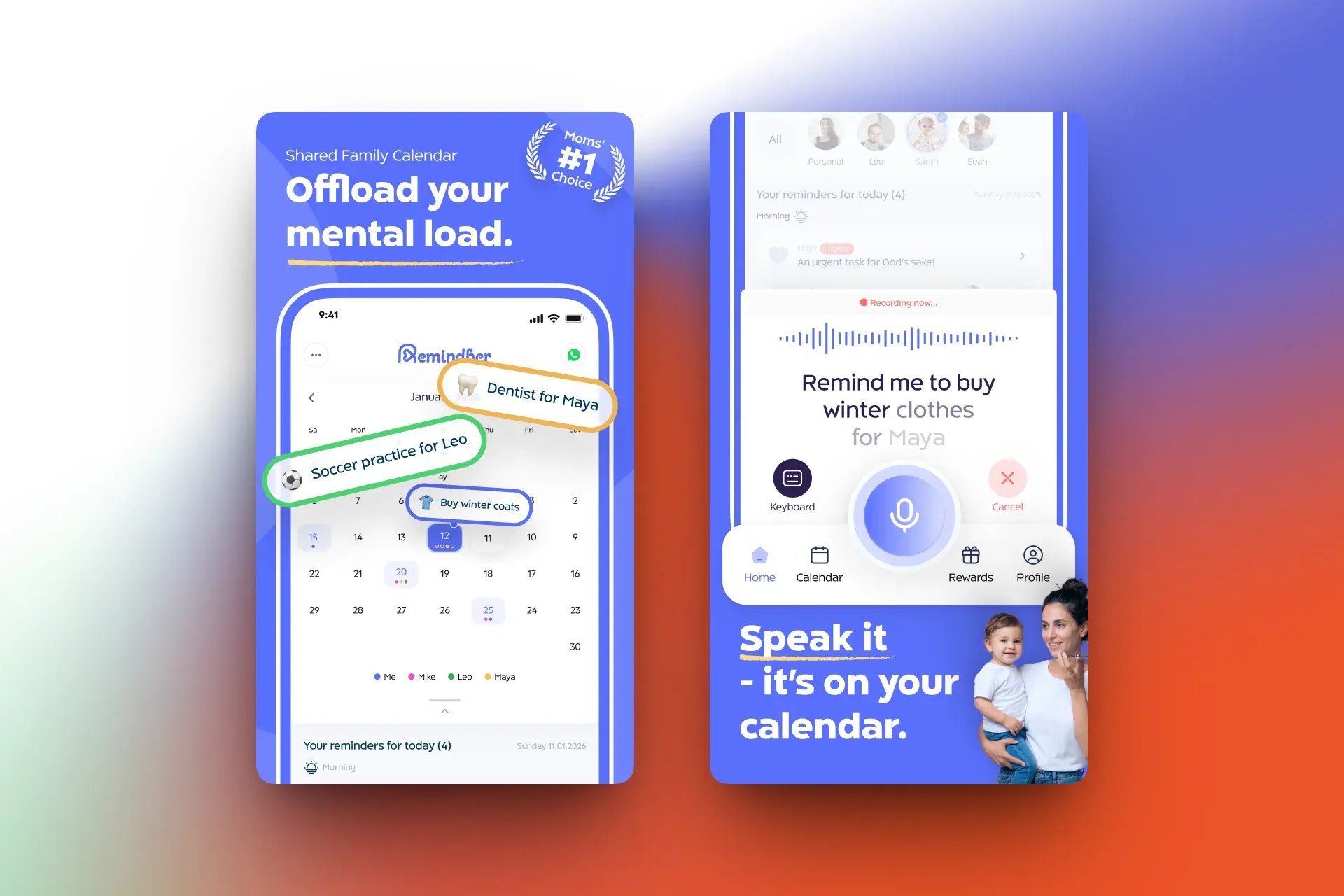
The signature capability of RemindHer is converting spoken words into tasks. The interface includes a prominent voice button that, when pressed, allows the user to speak a natural-language sentence such as "Pick up dry cleaning tomorrow at 5 PM." The app parses this input and creates a task with a due date and time. This feature is especially valuable for parents whose hands are often occupied, whether they are cooking dinner, holding a child, or driving. By eliminating the need to type, the app removes a significant barrier to capturing tasks in the moment. The voice-to-task mechanism is shown in a dedicated screen on the website, indicating that it is a primary workflow rather than an afterthought.
Shared Family Calendar
At the core of RemindHer is a real-time shared calendar. Every authorized family member can view upcoming events, appointments, and deadlines. The calendar supports multiple views, likely including month, week, and agenda views, with color-coded categories for different family members or activity types. This shared visibility reduces the need for constant verbal reminders and frantic text messages. When one partner schedules a dentist appointment, the other partner sees it immediately. The calendar also allows tasks to be scheduled directly onto a date, blurring the line between events and to-dos. This integration is key to creating a single source of truth for family logistics.
Smart Calendar Integration with Google Calendar
RemindHer offers two-way synchronization with Google Calendar. This is a critical feature for families that already rely on Google's ecosystem. Events created in RemindHer appear in the linked Google account and vice versa. The synchronization is described as privacy-aware, meaning that users can control which information is shared and with whom. For example, a parent could keep a personal therapy appointment private while sharing school events with the family. The integration likely supports adjustments for time zones and recurring events, which are essential for complex family schedules. This feature reduces the switching cost for new users and makes RemindHer an overlay on top of existing calendar habits.
Organize Kids & Tasks Easily
RemindHer includes a dedicated area for managing children's schedules and responsibilities. Parents can add school breaks, after-school activities, playdates, and medical appointments for each child. The tasks can be tagged with a child's name, making it easy to filter. For larger families, this granular organization is a lifesaver. Each child can have a profile with their own color, so a glance at the calendar reveals who needs to be where. The task list can also be used for age-appropriate chores, teaching kids about responsibility in a structured way. The app's design avoids overwhelming users by keeping the interface clean and declarative.
Distributed Responsibility and Role Assignment
A core philosophy of RemindHer is that the mental load should be shared. The app allows tasks to be assigned to specific family members, with deadlines and notifications. This creates accountability and transparency. When a task is completed, it can be checked off, giving a sense of collective progress. The app can show a weekly overview of how many tasks each person has completed, which can be a powerful tool for having conversations about household balance. This feature directly challenges the default dynamic in many homes where one person silently manages everything. By making the invisible work visible, RemindHer helps couples renegotiate their division of labor.
Notifications and Reminders
To ensure that tasks and events are not forgotten, RemindHer sends reminders through push notifications and possibly email. Users can customize the timing and type of reminders for each event. For example, a parent might want to be reminded about a school concert two hours in advance, while a recurring medication reminder might be set for the same time daily. The notifications are designed to loop in the assigned person, rather than the default organizer, which is a subtle but important shift. This feature is essential for the app's goal of distributing responsibility; if only the primary parent receives alerts, the mental load persists.
Community and Educational Content
Beyond the productivity features, RemindHer hosts a blog with articles on mental load, family management, and personal well-being. This transforms the product from a utility into a resource. The content appears aimed at helping parents feel understood and offering strategies to lighten their cognitive load. The community aspect is further emphasized by testimonials and a forum-like section, where users can share tips and experiences. This content strategy not only supports user retention but also improves the site's search engine visibility. It signals that the brand is invested in a mission, not just a software subscription.
How It Works
The user journey with RemindHer begins on the homepage, where the primary call to action is a "Get Started" button that leads to the contact page. Since there is no public registration form, a prospective user must submit an inquiry, likely receiving an email or demo invitation. This sales-led flow suggests that RemindHer is in an early access phase, with the founder personally onboarding families. After gaining access, the user creates a family profile, entering names, relationships, and perhaps age-specific information for children.
The next step is inviting partner, co-parent, or other family members. This is typically done via email or a unique invitation link. Each member then installs the app on their preferred device or accesses it through a web browser. The shared calendar populates with any pre-existing events from Google Calendar if the user authorizes integration. The setup process is designed to be quick, with a minimal number of required fields, respecting the user's time.
Daily use revolves around the central dashboard. The main screen displays today's schedule, upcoming tasks, and overdue items. To add a new task, the user can tap a plus button and choose between typing or using the voice recorder. Voice input parses the natural language and auto-fills due dates, categories, and assignments. The user can adjust these fields if needed. Voice is particularly useful for capturing something while on the go, such as "Add soccer practice to Saturday at 9 AM for Emma."
After a task is created, it appears in the shared space. The assigned person receives a notification. The calendar updates across all devices in real time, so a change made on a mobile phone is instantly visible on a partner's laptop. For recurring tasks like taking out the trash, the app can auto-generate the next occurrence. Completed tasks can be marked done with a single tap, providing a small dopamine hit and a visible record of contribution.
The smart calendar integration works quietly in the background. If a user exists in Google Calendar, events sync in both directions. For privacy, the user can designate certain events as "private" or "shared" at creation. This granular control helps maintain individual autonomy while promoting family transparency. The app's notification engine uses the assigned date and time to trigger reminders. Users can choose to receive alerts as push messages on their phone or as email digests. Over time, the accumulated task history can be summarized in reports, showing each family member's contribution. This data can be used in weekly family meetings to balance responsibilities.
Use Cases
Two Working Parents Managing a Toddler's Complex Schedule
A married couple both work full-time and have a two-year-old in daycare. Their weekly schedule is a patchwork of pickups, playdates, and doctor appointments. Before RemindHer, the wife handled all communication with the daycare and scheduled every pediatrician visit, leading to resentment. With RemindHer, the husband receives push notifications about the next parent-teacher conference and can volunteer to attend through the shared calendar. The voice-to-task feature lets them quickly add an extra tube of diaper cream while pushing the stroller at the pharmacy. As a result, both partners feel equally informed and the wife's nightly mental checklist has diminished significantly.
Blended Family Coordinating Custody and School Events
A blended family with a joint custody arrangement uses RemindHer to manage their daughter's activities across two households. The biological mother and father live separately, but each has a RemindHer account linked to a shared family space. The mother creates a task for the father to buy a science fair poster board. The father updates the schedule when he takes her to tutoring. The shared calendar reduces the need for hostile texts about missed communications. The daughter sees her own tasks, like packing her soccer gear for weekends, and feels more independent.
A Stay-at-Home Parent Re-entering the Workforce
After five years as a stay-at-home mom, Maya is returning to a part-time job. She worries about dropping all the household balls she has always juggled. She starts using RemindHer to assign chores to her husband and two teenagers. The app's role assignment feature creates a chore chart that is impossible to ignore. When a teenager completes a task, it is marked done, giving Maya real-time feedback without nagging. The visibility of tasks also helps her husband understand the sheer volume of unseen work she was doing, opening up a dialogue about a more equitable distribution.
Multi-generational Caregiving for an Elderly Parent
Although marketed for moms, RemindHer can serve as a caregiving coordination tool for an older parent with health issues. Three siblings create a shared space for their father. They add medication reminders, doctor appointments, and meal deliveries. One sibling is responsible for prescriptions, another for appointments, and the third for grocery shopping. The voice-to-task feature is especially useful for their father, who can verbally add a request like "Remind me to order new glasses" without navigating an interface. The app ensures that no sibling feels solely burdened, and the entire family has a transparent view of care progress.
Vacation Planning with Extended Family
For a week-long family reunion at a beach house, the extended family uses RemindHer to coordinate meals and activities. Twelve people with different preferences and schedules need a single place to organize. The shared calendar allows them to book the paddleboard in the morning and the grill in the afternoon without double-booking. Voice-to-task lets a parent quickly add "Buy charcoal" when they remember while driving. The task assignment feature gives each family unit a clear responsibility, such as bringing snacks or leading a kids' activity. This reduces the social friction that often arises during group trips.
Pricing & Value
Currently, RemindHer does not publish explicit pricing information on its homepage. The only action offered is a contact form, which strongly suggests that the product is either in a limited beta, a pre-launch phase, or using a white-glove onboarding process. This approach can be appropriate for a product that is still refining its market fit, but it is a disadvantage for curious users who want to compare prices upfront. In the family organizer category, pricing typically ranges from free (with ads) to around $10 per month for premium features. Apps like Cozi are free, while FamilyWall offers a subscription for advanced capabilities. RemindHer's perceived value will be determined by how well it executes voice-to-task and the quality of its shared calendar.
If RemindHer can deliver on its promise of reducing mental load, the monetary value is strong. A missed school event can lead to a child's distress, and a forgotten bill can incur late fees. The time saved from avoiding back-and-forth text coordination can be significant. The inclusion of Google Calendar integration adds convenience that many users already pay for in other tools. The company's ultimate pricing model may include a free tier for basic family calendars and a paid tier for voice features, integrations, and advanced reporting. Given the lack of transparency, potential users are encouraged to reach out directly to get a quote, which is reflected in the services page that outlines what is included.
Security and Privacy
RemindHer positions itself as a tool that respects the privacy of its users. The Google Calendar integration is designed with privacy controls, allowing users to choose which events are shared with family members. This is critical, as family calendars often contain sensitive information like health appointments or school meetings that not everyone needs to see. The app likely stores data in the cloud with encryption, although the website does not disclose specific security certifications. There is no mention of HIPAA compliance, which would be necessary for health-related use cases. The app's shared calendar model inherently involves data sharing among invited members, so users should be aware that tasks and events are visible to the family circle. RemindHer does not currently advertise two-factor authentication or advanced admin controls, which may be a consideration for privacy-conscious users. However, the founder's personal approach to onboarding may provide a sense of trust that larger platforms lack.
Final Verdict
RemindHer is a purpose-driven product aimed at solving a genuine problem: the invisible workload that mothers often bear alone. Its combination of voice-to-task capture, shared family calendar, and Google Calendar integration makes it a practical companion for modern families. The interface is friendly, and the mission is compelling. Families that adopt it may find that the burden of remembering birthdays, school forms, and chores is more evenly distributed, leading to less conflict and more harmony.
However, the product is not without its limitations. The lack of transparent pricing and a self-serve signup process creates ambiguity and slows adoption. The absence of clear platform support (iOS/Android app store links) and the use of generic stock imagery on the homepage may undermine trust. Additionally, the app seems to lack advanced features like recurring sub-tasks, location-based reminders, or integrations beyond Google Calendar, which power users might expect. The statistics displayed on the homepage (e.g., "20+ Years Of Experience") appear inconsistent with a new brand, potentially raising eyebrows.
Despite these reservations, RemindHer's core value proposition is sound. The app is best suited for families who are already committed to the idea of sharing family responsibilities and who want a dedicated space to do so. It is less ideal for individuals who prefer a lightweight, free calendar solution. The founder's personal involvement and the supportive blog content offer a human touch that larger competitors often lack. With more transparency around pricing and a clear product roadmap, RemindHer could evolve into a strong niche player in the family organization space.
Pros & Cons
The Good
- Voice-to-Task feature lets users capture tasks hands-free by simply speaking, which is a significant time saver for parents.
- Shared family calendar with real-time updates ensures all members see the same schedule, reducing miscommunication.
- Two-way Google Calendar integration with privacy controls makes it easy to adopt without abandoning existing workflows.
- The app's focus on mental load and distributed responsibility directly addresses a common source of family stress.
- The founder's personal involvement and the included blog content provide a supportive community feel.
The Bad
- No transparent pricing or self-serve signup, which creates friction for potential users.
- Platform availability is unclear (no explicit iOS/Android links or offline mode mentioned).
- Advanced features like recurring sub-tasks, location-based reminders, and integrations beyond Google Calendar are not mentioned.