Turbofy
Turbofy is an AI app builder that turns one chat prompt into a hosted business app with data, authentication and automations already wired in.
Overview
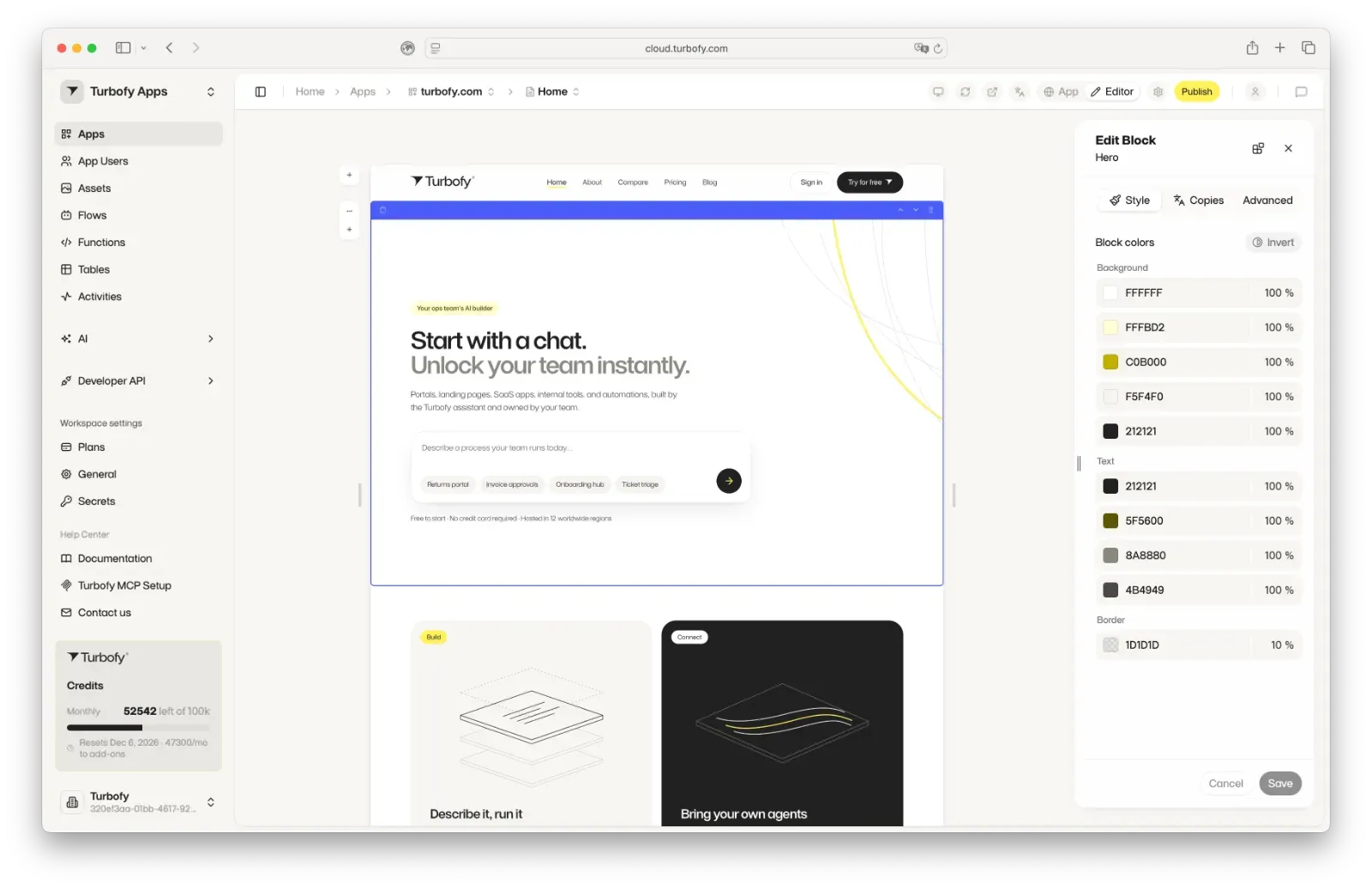
Turbofy is a browser-based AI app builder for operations teams and small product groups that need working business software rather than a disposable prototype. A single chat message describing a process, such as returns handling or invoice approvals, produces an application with a database, user accounts, hosting, and workflow automations already connected. The company describes the output as production software the customer owns outright, and it pairs the assistant with an MCP server so teams that prefer Claude Code, OpenAI Codex, OpenCode, or Cursor can build through their own coding agent. The advertised scope covers customer portals, landing pages, SaaS products, internal tools, and standalone automations.
Key Features
- Prompt-to-application generation. The homepage opens with a single text field that accepts a plain description of a business process, with starter chips for a returns portal, invoice approvals, onboarding hub, and ticket triage. The assistant generates the interface, the data model underneath it, and the automations in one pass instead of requiring separate configuration for each layer.
- Managed hosting across 12 worldwide regions. Applications run on Turbofy's own cloud rather than a separate deployment service, and the signup flow advertises hosting spread over twelve geographic regions. That removes the DNS, server, and release pipeline work that normally follows a prototype.
- MCP bridge to third party coding agents. Teams that already work inside Claude Code, Codex, OpenCode, or Cursor can connect through the Turbofy MCP and keep their existing editor and agent. The company frames this as the same platform and the same governance, so the choice of interface does not change where the app lives or who administers it. A public plugin repository is available on GitHub.
- Data, authentication, and permissions included. Every generated app arrives with storage and user management attached, which is the piece most conversational builders leave to the developer. The published Airbnb-style marketplace walkthrough on the video page explicitly covers listings, photos, reviews, bookings, permissions, and test data appearing from one prompt.
- Model choice across providers. Recorded build sessions on the Turbofy video page show apps assembled with models from OpenAI, Anthropic, Moonshot AI, and xAI, including Kimi K3, Grok 4.6, GPT-6 Luna, and GPT Image 2.5 Sunburst. The same library includes an image generation and editing walkthrough comparing FLUX, Gemini, and OpenAI image models inside a Turbofy-built studio.
- Visual refinement after generation. Generated screens stay editable, and the recorded sessions show layout and copy being corrected with screenshots and short written instructions rather than a full rebuild. The workflow is inspired by idea iteration rather than one-shot output.
- Founder-led onboarding call. A 30 minute intro with founder Jens Dressler is offered directly on the site, framed as bringing a process and leaving with a working draft. It functions as a paid-tier entry point for teams that want a guided first build.
How It Works
A new user reaches a chat field that autofocuses and asks for a description of a process the team already runs. The form submits into the Turbofy cloud signup, so account creation and the first prompt are the same action, and the page states that the tier is free to start with no credit card required.
From that submission, the assistant writes the interface and the underlying data structure, attaches authentication, and deploys the result to hosted infrastructure. The video library documents the resulting cycle: an initial prompt produces a first version, the user reviews it in the browser, then issues corrections in plain language or through annotated screenshots until the layout and copy match expectations. Users who prefer their own tooling install the MCP plugin instead and drive the same workspace from a coding agent, with the platform retaining control of hosting and access.
Iteration continues inside the app rather than a separate code editor, which keeps non-technical stakeholders in the same loop as whoever originally described the process. The published comparison pages against Lovable, Retool, Bubble, Airtable, and Replit Agent suggest the company expects buyers to evaluate the workflow against those products before committing.
Use Cases
A logistics or retail operation can describe a returns process and receive a customer-facing portal where requests are logged, statuses tracked, and approvals routed, without commissioning a custom build. A finance team can model invoice approvals, with submission forms, reviewer permissions, and status notifications generated together.
Onboarding hubs follow the same pattern: a checklist app that tracks new hires across departments, with the data tables and access rules provisioned automatically. Support groups can generate ticket triage tooling that sorts incoming requests and assigns owners.
Two published customer accounts extend the scope beyond internal tools. G-W Technologies uses Turbofy for Typograph, a product the managing director says now ships weekly features at a pace that previously took six months. RM Components runs a high-performance B2B shop on the platform alongside adjacent apps, and its managing director describes the company becoming independent as non-programmers. A recorded walkthrough also covers a marketing agency site and an Airbnb-style property marketplace.
Who It's For
Turbofy suits operations, finance, and support teams that own a recurring process and lack engineering capacity, as well as founders who want a working product before hiring. It fits better than a traditional low-code tool for teams with no schema or workflow modeling experience, since the model is inferred from a description. Teams needing fine-grained control over generated code, or deep native connectors to existing enterprise systems, should compare it against Retool, Bubble, and the Replit Agent before adopting, and should confirm pricing tiers directly since the landing page does not list them.
Pros & Cons
The Good
- Generated apps arrive with database, authentication, and hosting already connected, so deployment is not a separate project.
- The Turbofy MCP lets teams keep working inside Claude Code, Codex, OpenCode, or Cursor while staying on the same hosted workspace.
- Published customer accounts from G-W Technologies and RM Components describe weekly shipping and a running B2B shop built by non-programmers.
- Free tier with no credit card and hosting across 12 worldwide regions lowers the cost of a first evaluation.
- Dedicated comparison pages against Lovable, Retool, Bubble, and Airtable make the positioning verifiable before adoption.
The Bad
- No pricing tiers appear on the landing page, so budget expectations require a separate visit or a sales conversation.
- Chat is the primary authoring surface, which may frustrate developers who want direct control over schema or generated code.
- Native integrations beyond the MCP and coding agents are not detailed publicly, leaving enterprise system connections unclear.