QuickFax
QuickFax lets users send a fax online for $1.50 per page with no account, subscription, or app required, plus emailed delivery confirmation.
Overview
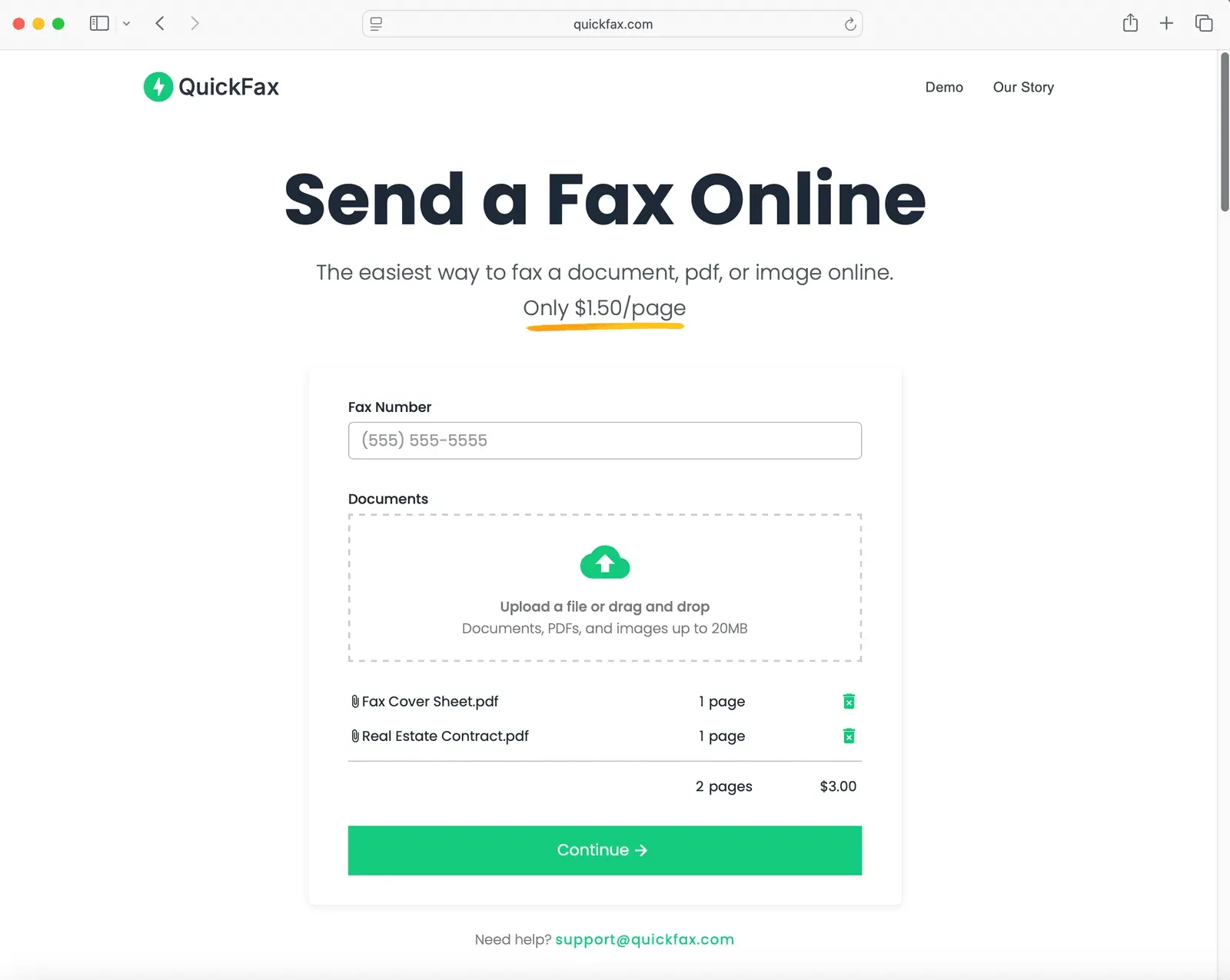
QuickFax is an online fax transmission service built around a single, one-off transaction instead of a recurring subscription. The product targets people who need to move a PDF, word processing file, or phone photo to a fax number and have no interest in registering an account first. The service charges $1.50 per page with no trial period, no monthly plan, and no login. Founder Ron Hash describes building the tool after a personal attempt to fax a document ended at an office supply store because every online option demanded a subscription before sending anything. That origin story shapes the product design: the homepage opens with a fax number field and a file upload box rather than a pricing table or a sign up form.
Key Features
- Account-free checkout: Sending a fax requires only a destination fax number, an uploaded file, and a payment. No name, address, password, or profile is requested before transmission, and there is nothing to cancel afterward.
- Flat per-page pricing: Every page costs $1.50 with no volume tiers, setup charge, or monthly minimum. The rate applies to outbound transmission of the uploaded document set.
- Wide file compatibility up to 20MB: PDFs, DOC and DOCX documents, JPG, PNG, TIFF, and HEIC images are all accepted, and formats can be mixed within a single job.
- Optional cover sheet: A single control appends a generated cover sheet to the outgoing documents, useful for formal filings that expect recipient identification on the first page.
- Live status tracking plus email confirmation: After payment the browser routes to a monitoring page that reports the fax in progress and its final state, and an emailed delivery confirmation follows once the receiving machine acknowledges the transmission.
- Encrypted handling with automatic deletion: Uploads are encrypted immediately with 256-bit AES, transmission runs over enforced TLS 1.2 with encrypted APIs, infrastructure sits on Microsoft cloud services, and stored files are removed once a fax is delivered or definitively fails.
How It Works
The workflow runs inside one browser session. A sender enters the receiving fax number, uploads one or more documents, and optionally attaches a cover sheet. Selecting continue leads to checkout for the page count at $1.50 per page. Payment submits the job, and the browser redirects to a monitoring page that displays the live state of the transmission. A confirmation email arrives when the destination fax machine accepts the document. No install, browser extension, or mobile application is involved at any step, and the same interface serves desktop, iPhone, Android, and tablet users.
Who It's For
QuickFax suits low-frequency senders: individuals filing IRS, Social Security Administration, legal, medical, or government paperwork, along with small operators who need one document delivered and have no fax hardware on hand. The site names consumers, remote workers, and freelancers handling a single form as its core audience. Organizations that transmit faxes weekly, need dedicated inbound fax numbers, or require archived send histories fall outside the design envelope.
Pricing and Market Context
The $1.50 per page rate sits close to what a copy shop counter charges for the same task, which is the comparison the company explicitly invites. Against subscription fax services that bundle hundreds of pages monthly, the model inverts the economics: a five page transmission costs $7.50, so a frequent sender will spend more than a flat plan would cost. The trade is deliberate. Budget predictability is sacrificed for zero commitment, and no unused allowance accumulates. Established competitors including eFax and Dropbox Fax are addressed through dedicated comparison pages, while a separate library of guides covers fax availability at CVS, FedEx Office, Staples, Walgreens, Office Depot, and The UPS Store. That content positions QuickFax as an alternative to errands rather than to enterprise fax infrastructure.
Trust and Verification
Delivery assurance rests on two mechanisms: the live status page during transmission and the confirmation email that follows. The company reports being trusted for IRS, SSA, legal, medical, and government documents, and displays a Trustpilot review widget on the homepage. Testimonials collected on site come from users in California, Texas, Virginia, Arizona, and other states who repeatedly cite the absence of registration and the flat fee as deciding factors. The security claims are specific enough to check against industry norms: TLS 1.2 enforcement, 256-bit AES encryption at upload, and deletion of files after delivery or failure rather than indefinite retention.
Pros & Cons
The Good
- No account creation, login, or subscription is required, and billing is limited to $1.50 per page actually sent.
- Works entirely in a browser across computers, iPhones, Android devices, and tablets, including camera capture for paper documents.
- A live status page plus an emailed delivery confirmation provides immediate proof that the receiving fax machine accepted the transmission.
- Accepts PDFs, DOC and DOCX files, JPG, PNG, TIFF, and HEIC images up to 20MB, with an optional generated cover sheet.
- Uploads are encrypted with 256-bit AES and deleted automatically after delivery or failure, limiting retention of sensitive documents.
The Bad
- At $1.50 per page the cost scales linearly, so multi-page or recurring faxing quickly exceeds the price of flat-rate subscription services.
- With no account system there are no stored contacts, send history, or reusable document library between sessions.
- The service appears limited to outbound sending, with no inbound fax number or receiving capability described on the site.