GeckoStats
GeckoStats is privacy-friendly web analytics that ties every visit to revenue, revealing which channels and posts actually bring paying customers.
Overview
GeckoStats is a web analytics platform built on the argument that traffic counts are an incomplete metric. The product counts visitors the way other privacy-focused tools do, then attaches payment events from connected processors so every source, campaign, page, and search query carries a revenue figure beside it. That framing places it between the minimalist cookieless vendors such as Plausible, Fathom, and Simple Analytics, and full marketing suites such as Google Analytics 4, which offer depth but demand substantial configuration before money becomes visible in a report.
The company targets three audiences explicitly: founders who publish and sell, creators running newsletters and social accounts, and developers who want programmatic access to their own numbers. The third group receives unusual attention. GeckoStats ships a Model Context Protocol server exposing 26 read-only tools, allowing assistants such as Claude, ChatGPT, Cursor, Gemini CLI, and Grok to query traffic, revenue, funnels, and search data directly. Plans start with a seven day trial, the tracker sets no cookies by default, and the deployment checklist therefore skips the consent banner entirely.
Key Features
Revenue attribution across payment providers. Stripe, Dodo Payments, Polar, and Creem connect through individual webhooks, and each payment lands against the visitor who generated it. Any other processor can push amounts through a single API call that accepts an amount and a visitor identifier. The dashboard reports which match method succeeded, so attribution never appears as a silent guess.
Customer journey profiles. Opening a paying customer reveals every visit in sequence, from the first referrer through intermediate pageviews and goal clicks to the checkout that closed. Each profile carries geography, device, browser, total spent, and the elapsed time between first contact and first payment, which makes multi-week consideration windows visible rather than invisible.
Campaign and UTM level reporting. Tagged links appear by name with the visitors and money they produced, with the feed showing examples such as a launch tweet, a newsletter issue, an Instagram reel, and a podcast episode ranked against one another. Attribution credits the last visit from a real source, so a social post retains credit when the buyer returns directly two weeks later.
Search Console with revenue weighting. A single connection pulls queries, pages, and countries from Google's data and sorts them by the money their landing pages earned rather than by impression volume. Values derived from apportionment are marked with an approximation symbol instead of being presented as exact figures, a distinction that most competitors blur.
AI crawler intelligence. The platform records which AI agents read the site, including GPTBot, ClaudeBot, and PerplexityBot, then places that reading activity next to the visitors and revenue those same services sent back. Because crawlers do not execute JavaScript, the company collects this data through a separate mechanism, and crawler hits are excluded from event quotas.
Live globe and event feed. A real-time map shows everyone currently on the site, paired with a stream of pageviews, goals, and payments as they arrive. The feed annotates each payment with the campaign that earned credit, and an optional sound plays on every sale for teams that want ambient awareness of conversions.
MCP server and REST API. Twenty-six tools cover overview, sources, pages, goals, funnels, customers, search queries, releases, and the live view, all reading the same numbers the dashboard renders rather than a periodic export. Keys are issued per website and can be rotated or revoked from settings, and agents inherit read-only permissions unless explicitly widened.
Additional capabilities round out the plan: goals and step-by-step funnels, one-click dashboard-wide filters, MRR and churn broken down by acquisition source, alerts for stopped tracking or dropped rankings, release markers posted with a single curl at the end of a deploy, retention cohorts, and a share-as-image export that renders a period to PNG from the underlying numbers.
How It Works
Setup begins with an account and a tracked domain, and the tracking script is 6.6 KB gzipped with no dependencies and deferred loading, so it does not block page rendering. Installation follows the familiar pattern of pasting a snippet or rewriting a path so the script serves from the site's own domain, which reduces the odds of ad blockers filtering it out.
Revenue connection is the second step and the one that distinguishes the product. A webhook from Stripe, Dodo Payments, Polar, or Creem links payments to visitor identifiers, while alternative processors use a documented API call. Search Console authorization is optional but recommended, since it unlocks the query-level reporting that ranks keywords by earnings.
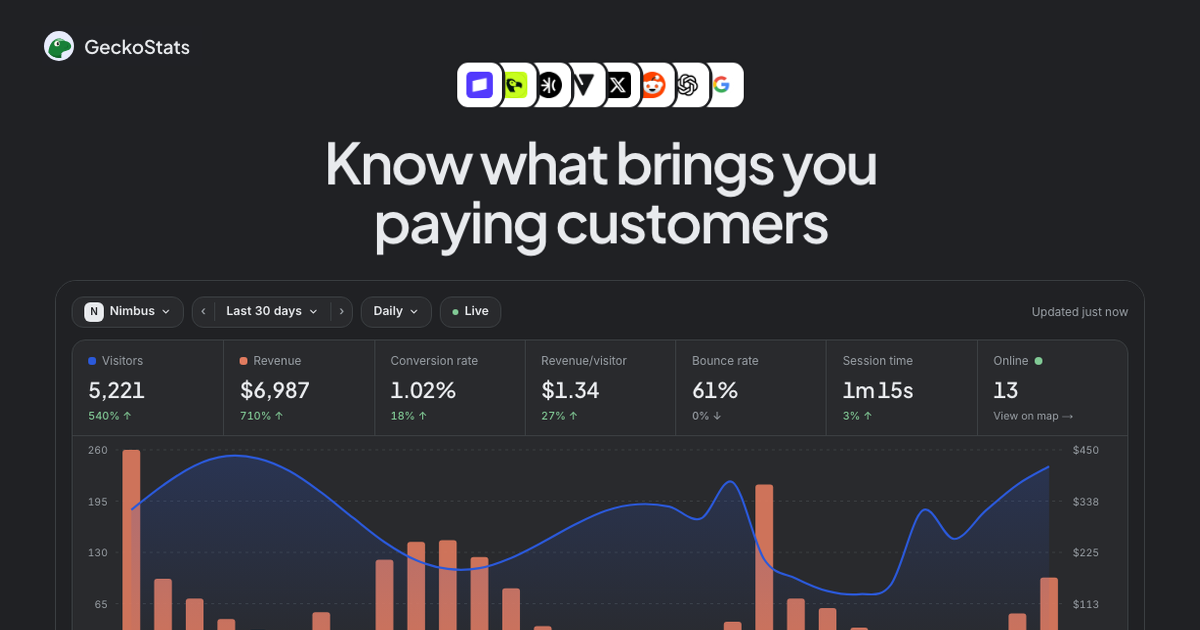
Daily use centers on a single overview screen where visitors appear in blue and revenue in orange on the same chart, with channels, referrers, campaigns, keywords, and geography listed beneath. Clicking any row filters the entire dashboard, which keeps the drill-down path short. A visitor profile opens from any row, and the journey view reconstructs the path to payment with timestamps and session durations.
The attribution logic runs a defined fallback order: checkout visitor identifier, then return page, then the customer's earlier payments, then an identified email, and finally checkout timing. The interface states which method matched, which is a meaningful transparency choice for anyone who has tried to audit a black-box attribution model.
For teams working with assistants, the MCP server is added with one terminal command or a connector entry, authenticated with a per-site bearer key. The agent then answers questions about traffic, spend, and search performance from the same dataset the dashboard uses, and a live demo with clearly labeled sample data lets prospective buyers inspect the interface before signing up.
Use Cases
Indie founder measuring launch channels. A solo operator posts to X, submits to Product Hunt, and sends a newsletter in the same week. GeckoStats separates the three by tagged link and shows that the tweet produced 612 visitors and $497 while the reel produced 1,120 visitors and $98, which redirects effort toward the lower-volume, higher-yield channel.
Newsletter writer tracking delayed conversions. A creator tags every issue separately and watches subscribers buy two weeks after the click. Because the last real source keeps credit, the issue that introduced the reader retains the sale instead of losing it to a direct visit, and the creator can price sponsorship against demonstrated revenue rather than opens.
SEO lead prioritizing by money. A content team connects Search Console and finds a query in position 11.4 earning nothing next to a position 4.2 query earning several hundred dollars. The ranking opportunity list is ordered by potential revenue, which changes which page gets rewritten first. Teams evaluating the trade-offs against simpler tools can review the comparison against Plausible for a side-by-side account of what each product does better.
Developer querying numbers from the editor. An engineer working in Cursor or Claude Code adds the MCP server and asks which landing page converted best last month without leaving the terminal. The agent reads the same rows the dashboard draws, so the answer matches what the marketing owner sees in the browser.
Team watching AI-referred traffic. A small SaaS notices ChatGPT reading 230 pages and sending 61 visitors worth $212. That ratio informs decisions about structured content and whether AI visibility deserves the same attention as organic search, using data the company collects without a JavaScript-based tracker in the path.
Pricing & Value
Two tiers sit on a shared event ladder spanning 25K to 10M events per month. Starter covers one site and one seat, while Growth raises that to up to 30 sites and 30 seats for teams and agencies. The pricing slider lists Starter at $17 per month and Growth at $35 per month at the 100K event tier, with annual billing discounted by roughly 17 percent, and the marketing copy references entry pricing from $9 per month at the smallest volume. Every provider integration, Search Console, the AI assistant, and the MCP server are included at all sizes rather than gated into an enterprise tier.
Overages are handled without data loss: counting continues and a note recommends the next tier, with two consecutive months over the limit prompting an upgrade request. A pageview, a tracked goal, and a payment each consume one event, while crawler hits do not touch quota, which is a fair accounting choice. Against rivals charging comparable rates for pageview analytics with no revenue layer, the value proposition is strongest for anyone already selling something and weakest for publishers who never transact on-site. Full tier details live on the pricing page.
Final Verdict
GeckoStats is a focused product that answers one question well: what brought the money. The revenue attribution chain, campaign naming, and Search Console revenue weighting form a coherent loop that most analytics tools leave to spreadsheets or warehouse projects. The MCP server is the standout differentiator, turning the dashboard into a queryable data source for assistants without duplicating the pipeline, and the default cookieless design removes a compliance chore from launch.
Trade-offs exist. The event-based ladder means high-traffic sites without ecommerce revenue will find cheaper pageview-only alternatives, the revenue-first framing assumes a connected payment processor, and pairing Stripe requires the integration walkthrough rather than a fully guided setup. The AI crawler metrics also require an additional collection path beyond the script, which some teams will need to verify against their own infrastructure.
For founders, newsletter operators, and small product teams selling online, the balance of price, privacy posture, and revenue clarity is unusually tight. Anyone running a content site with no checkout, or a large publisher needing warehouse-grade export tooling, should look elsewhere. Those already selling should start with the Stripe integration walkthrough to confirm compatibility before committing.
Pros & Cons
The Good
- Revenue from Stripe, Dodo Payments, Polar, and Creem is linked to individual visitors, so every channel, campaign, and search query carries a dollar figure rather than a visit count.
- A Model Context Protocol server with 26 read-only tools lets Claude, ChatGPT, Cursor, Gemini CLI, and Grok query the same numbers the dashboard renders.
- Cookieless tracking with a daily rotating salted hash keeps the deployment free of consent banners while still producing visitor-level journey profiles.
- Search Console data is ranked by the revenue its landing pages earned instead of impression volume, with apportioned estimates clearly marked as approximations.
- Alerts, release markers, retention cohorts, and MRR by acquisition source are bundled into both tiers rather than reserved for an enterprise plan.
The Bad
- The value depends on a connected payment provider, so content sites and publishers that never transact on-site gain little from the revenue-first framing.
- Event-based pricing means high-traffic sites reach the 100K tier quickly, and entry pricing quoted in marketing copy only applies at the smallest volume band.
- AI crawler reporting relies on a separate collection mechanism beyond the JavaScript snippet, which teams may need to validate against their own infrastructure.