MySOP.guru
MySOP.guru converts browser workflows into branded SOP PDFs in minutes, with a free first export and pay-per-document pricing from €5.
Overview
MySOP.guru is a Google Chrome extension that transforms a recorded click-through of any web application into a professionally formatted Standard Operating Procedure document. The first export is free, and every subsequent PDF export is priced at five euros, with HTML exports at three euros. It is built for a particular kind of user: the person who does not document processes every week but absolutely needs a clear, shareable document when a process changes, an employee departs, or a compliance check arrives. This category includes HR teams writing the next onboarding checklist, finance departments capturing the month-end close before the senior accountant takes a sabbatical, operations leads producing a handover guide for a replacement hire, IT teams describing a freshly rolled-out system, and consultants that need client-ready procedure documents as part of an implementation.
The product's market position is defined in opposition to subscription SOP tools such as Scribe and Tango, which charge fifteen to twenty-nine dollars per seat per month regardless of actual usage. MySOP.guru instead separates the capture process from the payment. Capture and editing are free and unlimited, with no trial period and no expiry on stored drafts, while payment is triggered only at the point of export. This pricing design fits the documentation reality of companies that produce a few SOPs per year but also builds in a path for teams that produce more, through discounted prepaid bundles.
The extension itself is deliberately cautious with data. It requests no site permissions at installation, runs exclusively in the single browser tab where the user presses the Start button, and executes no background snapshots when the session is over. Screenshots are stored in Cloudflare R2 on European infrastructure, encrypted in transit, and automatically deleted after twelve months. Users can request full deletion at any time. This combination of low price, low intrusion, and high-quality output is uncommon in the documentation tool landscape and gives MySOP.guru a distinct position in the market.
Key Features
Automatic Screenshot Capture
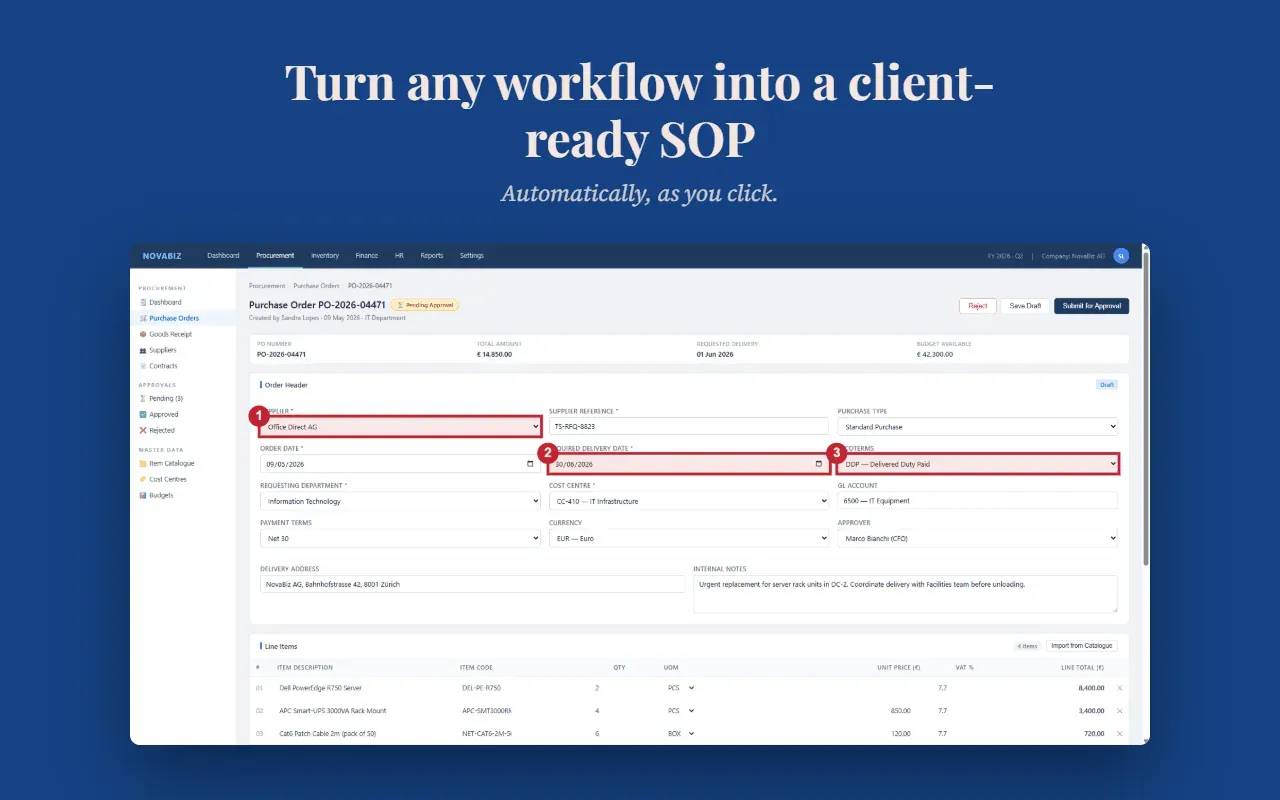
The extension records every click, form entry, and page transition while a capture session is running. Each interaction that takes place on a new page or an updated view is paired with a full-page screenshot, and a numbered badge is drawn over the exact element that was clicked. The recording output is therefore a visual map of the interaction, not just a log of URLs and timestamps. This feature eliminates the manual process of taking screenshots, cropping them, and placing them into a document, which is typically the most time-consuming part of writing an SOP.
Professional PDF Export
The export engine formats the document with the user's logo, header, footer, page numbers, and a clean visual layout. A user can upload branding, configure fonts and colors in the account settings, and generate a PDF that looks as if it came from a corporate documentation team. The first export is free, so the user can inspect the actual output before any payment is made. For teams that publish on intranets, an HTML version at three euros is useful for pasting the procedure into a portal without page-number artifacts.
Smart Page Grouping
Multiple interactions that occur on the same page are merged into a single step with a numbered sub-action list. A user who clicks three different tabs and enters two fields on the same screen will see one step with five sub-actions rather than five repetitive steps. This is a significant time-saver during the editing phase and helps keep the final document readable. It also reduces the total number of pages in the exported PDF.
Full Editor Control
The built-in editor supports drag-and-drop step reordering, inline text editing, splitting and merging of steps, and deletion of unwanted screenshots. Every change is stored in the draft, allowing a user to refine a document over consecutive days without losing anything. Because capture is unlimited, users can rerecord a portion of the workflow and replace the old step. This makes the tool suitable for maintaining a document that evolves when the underlying system changes.
Pay-Per-Export Pricing
The pricing structure is straightforward: capture is unlimited and free, the first export is free even without a credit card, and from the second export onward a PDF costs five euros. HTML exports are three euros. Prepurchased bundles of ten and twenty-five exports bring the rate to four euros and three euros sixty respectively. Credits are valid for twenty-four months, and an email reminder is sent before any credit expires. This model removes the renewal anxiety of annual subscriptions and adjusts spending to real documentation demand.
White-Label Branding
In the account export settings, a user can upload a logo, choose fonts, assign brand colors, and set custom header and footer text. Screenshot layout options also exist to control how images are fitted into the document. The output is branded with the customer's identity, not the tool's identity, which is a key differentiator for agencies and consultants who hand SOPs to clients as deliverables.
No Background Monitoring
The extension is invisible until the user starts a session. It requests no site permissions during installation, and the only permanently allowed domains are the product's own app and backend. When the user presses Start, access to the active page is requested with an optional, revocable permission. The capture script runs in the single tab where the session started and only for the duration of the session. Data is stored in the EU, transmitted over HTTPS, and deleted at the end of the twelve-month retention period.
How It Works
The workflow begins with the Chrome Web Store listing. Users install the extension, which adds a small toolbar icon to their browser. Unlike most recording extensions, MySOP.guru does not ask for access to every website at install time. The user navigates to the application they want to document and clicks the toolbar icon to begin a session. The extension then watches the active tab and records clicks, keystrokes, and navigation events. Screenshots are captured each time the visible page changes, giving the document a natural sense of progress.
Once the workflow is completed, the user opens the editor. Here the recorded steps appear in order, each with a screenshot, a numbered callout and an auto-generated title. The user can adjust these elements using drag gestures or keyboard shortcuts. Editing is not limited to a single session; drafts persist until deleted, and users can come back after breakfast or after a holiday to finish the document.
The export process is triggered from the same screen. The user selects PDF or HTML, verifies branding options in the account settings, and submits the export. Payment, when applicable, is processed through Stripe. The exported document becomes available immediately after payment confirmation. For a first-time user, this entire sequence takes roughly five minutes from installation to the first downloaded PDF, which is fast enough that it can be tried during a lunch break. The company maintains a blog where such workflows and usage tips are described in more detail.
Use Cases
HR onboarding for a new hire
A fast-growing retail company hires an inventory planner. The HR manager starts a session while creating the planner's email account, granting ERP access, inviting the employee to the HR portal, and scheduling a security briefing. The exported PDF becomes part of the onboarding folder. Three months later, when a second planner is hired, the same document reduces the setup time from two hours to thirty minutes, because the IT team no longer makes independent decisions about which roles to assign.
Finance month-end close
A finance team that relies on the knowledge of its senior accountant records the month-end close in a single session: generating the trial balance, reviewing suspense accounts, posting depreciation, running currency revaluation, and locking the period. Before this document existed, the process was effectively trapped in one person's memory. After the export, the team has a reference they can follow during holiday season or when they expand from two people to four.
Operational handover before a departure
A facilities manager gives notice after six years. For the final month, they record the process for updating vendor contracts, handling emergency maintenance requests, and preparing the monthly board report. The resulting set of SOPs allows their successor to take over without a prolonged shadowing period. The HR department keeps these documents in the employee's offboarding record, turning an organizational risk into an asset.
IT system rollout
An internal tools team replaces its legacy ticket system with a modern help desk platform. During the configuration phase, the lead engineer records the creation of support email forwarding, the escalation path, the SLA policy fields, and the reporting dashboard. The SOP is exported and shared with the whole organization on the day of the launch. Support tickets that would otherwise flood the new system are reduced by the clarity of the documented instructions.
Consultant client delivery
An implementation consultant uses MySOP.guru while setting up a billing system for a client. The consultant records the creation of product catalogues, the mapping of tax codes, and the activation of payment gateways. The export is then branded with the consultant's company logo, not the tool's, and delivered to the client as a document called "System Configuration Guide." This turns a set of repetitive clicks into a professional deliverable that supports the client's internal adoption.
Pricing & Value
The pay-per-export model is easy to evaluate. A team that needs three PDFs per quarter spends fifteen euros per quarter, a figure that equals roughly one hour of an employee's time in the United States or two hours in some European markets. Used this way, MySOP.guru is cheaper than a single one-month subscription to any mainstream competitor. The free first export also allows the team to evaluate the output quality before spending anything, and the unlimited capture capacity means users can build up a backlog of drafts without risk.
For more substantial users, the credit bundles become relevant. Ten exports at forty euros effectively reduce the per-document cost to four euros, while twenty-five exports at ninety euros drop it further to three euros sixty. These bundles are valid for twenty-four months, which smooths out bursts of documentation activity such as onboarding seasons or system rollouts. HTML exports at three euros provide a lower-cost format for internal publishing.
The terms page lists the formal conditions for credit validity, refunds, and data retention, while the privacy policy explains in detail which data passes through Stripe and Cloudflare. This level of transparency is not universal in the screen capture industry.
Final Verdict
MySOP.guru occupies a specific niche in the documentation landscape: teams that need polished SOPs every now and then, without the commitment of a month-to-month seat fee. The extension captures workflows with enough fidelity that a reader can reproduce the process successfully, and the export quality matches what a small internal communications team would produce after hours of work. The free first export is generous because it reveals the finished product rather than a watermarked tease.
The limitations are real but narrow. Users cannot capture multiple applications in one session, which means a cross-platform workflow requires several documents. Desktop applications outside the browser are invisible to the recorder. And teams that march through a high volume of documentation every week will find that pay-per-export prices accumulate to a point where a subscription alternative is more economical. For the vast majority of organizations, however, the pricing model is aligned with real behaviour, and the product delivers on its central promise: any workflow becomes a professional SOP in minutes.
Pros & Cons
The Good
- Pay-per-export pricing (€5 per PDF, €3 for HTML) eliminates monthly subscription costs for teams that document workflows only sporadically.
- Automatic full-page screenshot capture with numbered callouts turns any browser workflow into an instructional SOP without manual screen grabbing.
- White-label branding lets customers upload their logo and colors, so external-facing documents look built by the user's own organization.
- Privacy-conscious by design: extension requests no site permissions at install, records only in an explicitly started session, and stores data on EU infrastructure.
- The free first export requires no credit card and shows the branded PDF output before the user ever spends money.
The Bad
- A single capture session cannot span multiple websites, so workflows that run across two or more applications must be broken into multiple documents.
- Desktop and native applications are outside the scope of the recorder; only software running in a Google Chrome tab can be documented.
- For high-volume documentation teams producing several exports per week, pay-per-document pricing can exceed the cost of a flat-rate subscription.