Light Cloud
Light Cloud deploys GitHub web apps in seconds, unifying static hosting, containers, and Postgres with branch previews and AI.
Overview
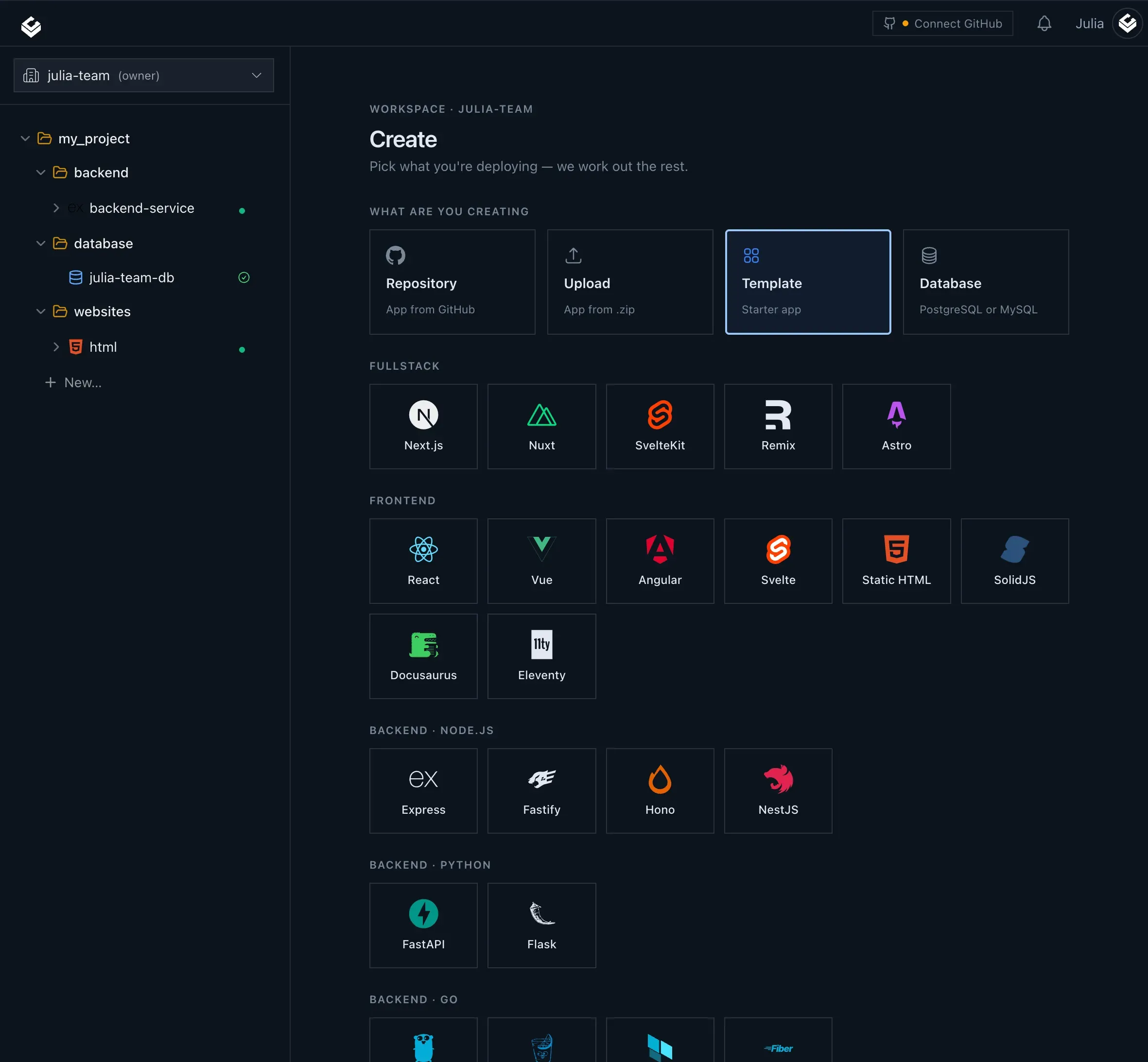
Light Cloud is a deployment platform that connects directly to GitHub repositories, turning every push into a live URL. It targets developers who want to move from code to production without assembling separate hosting services. The platform combines static site delivery through a global CDN, containerized application hosting on Cloud Run, and managed PostgreSQL databases within a single project structure. This consolidation addresses a common friction point: managing frontend, backend, and database infrastructure across multiple providers.
Market positioning places Light Cloud as a modern alternative to established services like Vercel, Netlify, and Heroku. It differentiates through native AI integrations, allowing deployments to be triggered from Claude or GitHub Copilot conversations. The platform also emphasizes cost efficiency with scale-to-zero behavior for idle containers, meaning users pay only for compute when traffic is actually hitting the application.
For teams that rely on GitHub for collaboration, the workflow is remarkably straightforward. Every branch and pull request receives its own preview URL, which is particularly useful for frontend developers who need to share work in progress with designers or product managers. Meanwhile, the built-in observability tools keep logs and metrics adjacent to the environment they belong to, reducing the need for third-party monitoring setup.
The founding team also maintains a research arm called Labs, which has produced ICE, an open-source visual environment for designing cloud infrastructure. While ICE operates independently, its existence signals the company's long-term interest in expanding beyond simple deployment into broader cloud management. Pricing information is available on the site for those who want to estimate costs.
Key Features
Full-stack deployment: Light Cloud reads a connected repository and automatically determines whether to serve a static site from the global CDN or run a container on Cloud Run. This removes the guesswork around build targets and lets a developer push code without worrying about underlying infrastructure choices. The same project can host a static frontend, a containerized backend, and a managed Postgres database side by side.
Branch-based preview environments: Every branch and pull request generates a unique, live URL that is updated on each push. These previews are removed automatically when the branch is deleted, ensuring that stale testing environments do not accumulate. Production traffic remains unaffected, which makes it safe for teams to experiment alongside a stable main deployment.
Scale-to-zero containers: Containers that receive no traffic automatically stop billing, so an idle service costs nothing. This is a significant advantage for low-traffic projects or development sandboxes. When a new request arrives, the container spins up again, though there may be a slight cold start delay depending on the application's boot time.
AI-assisted deployment: The Light Cloud MCP server allows tools like Claude to create applications, trigger deployments, and retrieve logs through natural language conversations. A Visual Studio Code extension adds the @lightcloud command to GitHub Copilot, with shortcuts such as /deploy, /status, and /plan. This lowers the barrier for developers who prefer to interact with infrastructure through an editor or chat interface rather than a dashboard.
Integrated observability: Each environment comes with its own log stream and basic metrics, presented in the same console where the deployment is managed. Build logs are available for every commit, and runtime logs are organized by service and environment. This reduces the need to stitch together separate monitoring tools for small to medium-sized projects.
Framework and environment detection: Light Cloud automatically recognizes common frameworks and parses .env files during the build process. This means less manual configuration for environment variables and build commands. For projects that need custom setup, the platform still exposes controls to override the defaults.
Managed PostgreSQL: The database service allows developers to provision a Postgres instance with a chosen tier, region, and storage size. Credentials are encrypted and injected into the connected application automatically, removing the typical copy-paste dance. It also places the database close to the compute resources to minimize latency.
How It Works
The onboarding process begins by creating an account and linking a GitHub repository. Once the repository is selected, Light Cloud scans the codebase to determine the appropriate deployment target, detecting whether it is a static site, a containerized application, or a hybrid project. The user is presented with a configuration summary, though the platform attempts to work with zero configuration out of the box.
After the initial connection, every push to the default branch triggers a production deployment. The commit is built, the resulting artifact is rolled out to either the CDN or Cloud Run, and the deployment history records the commit hash, author, build time, and associated logs. Users can follow the build in real time from the dashboard, and they can roll back to a previous deployment if needed.
Opening a second branch automatically creates a preview environment. Each branch receives a URL that is updated as new commits land. When the branch is merged or deleted, the preview disappears. This aligns with common Git-based workflows and removes the burden of manually managing test servers.
For teams that want to leverage AI, the MCP server or Copilot extension can be configured in just a few minutes. A developer might ask Claude to "deploy the auth service" or "show the logs from the last deploy," and the assistant will execute the corresponding action through the Light Cloud API. The system handles framework detection and environment variable parsing internally, so there is no need to write custom scripts for common tasks. More details can be found on the AI-assisted deployment page.
Day-to-day operations are centered around the console, which lists all services, their deployment history, current status, and key metrics. Logs are accessible per environment, and database connection strings are available in a protected section. The simplicity of moving from repository to live URL makes Light Cloud suitable for both rapid prototypes and production workloads.
Use Cases
Indie hackers and solo developers: A developer building a SaaS MVP can use Light Cloud to launch a Next.js frontend, a Node.js backend, and a Postgres database without managing multiple hosting accounts. The free plan covers early development, and scale-to-zero keeps costs minimal until real traffic arrives.
Product and design teams: With preview URLs on every pull request, a frontend team can immediately share a new feature with designers and product managers. Stakeholders can click a link from the GitHub conversation and see the exact state of the branch, eliminating the need for separate staging deployments.
AI-first development workflows: A developer using Claude or GitHub Copilot can ask the assistant to create a new service, deploy it, and show the logs without leaving the chat. This is particularly useful for automated code generation pipelines, where the deployment step should be as frictionless as possible.
Agencies managing multiple client sites: An agency can maintain a separate repository for each client site, with production deployments on the main branch and previews for internal review. The consolidated billing and single dashboard simplify multi-tenant management, though each project remains isolated.
Startups iterating on infrastructure: Teams that need to adjust database tiers or container resources can do so from the dashboard, and the associated costs are immediately visible. The combination of managed Postgres and scalable containers supports growth without requiring a dedicated platform engineer in the early stages. The company's open-source ICE project, which allows visual design of cloud infrastructure, can be explored here.
Pricing & Value
Light Cloud offers a free plan that includes a reasonable quota of deployments and resources, making it feasible to run small personal projects without any payment. Beyond that, the platform adopts a usage-based pricing model, charging for container compute hours, database storage, and CDN traffic. There is no public breakdown of the exact tiers on the landing page, so teams will need to use the in-app pricing calculator or contact sales for a detailed quote.
Compared to assembling separate services, Light Cloud's consolidated approach can reduce engineering time and simplify billing. The scale-to-zero feature eliminates the cost of idle containers, which is a major saving for APIs or workers that receive intermittent traffic. Managed Postgres pricing is competitive with other cloud database providers, and the automatic credential injection reduces operational overhead.
For developers who primarily deploy from GitHub, the value proposition is strong. The preview environments alone are a tangible benefit that most hosting platforms charge extra for. While advanced users might find the lack of granular documentation for pricing a minor inconvenience, the overall cost structure aligns with modern serverless expectations.
Final Verdict
Light Cloud stands out as a developer-friendly deployment platform that embraces AI in a practical way. Its ability to combine static hosting, container runtime, and a managed database in one package removes a class of problems that typically plague full-stack projects. The branch previews and scale-to-zero behavior are polished features that improve both team collaboration and cost management.
The platform is not without trade-offs. It is tightly integrated with GitHub and Google Cloud Run, so teams using GitLab or Azure might find the initial integration lacking. The AI deployment capabilities, while innovative, rely on external tools like Claude and GitHub Copilot, which may not appeal to every workflow. Additionally, the absence of detailed pricing documentation on the site could be a hurdle for procurement teams that need predictable estimates.
For individual developers and small teams who already live in the GitHub ecosystem, Light Cloud offers a compelling path from code to a live URL in seconds. It is also a notable option for those who want to experiment with AI-assisted infrastructure management. As the product matures, expanding beyond GitHub and adding more granular controls could make it a serious contender in the crowded platform-as-a-service market.
Pros & Cons
The Good
- Combines static hosting, container runtime, and managed Postgres in a single project, simplifying full-stack deployment.
- Every GitHub branch receives a unique preview URL that is automatically deleted when the branch is removed.
- Idle containers scale to zero and stop incurring charges, reducing costs for intermittent or low-traffic workloads.
- Deployments can be triggered from Claude via MCP or GitHub Copilot through a VS Code extension.
- Integrated logs, build streams, and metrics for each environment remove the need for separate observability tools.
The Bad
- Currently only supports GitHub as the version control source, with no mention of GitLab or Bitbucket integration.
- The website does not disclose specific pricing tiers, forcing users to sign up to see detailed costs.
- AI deployment features require separate subscriptions to Claude or GitHub Copilot, adding extra expense.