HomeDesignsAI
AI home design tool trusted by 2.4M+ users. Transform interiors, exteriors, and gardens in seconds with 80+ styles and instant results.
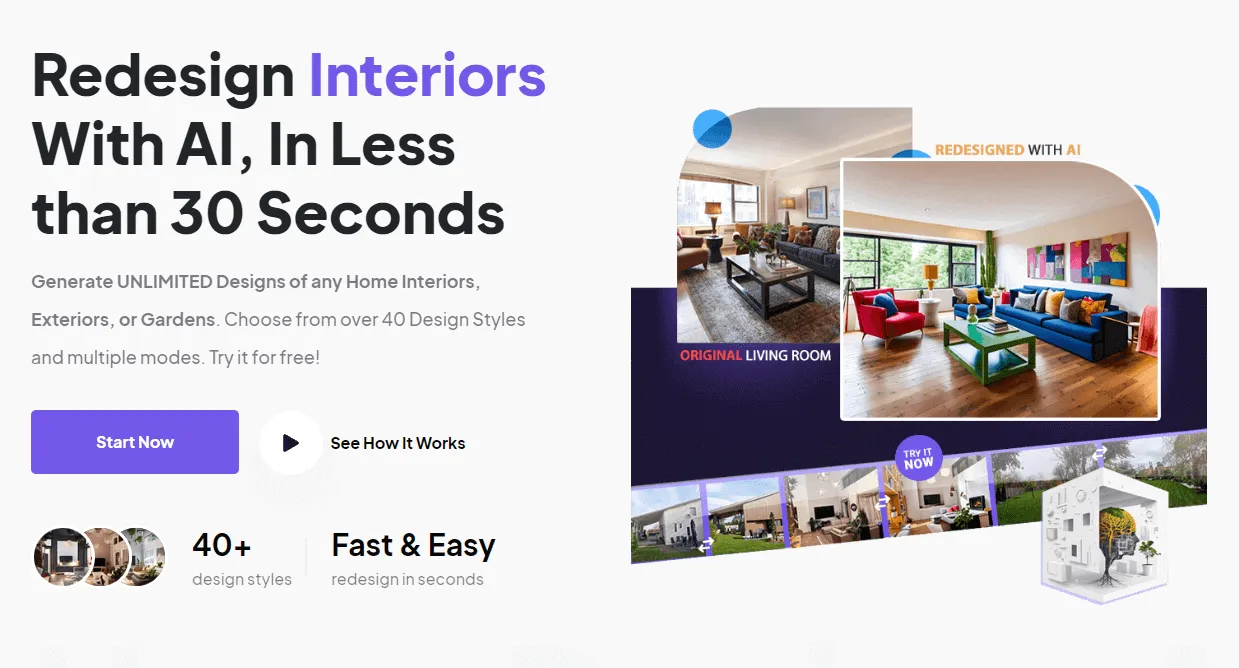
Overview
HomeDesignsAI is an AI-powered home design platform that enables users to transform interiors, exteriors, and gardens in under 30 seconds. Trusted by over 2.63 million users worldwide, the tool addresses the challenge of visualizing home renovations without requiring design skills or expensive software. By uploading a photo of any space, users can instantly generate photorealistic redesigns across 80+ design styles. The platform serves homeowners, interior designers, landscapers, architects, and real estate professionals, offering a web-based solution that eliminates the need for installations or complex CAD software.
Key Features
- Instant AI Redesign: Users upload a photo of their space and select a design style. The AI generates a completely transformed version in under 30 seconds, covering interiors, exteriors, gardens, patios, and terraces. This feature supports both personal and professional use cases, with options to adjust intensity levels for different types of modifications.
- 80+ Design Styles: The platform offers a vast library of design styles, from modern and minimalist to rustic and eclectic. Users can browse and apply these styles to any uploaded image, enabling exploration of diverse aesthetics without manual effort.
- Virtual Staging: Empty rooms can be automatically furnished with realistic furniture and decor. This is particularly useful for real estate listings, allowing agents to showcase a property's potential without physical staging.
- Customizable Results: After generation, users can fine-tune colors, textures, and even weather conditions for exterior shots. The tool provides sliders and options to adjust the degree of change, giving control over the final output.
- Furniture Shopping Links: Generated designs include clickable links to purchase featured furniture and decor items, bridging the gap between visualization and procurement.
- Web-Based Platform: No software installation is required. The entire workflow runs in a browser, making it accessible on any device with an internet connection. This contrasts with traditional tools like AutoCAD or SketchUp that demand powerful hardware.
- API Access: HomeDesignsAI offers a scalable API for businesses and developers to integrate AI design capabilities into their own applications, enabling automated design generation at scale.
How It Works
The user journey begins by uploading a photo of the space to be redesigned. The platform accepts real room images, not just 3D models. Next, users set preferences by selecting a design style from the extensive library and adjusting parameters like color palette, texture, and weather. The AI processes the image and delivers a photorealistic result within seconds. Users can then further customize the output, save it, or generate additional variations. The interface is intuitive, with a step-by-step guide: Step 1 (Upload), Step 2 (Set Preferences), Step 3 (Generate and Use). No design skills or prior experience are required, making it accessible to homeowners and professionals alike.
Use Cases
- Homeowners Planning Renovations: A homeowner wanting to remodel their kitchen can upload a photo and instantly see it transformed in multiple styles, helping them decide on paint colors, cabinet finishes, and layouts before committing to contractors.
- Real Estate Agents Staging Properties: Agents can virtually stage empty rooms to make listings more appealing. By generating furnished interiors, they increase buyer interest and potentially sell properties faster.
- Interior Designers Presenting Concepts: Professional designers can use the tool to quickly generate visual concepts for clients, iterating on styles and arrangements without manual rendering. This speeds up the proposal process and enhances client communication.
- Landscapers and Garden Designers: Exterior and garden transformations allow landscapers to show clients how their outdoor spaces could look with different plants, hardscaping, and layouts, facilitating decision-making.
- Architects and Home Builders: Architects can use the AI to visualize building exteriors in various architectural styles, helping clients choose a design direction early in the project.
Who It's For
HomeDesignsAI targets a broad audience ranging from individual homeowners to professionals in the home improvement industry. It is designed for users with no technical or design background, as well as experts seeking rapid prototyping. The platform competes with tools like Canva (for basic design), Planner 5D (for 3D modeling), and Photoshop (for manual editing), but differentiates itself through AI automation, speed, and specialization in home design. It is suitable for small businesses, real estate agencies, landscaping firms, and large enterprises via its API. The tool is web-based, requiring no installation, and offers both free and paid tiers.
Pros & Cons
The Good
- Generates photorealistic home designs in under 30 seconds from a single photo.
- Offers over 80 design styles covering interiors, exteriors, and gardens.
- Web-based platform requires no installation or powerful hardware.
- Includes virtual staging to automatically furnish empty rooms.
- Provides shopping links for furniture and decor items shown in designs.
The Bad
- Free tier has limited credits, requiring a wait or upgrade for more.
- Results may not always match user expectations precisely due to AI limitations.
- No offline mode; requires internet connection to use.