Voicemail Saver & Text Backup
Voicemail Saver & Text Backup archives voicemails, texts, contacts, photos and documents to the cloud so phones can be wiped without losing messages.
Overview
Voicemail Saver & Text Backup is an iOS and Android application published by VoicemailSaver.com, a Sound Feelings Publishing subsidiary that has worked on voicemail preservation since 2001. The app copies voicemail recordings, text messages, contacts, photos, videos, audio files and documents off a handset and into hosted cloud storage, where they can be pulled down to another device for safekeeping. The pitch is narrow and practical: the messages people most want to keep are often trapped inside a phone that is out of storage, due for replacement, or headed for a trade-in. The company frames the product as a dedicated archive rather than a full device migration suite, and the site is explicit that a similarly named app called "Voicemail Saver" is a competitor and not affiliated.
Key Features
- Seven file types handled in one archive. Voicemail recordings, text messages, contacts, photos, videos, audio files and documents all pass through the same backup flow. Instead of combining a call recorder, a contacts exporter and a separate photo service, users manage a single queue of message types.
- Cloud storage with cross-device retrieval. Backups land in a secure hosted location tied to the account, and from there files can be downloaded to a tablet, a replacement phone, or a browser session on a computer. Preservation does not depend on the original handset remaining functional.
- No cables and no carrier PIN codes. Transfers run entirely from the phone, which removes the USB sync step and the need to re-enter a carrier voicemail password. That detail matters for people who inherited a device or never knew the account credentials in the first place.
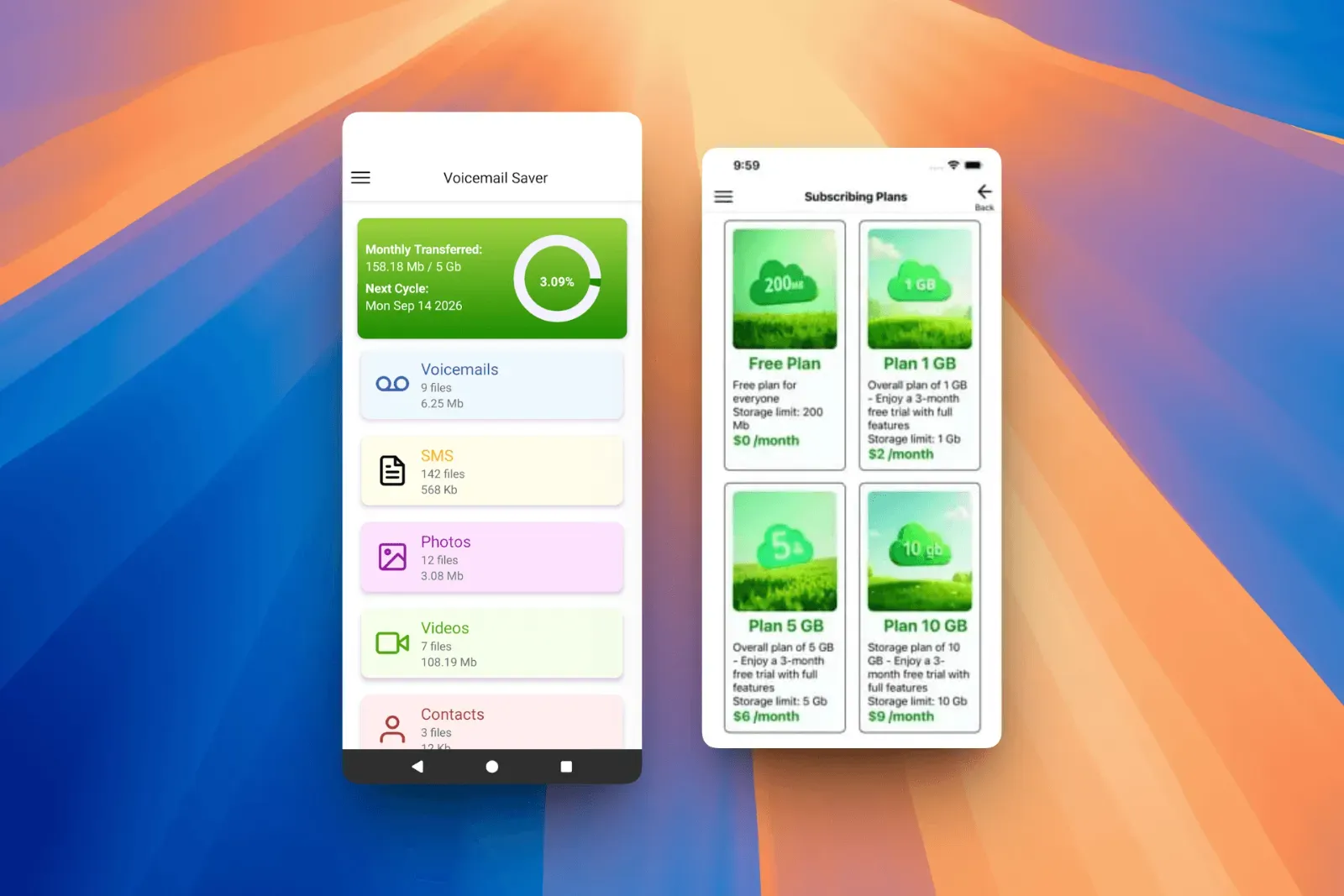
- A free tier that stays free. The lowest storage tier carries no charge indefinitely, a commitment the company repeats on the product page. Paid plans scale by usage, with the top tier set at 10GB for archives that include video and photo libraries.
- Three months of open access across every tier. A promotional window running until February 15, 2027 unlocks all tiers at no cost. VoicemailSaver recommends subscribing at the 10GB level during the trial so file transfers are never capped, then downgrading afterward if the larger allowance is unnecessary.
- Cleanup guidance built around confirmation. The documented workflow puts verification first: once the backup is confirmed, the company advises deleting the originals from the handset to clear capacity for incoming messages. The feature set is designed to make that deletion decision feel safe rather than automatic.
- Browser account portal. A web login at app.voicemailsaver.com serves accounts created inside the mobile app, giving access to stored files without needing the phone nearby. Separate terms, privacy and affiliate program pages are published alongside the portal.
How It Works
The journey starts in the App Store or Google Play, where the app is listed as "Voicemail Saver & Text Backup." Users install it, create an account, and select a storage tier, with the site advising the 10GB option for the trial period to avoid transfer limits. From there the app walks through message selection: voicemails, texts, contacts, photos, videos, audio and documents can each be queued for upload rather than treated as separate tasks.
Uploads go to the cloud account, and the app reports back once the files have landed. That confirmation step is the pivot point in the workflow, because only after it does the company suggest removing originals from the phone. Retrieval happens later, either through the mobile app on a new device or through the browser portal, and files can be downloaded wherever they are needed. Because no cable or carrier PIN is involved, the entire cycle can be completed from the handset alone, which is unusual for voicemail extraction tools that typically rely on a desktop bridge or a carrier feature.
Use Cases
A family member inherits a phone after a death and wants to keep the recorded voice of a parent or spouse. Voicemail Saver & Text Backup moves those recordings into an account that survives the handset, and the audio can later be downloaded to a computer for a memorial or a family archive.
Someone whose phone reports full storage and has stopped accepting new voicemails runs a backup of stored messages, confirms the transfer, then deletes the originals to reopen space. The same cycle applies before a trade-in or carrier upgrade, when a device is about to be wiped and the sentimental threads and photos would otherwise disappear.
A small business owner or tradesperson keeps client voicemails and text confirmations as a record of verbal agreements, moving them into cloud storage so a lost or broken phone does not erase the evidence. Photographers and field workers with hundreds of images and clips use the tiered storage to offload media without subscribing to a full device backup plan.
Android users moving to iOS, or the reverse, find the archive platform-neutral: files are stored independently of the operating system and can be retrieved on whichever device comes next.
Who It's For
This is a consumer utility with a clear audience: people holding sentimental, legal or business-critical voicemails and texts on a phone they cannot keep forever. It suits households more than IT departments, since there is no admin console, retention policy engine or team provisioning. Alternatives include carrier voicemail-to-email forwarding, which often compresses audio and depends on the carrier; full-device backups through iCloud or Google One, which restore everything but rarely expose individual voicemail files for download; and dedicated call recorder apps, which capture new calls but cannot reach messages already sitting in the carrier mailbox. Voicemail Saver & Text Backup sits in the gap between those options, trading breadth for direct access to the messages that are hardest to extract.
Pros & Cons
The Good
- A permanently free entry tier lets users archive small message collections without any subscription commitment.
- Voicemails, texts, contacts, photos, videos, audio and documents are consolidated into a single backup flow instead of separate tools.
- Transfers run from the phone with no USB cable or carrier voicemail PIN, which simplifies retrieval from inherited or unfamiliar devices.
- Every storage tier is open at no cost until February 15, 2027, including the 10GB plan used for large media archives.
- The service has operated in voicemail preservation since 2001 and ships native apps for both iOS and Android plus a browser portal.
The Bad
- Paid tiers scale with usage, so archives that grow past the free allowance turn into an ongoing monthly cost.
- On-page documentation is thin, with much of the product explanation delegated to a single embedded YouTube video rather than written detail.
- There is no desktop-native client, so bulk retrieval on a computer depends on a browser login rather than a dedicated app.