OnVid
OnVid is a free AI video generator that turns text or images into HD videos using top models like Kling and Veo, with no watermark.
Overview
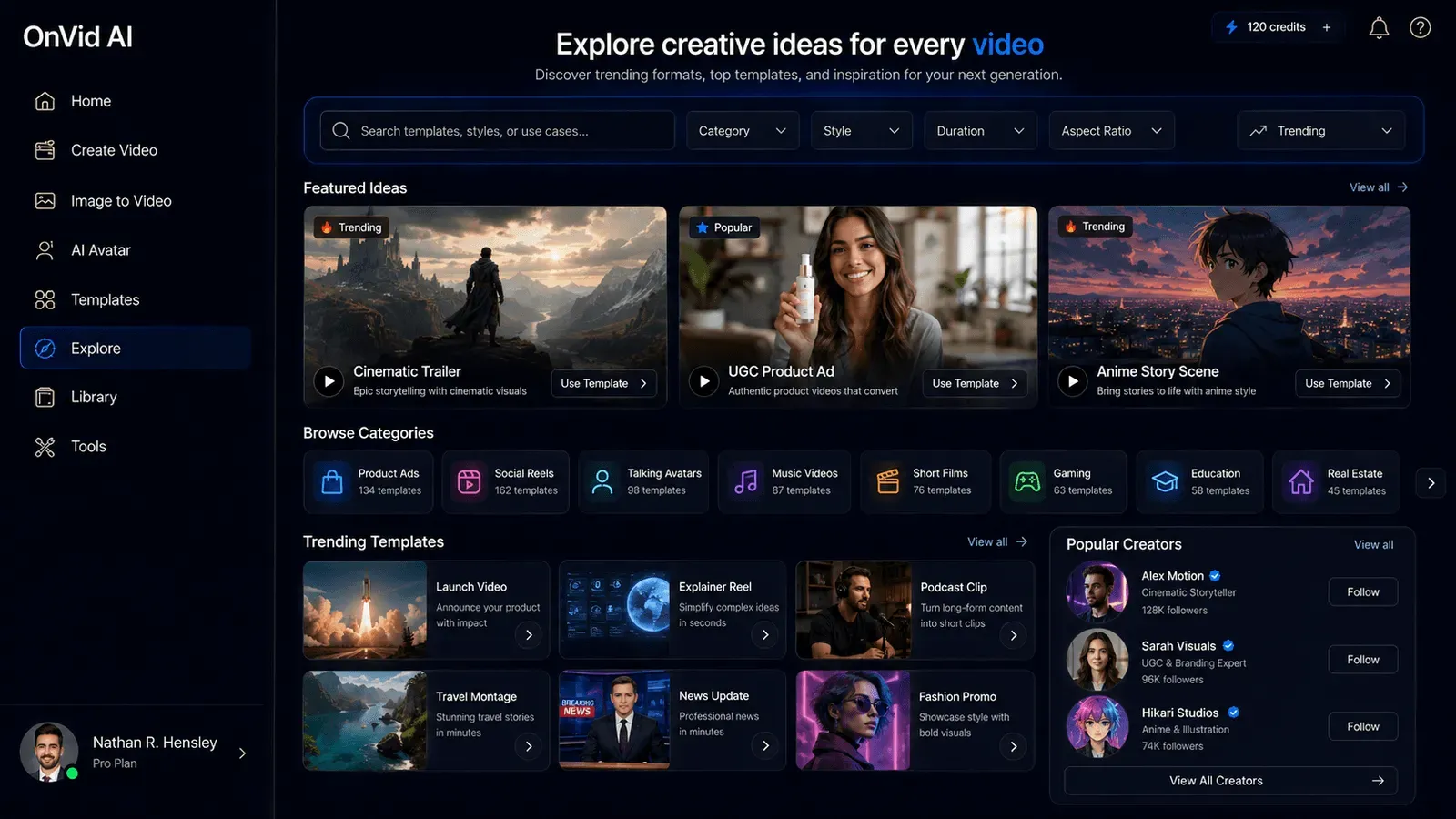
OnVid positions itself as a free AI video generator that consolidates multiple leading video generation models into a single web-based studio. Instead of juggling separate subscriptions for tools like Kling, Veo, Seedance, or Hailuo, creators can access all of them through one interface. This aggregation approach is a key differentiator in a market that has become fragmented with model-specific platforms.
The core promise is simple: type a text prompt or upload a photo, choose a length and style, and get a finished HD video in seconds. OnVid targets casual creators, social media users, and small business owners who need quick video content without learning complex editing software. The platform claims support for 140+ languages and offers a free tier with no signup required, making it one of the more accessible options available.
What stands out is the breadth of models. The homepage lists Kling 3.0, Veo 3.1, Seedance 2.0, Hailuo 2.3, Hunyuan, FLUX 3, and Grok Imagine, each with distinct strengths. Users can switch models based on whether they prioritize 4K resolution, native audio, or fast generation. This flexibility is rare among competitors, which typically lock users to a single proprietary model.
However, the platform's reliance on third-party models means video quality and generation speed can vary depending on the underlying provider. Additionally, while OnVid advertises a free tier, some advanced export options may be gated behind paid plans. Still, for everyday video creation, the platform delivers a remarkably low-friction experience.
Key Features
Multi-Model Access
OnVid provides a unified interface to several state-of-the-art AI video models. Users can select from Kling 3.0 for cinematic 4K outputs, Veo 3.1 for native audio, Seedance 2.0 for sharp motion, and others like MiniMax H3 and FLUX 3. Each model card displays resolution, max clip length, and best-use case, helping users make informed choices. This aggregation eliminates the need to maintain multiple accounts or switch between tabs.
Text-to-Video Generation
The primary workflow starts with a text prompt. Users describe a scene, action, or concept, and the AI constructs a video from that description. OnVid's system builds scenes automatically, so there is no manual storyboarding. The text-to-video pipeline supports multiple languages, allowing non-English speakers to generate videos in their native language. This feature is especially useful for producing quick drafts of ideas that would otherwise require filming.
Image-to-Video Animation
Users can upload a single photo and animate it with motion, depth, and camera movement. The platform uses the uploaded image as the visual base and generates a video sequence around it. This works well for turning pet photos, travel shots, or selfies into shareable clips. The image-to-video feature is optimized for clear, well-lit images with a distinct subject, which yields the best results.
Style Presets
Before generating, users can choose from a set of style presets including cinematic, anime, realistic, fantasy, claymation, and product ad. Each preset adjusts the visual tone, lighting, and motion characteristics of the output. This upfront style selection reduces the need for prompt engineering and helps achieve a consistent look across multiple clips. The presets also provide a starting point for experimentation.
Length Control
OnVid lets users select the desired video length before generation, with options ranging from short 5-second clips to longer 30-second sequences depending on the model. This feature is crucial for pacing, as a joke or dramatic reveal often needs a specific duration. Length control also enables users to create content tailored to different platforms, from TikTok's quick loops to YouTube's longer intros.
HD Downloads and Sharing
Generated videos can be downloaded in HD resolution or shared via a direct link. The platform supports up to 4K for compatible models, ensuring outputs look clean on modern displays. No watermark is applied on the free tier, which is a major advantage for creators who want to post content without attribution clutter. The download process is straightforward, with no additional conversion steps required.
Multilingual Interface
OnVid's interface is available in English, Spanish, Portuguese, German, Italian, and French, with video generation itself supporting over 140 languages. This localization makes the tool accessible to a global audience. Language selection is available in the navigation, and prompts can be written in the user's native language without compromising output quality.
How It Works
Using OnVid involves three straightforward steps. First, users navigate to the homepage and either type a text prompt or upload an image. The interface is designed to be intuitive, with a prominent input field and clear visual examples. No account is required to start generating, which lowers the entry barrier significantly.
Second, users configure the generation parameters. They select the AI model they want to use (or stick with the default), choose the desired video length from options like 5s, 10s, or 15s, and pick a style preset if desired. The interface displays each model's capabilities, such as maximum resolution and audio support, allowing for informed decisions. Users can also view a comparison table of all available models on the models page.
Third, the generation process runs, and the finished video is presented for preview. Users can play the video directly in the browser, download it in HD, or copy a shareable link. There is no hidden rendering queue or complex export settings. The entire flow from idea to downloadable video typically completes in under a minute for shorter clips, though generation time varies by model and server load.
For those who want to explore more advanced features, OnVid's platform includes dedicated tools like an AI video editor, a UGC video generator, and an AI video ad generator, which are accessible from the Resources menu. These tools extend the core video generation capability into specific use cases, such as creating user-generated content advertisements or editing existing clips.
Use Cases
Social Media Content
A social media manager can use OnVid to produce daily video posts without filming. By typing a text prompt like "a neon city at night with flying cars," they can generate a cinematic clip that fits Instagram Reels or TikTok. The ability to choose a 10-second length and a vertical format (implied by style presets) makes it easy to match platform requirements. The result is a steady stream of original video content that boosts engagement.
Personal Memories
A parent can upload a photo of a child's birthday party and turn it into a moving video with gentle camera motion. This adds a new dimension to family memories, making them feel more alive than static images. The image-to-video feature works well for this purpose, and the HD download ensures the video can be saved for future viewing. Users can also apply a fantasy or cinematic style to make the memory feel more whimsical.
YouTube Visuals
A YouTuber who needs background visuals for a tech review can generate abstract or environment clips using text-to-video. For example, a prompt like "a futuristic circuit board with glowing pathways" produces a looping background that fits a tech channel's aesthetic. Since OnVid supports longer clips (up to 30 seconds with Seedance 2.5), creators can generate full B-roll segments without hiring a videographer.
Marketing Ads
Small business owners can prototype video ads for products. The product ad style preset applies clean studio lighting, which is ideal for showcasing items. A user could upload a product photo and generate a 10-second ad with a voiceover-style musical tone (if the selected model supports native audio). This allows for rapid A/B testing of different ad concepts before committing to a professional production.
Creative Experimentation
Artists and hobbyists can explore visual ideas without the cost of animation software. OnVid's multi-model access lets them compare how different AI models interpret the same prompt, revealing unique artistic styles. The claymation and fantasy presets offer particularly distinctive looks that might inspire new creative directions. The platform serves as a low-risk sandbox for testing narrative prompts.
Pricing & Value
OnVid operates on a freemium model. The homepage emphasizes "Free AI video generator" and specifies "No signup · No credit card · Free to start." This suggests a generous free tier that allows users to generate videos without payment. However, the exact limits of the free tier (number of generations, export resolution, watermark removal) are not clearly disclosed on the main page. The FAQ mentions that "export details can vary by plan or option at the time you use it," implying there are paid upgrades for enhanced features.
Compared to competitors like Runway, which offers limited free credits, or HeyGen, which requires a paid subscription for most features, OnVid's no-signup entry point is notably accessible. The value proposition is strengthened by the aggregation of multiple models, as users effectively get access to several tools for the price of one (or free). For professionals who need 4K exports and consistent quality, a paid plan may be worthwhile, but pricing specifics are not listed on the site. Potential users should check the pricing page for current details, as the company appears to update its offerings regularly.
Overall, OnVid provides strong value for creators who want to experiment with AI video generation without a significant upfront investment. The free tier covers most casual use cases, while power users can upgrade if they need additional hours or premium features.
Final Verdict
OnVid is a compelling option in the rapidly growing AI video generator landscape. Its key strength is the aggregation of multiple cutting-edge models into a single, easy-to-use interface. This saves users both money and time, as they no longer need to subscribe to separate services like Kling or Veo. The text-to-video and image-to-video workflows are straightforward, and the inclusion of style presets and length control adds a level of creative control that is often missing in similar tools.
The platform's free tier is generous, and the absence of a watermark on exports is a significant advantage. The multilingual support also broadens its appeal internationally. However, there are some trade-offs. The reliance on third-party models means output consistency is not guaranteed; sometimes a prompt may work better with one model than another, requiring trial and error. The maximum clip length is still relatively short, maxing out at around 30 seconds, which may not be sufficient for long-form content. Additionally, the lack of transparent pricing for premium features could be a hurdle for businesses planning to scale.
That said, for anyone looking to create short video clips for social media, personal projects, or marketing experiments, OnVid is definitely worth trying. Its text-to-video generator and image-to-video tool are both accessible directly from the homepage, making it easy to get started. As the AI video space evolves, OnVid's model-agnostic approach positions it well to adapt to new breakthroughs, ensuring users always have access to the best available generation technology.
Pros & Cons
The Good
- Aggregates multiple top-tier AI video models like Kling 3.0, Veo 3.1, and Seedance 2.0 into one interface, eliminating the need for multiple subscriptions.
- Offers a genuinely free tier with no signup required, allowing users to generate and download HD videos without watermark immediately.
- Supports both text-to-video and image-to-video conversion, making it versatile for a wide range of creative tasks.
- Provides granular control over video length and style presets, enabling tailored output for specific platforms and moods.
- Localized interface and over 140 language support make it accessible to a global audience, not just English-speaking users.
The Bad
- Output quality varies between underlying third-party models, requiring users to experiment with different providers to get a consistent look.
- Maximum video length is capped at around 30 seconds even on the best model, limiting its use for long-form content.
- Pricing for premium features, such as higher resolution exports or faster generation, is not fully transparent on the website, potentially leading to unexpected costs.