Lizard
Lizard is an AI-native deployment platform for coding agents with managed Postgres, Redis, S3, and per-second billing.
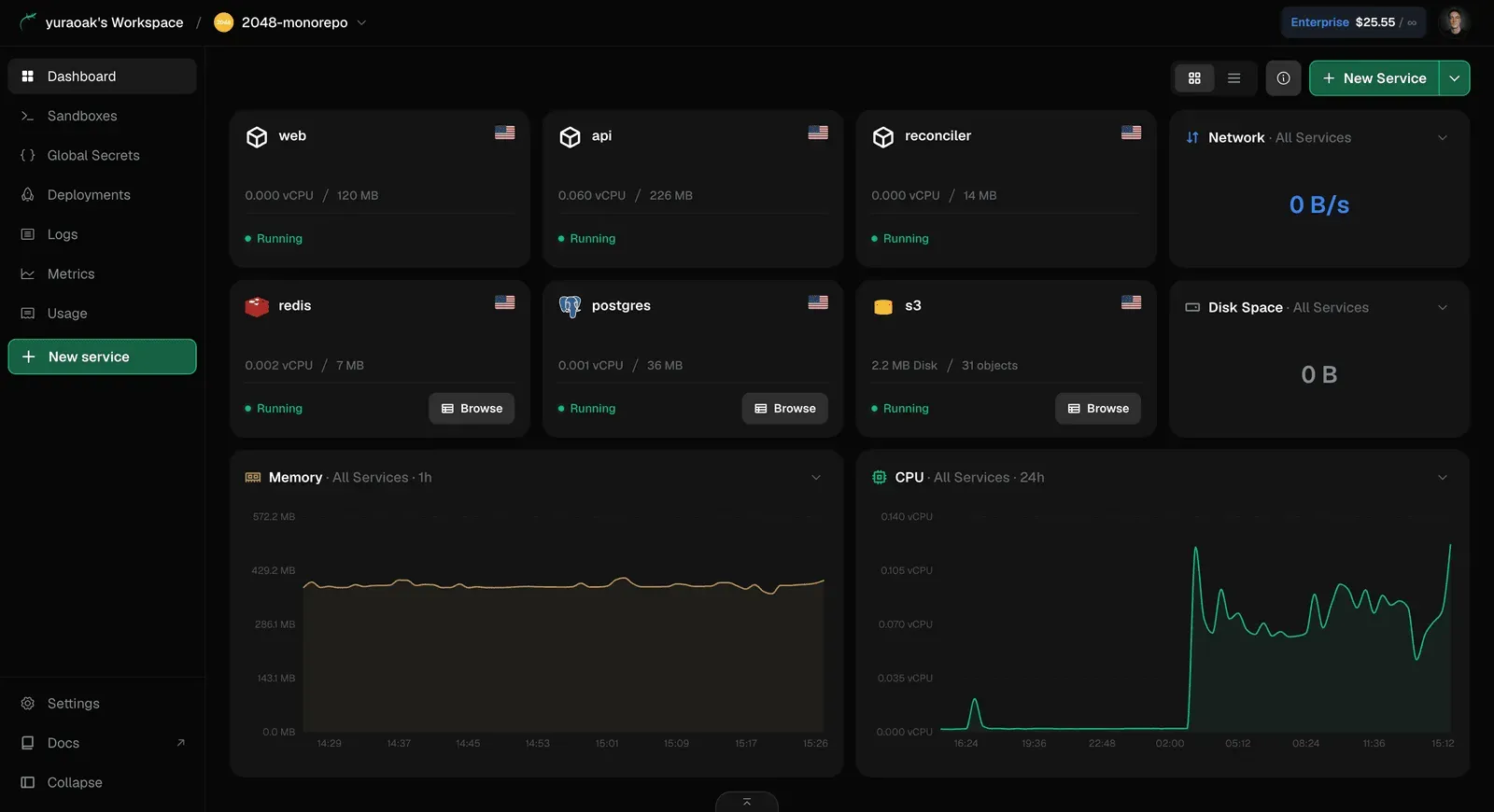
Lizard is an AI-native cloud deployment platform that bridges the gap between coding agents and production infrastructure. Designed for teams that build with Claude Code, Codex, or Cursor, it combines git-based deployments, managed data services, and a command-line interface that speaks machine-readable output. The platform promises to treat every resource as code and bill by the second, which could make it a cheaper and more flexible alternative to established PaaS offerings like Railway, Render, and Fly.io.
Overview
Lizard emerges in a crowded field of deployment platforms, but its focus on AI agent workflows sets it apart. While traditional PaaS providers have bolted AI features onto human-centric dashboards, Lizard was built from the ground up for the agent loop. Every command, deploy event, and log line is structured with a machine-readable schema, allowing coding agents to parse, reason, and act without human intervention. This design philosophy resonates with the growing number of developers who delegate routine coding tasks to AI assistants.
The platform includes a CLI tool, managed Postgres, Redis, and S3 object storage, plus ephemeral sandboxes for code interpretation. It supports any language or framework, from Node.js and Python to Go and Rust, by automatically detecting the stack and generating a multi-stage Dockerfile. The result is a deployment experience that feels familiar to developers who have used Railway or Render, but with an underlying architecture optimized for autonomy and cost efficiency.
Key Features
Git Push to Deploy
Lizard's core workflow is refreshingly simple. Pushing code to the connected repository triggers an automatic build and deploy pipeline. The platform detects the language, framework, and package manager, then writes a real Dockerfile rather than hiding the build process inside a opaque plan. This means developers and agents can read, edit, and port the Dockerfile to any other platform, providing a level of transparency that many managed PaaS offerings lack.
Managed Postgres, Redis, and S3 in One Command
Databases are often the biggest friction point when shipping an app. Lizard solves this by allowing users to provision a managed Postgres database, a Redis instance, or an S3-compatible object storage bucket with a single CLI command. These services are automatically connected to the app, with connection strings injected into the environment. The dashboard shows real-time resource usage, such as vCPU and memory, and the integration works seamlessly with popular ORMs and client libraries.
Agent-First CLI
The Lizard CLI is not just a wrapper around cloud APIs; it is designed to be consumed by AI agents. Every command outputs JSON, making it trivial for tools like Claude Code or Codex to understand deployment status, error messages, and resource usage. There is also a dedicated Lizard skill for Claude Code that can be installed with npx skills add lizard-build/skill -g, enabling the agent to perform migrations, create databases, and roll back services autonomously.
Per-Second Billing
Most cloud providers charge by the hour or by reserved instance size, leading to wasted spending on idle resources. Lizard bills only for measured CPU, memory, and egress, with per-second granularity. The homepage includes a comparison calculator that shows how an app with 15% average CPU load and 25% memory utilization would cost around $32 per month on Lizard versus $55 on AWS, including a managed database. This cost model is particularly attractive for side projects, staging environments, and bursty workloads.
Live Logs & Metrics
Every service comes with built-in streaming logs and request metrics. The dashboard provides a real-time view of incoming requests, status codes, and latency, while the CLI streams logs directly to the terminal. For AI agents, this data is structured and queryable, allowing them to detect anomalies, debug errors, and even trigger rollbacks based on log patterns. This integration eliminates the need to set up separate observability tools for simple deployments.
Isolated Pod Architecture
Each deployment runs in its own container with secure isolation. The dashboard displays replica counts, regional data centers, and resource allocation per service. This architecture ensures that one noisy neighbor cannot impact another app, a common concern with shared PaaS boxes. The isolation also makes it easier to enforce security policies and control network access between services.
Cost Comparison Tool
The homepage's calculator is a clever addition. It lets users compare Lizard's billing against AWS, Render, Fly.io, and DigitalOcean by adjusting vCPU, memory, and utilization sliders. The tool estimates monthly costs for an app and a managed database, highlighting potential savings of 40% or more. This transparency helps developers and finance teams evaluate the platform before committing to a migration.
How It Works
Getting started with Lizard takes minutes. A user signs in with GitHub, then installs the CLI globally with npm i -g @lizard-build/cli. The next step is to link an existing repository or create a new one. Lizard detects the project type and provides a default configuration, which can be customized with a lizard.toml or Dockerfile.
The lizard up command triggers the first deployment. The platform builds the application in an isolated environment, then launches it on the chosen region. If the app requires a database, lizard drain db:create --type=postgres provisions a managed instance in seconds and automatically sets the DATABASE_URL environment variable. The same applies to Redis and S3 buckets.
After deployment, users monitor everything from the dashboard or the terminal. The CLI supports streaming logs, viewing metrics, scaling replicas, and even restoring deleted services. For AI agents, the machine-readable output means they can diagnose a failed build, fix the code, and redeploy without human assistance. The platform also supports preview environments for pull requests, allowing agents to test changes in isolated sandboxes.
Use Cases
Rapid MVP Development
A solo developer with a weekend idea can leverage the $5 free credit to deploy a Next.js app with a Postgres database. Per-second billing keeps the cost near zero when the app is idle, and the CLI is simple enough to launch the entire stack from a single terminal session. This makes Lizard an excellent choice for validating concepts without committing to a high monthly bill.
AI Agent-Driven Development
Software teams that use Claude Code or Codex for code generation can turn deployments over to the agent entirely. The agent installs the Lizard skill, then uses natural language to migrate an app from Railway, create a new Redis cache, or troubleshoot a production incident. The structured logs allow the agent to read error rates and respond quickly, turning a reactive workflow into a proactive one.
Production Microservices
A team running separate web, API, and worker processes can define each as a service in Lizard. The platform builds and scales them independently, with isolated containers and shared managed data services. The per-second billing model means a worker that runs only a few minutes per hour costs only for those minutes, offering significant savings over always-on instances.
Data-Intensive Applications
Apps that generate large amounts of user-generated content can use Lizard's S3-compatible object storage for files and backups. Combined with Redis for caching and Postgres for relational data, the platform covers the full data stack in one place. The dashboard provides a clear view of disk usage and object counts, making capacity planning straightforward.
Platform Migration
Moving an existing app from Railway, Render, or Heroku is a documented process. The Lizard skill automates the migration, carrying over secrets, domains, and data. Live logs, staging environments, and instant rollbacks help ensure continuity during the transition. The cost calculator can be used to estimate savings before making the switch.
Pricing & Value
Lizard offers a free plan that includes $5 of usage credit for the first month, with no credit card required. After the credit is exhausted, users can upgrade to a paid tier. The Hobby plan costs $5 per month and appears to include a modest amount of resources, enough to run a typical side project. Pro and Enterprise tiers add advanced features such as SSO, SOC 2, HIPAA compliance, and role-based access control.
The pricing structure is usage-based, which makes cost forecasting tricky but generally favorable for variable workloads. A comparison on the homepage suggests that an app with 2 vCPU, 4 GB memory, and 25% utilization costs around $32 per month on Lizard, including a managed Postgres database, versus $55 on AWS. The exact numbers depend on the chosen region and reserved resources, but the per-second billing model is undeniably innovative.
For teams that already use AI agents for development, the value proposition extends beyond raw dollar savings. The time saved by letting agents deploy and debug independently can be substantial. Compared to the cost of developer hours, the subscription fees are trivial. Developers should explore the detailed pricing page to understand the specific limits and overage rates.
Final Verdict
Lizard is a well-executed, forward-thinking deployment platform that aligns perfectly with the rise of AI pair programmers. Its machine-readable CLI, managed data stack, and per-second billing differentiate it from incumbents. The platform is particularly appealing to indie hackers, startups, and enterprise teams experimenting with agent-driven workflows.
However, it is a relatively young service. The available regions are sparse, and the platform lacks the extensive add-on marketplace and third-party integrations that Railway or Render offer. Teams with high compliance requirements will need to consult the official documentation to verify whether the Enterprise plan meets their needs. The agent-first focus also means that human developers who prefer graphical tools may find the learning curve steeper, though the dashboard is polished.
For developers who want to ship faster with AI assistance and avoid paying for idle infrastructure, Lizard is a compelling option. The free credit allows for a risk-free trial, and the CLI guide demonstrates how quickly a project can go from zero to production. As the platform matures, it could easily become a staple in the AI-native developer stack, but early adopters should remain aware of the trade-offs.
Pros & Cons
The Good
- Per-second billing on measured CPU and memory dramatically reduces costs for idle or variable workloads.
- Agent-first CLI outputs structured JSON, enabling coding agents to deploy, debug, and roll back autonomously.
- Managed Postgres, Redis, and S3 are provisioned with a single command and auto-connected to the app.
- Transparent build process generates a real Dockerfile instead of an opaque build plan, making it portable.
- Interactive cost comparison calculator on the homepage shows potential savings versus AWS, Render, and Fly.io.
The Bad
- Limited regional availability, with only a few data centers shown in the dashboard preview.
- The platform is new and lacks the extensive ecosystem of integrations and add-ons offered by established PaaS providers.
- The free plan provides only $5 of credit for the first month, which may be insufficient for larger trial deployments.