LifeVault
LifeVault turns scanned documents into structured, connected family records for iPhone, with private on-device storage and one-tap PDF sharing.
Overview
LifeVault is a privacy-first family organizer and document scanner app for iPhone that transforms how households manage important records. Instead of storing files as static images or PDFs, the app extracts key data from scanned documents — driver's licenses, insurance cards, vaccination records, prescriptions, and more — and structures them into searchable, interconnected profiles for each family member, pet, and even the household itself. The app positions itself as a smarter alternative to cloud document vaults like Everplans or Trustworthy, caregiver coordination apps like CaringBridge, and ad-hoc systems like Apple Notes or Google Drive. Its core differentiator is the combination of OCR-based data extraction, relational record linking, and on-device storage that never uploads personal information to external servers. LifeVault is currently available for free on iOS, with an Android version expected later in the year.
Key Features
Document Scanning with Intelligent Extraction
LifeVault's built-in scanner uses optical character recognition to pull key fields from common documents. Scan a driver's license and the app extracts name, date of birth, license number, and expiration date. Scan a vaccine card and it captures vaccine types, dates, and next due dates. Users review and edit the extracted data before saving, ensuring accuracy. The original document image remains attached to the structured record and is also stored in a Documents Vault for easy retrieval.
Profile-Based Organization with Three-Level Linking
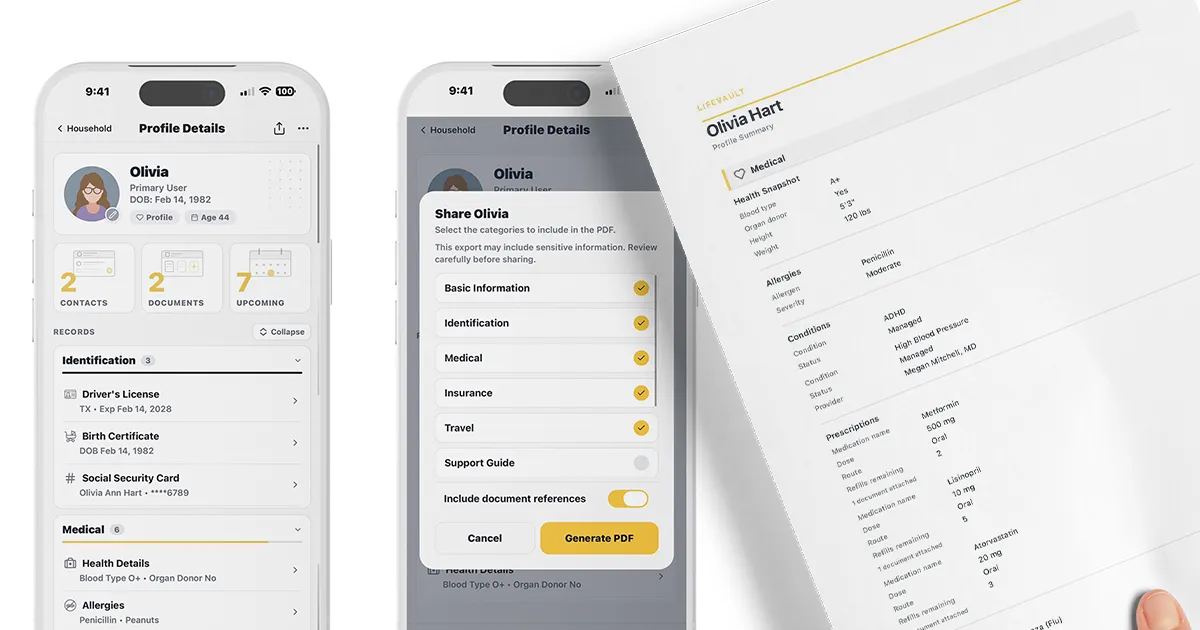
Every record is linked to a specific person, pet, or the household. The app supports three scopes: records attached directly to a document (e.g., a prescription photo linked to that prescription), records linked to a single profile (e.g., Olivia's primary care physician), and records added at the household level (e.g., the family plumber or home warranty PDF). This architecture prevents duplication and makes it easy to find information by person or category.
Customizable Profile Sections
Not every family member needs the same categories. LifeVault allows users to toggle sections on or off per profile. For example, a 7-year-old child's profile can exclude Travel and Preferences while keeping School & Support active. An adult's profile might include Passports and Advance Directives. This per-profile customization keeps each view focused and relevant, reducing clutter during stressful moments.
Support Guide Builder
One of the app's most distinctive features is the Support Guide, a structured template for documenting accommodations, triggers, calming strategies, sensory needs, transitions, safety considerations, and caregiver notes. Designed by a parent of a child with special needs, the guide produces a plain-language summary that can be shared with teachers, sitters, or medical staff. The guide is built once and can be modified anytime, then exported as a PDF.
Timeline and Version History
Each profile includes a timeline that users build by marking records as "Add to timeline." Medications, procedures, hospital stays, and custom events appear chronologically. When a record is renewed or replaced — like a driver's license or passport — the old version is archived with its validity dates, preserving a complete history. The app also sends reminders before IDs, insurance cards, and prescriptions expire.
One-Tap PDF Summaries
From any profile, users can generate a clean, shareable PDF summary that includes selected sections. The summary can be sent via text, email, or AirDrop without leaving the app. This is particularly useful for ER visits, travel with kids, handing off to a new caregiver, or pet boarding. Users choose exactly which sections to include before sharing.
Privacy-First Architecture
LifeVault stores all data on the device, not on company servers. There is no account required, no cloud sync by default, and no data harvesting. Biometric protection via Face ID or Touch ID secures the app. The company states it cannot access, lose, or be compelled to hand over user data because it never possesses it. Users control backups through iCloud or encrypted LifeVault backups.
How It Works
After downloading LifeVault from the App Store, users create profiles for each family member and pet. The first step is typically scanning a document — a driver's license, insurance card, or vaccine record. The app's OCR engine extracts key fields and presents them for review. Users correct any errors, confirm the data, and the structured record is saved. The original document image is automatically stored in the Documents Vault and linked to the record.
Next, users organize records by linking them to the appropriate profile. A prescription goes to the person it's for; a vet contact links to the pet; the home warranty PDF stays at the household level. Users can toggle which sections appear on each profile using the customization settings. For example, a child's profile might show Identification, Medical, Insurance, School & Support, and Preferences, while hiding Travel and End-of-Life directives.
For caregivers or families with special needs, the Support Guide is completed once across seven sections. The resulting summary can be shared as a PDF with teachers, sitters, or medical providers. When information changes — a medication dosage increases, a license is renewed — users update the record, and the previous version is archived. The timeline automatically reflects the change, and reminders are set for upcoming expirations.
Use Cases
Emergency Room Visit
A parent rushes a child to the ER. Instead of fumbling through a wallet or calling home for insurance details, they open LifeVault, select the child's profile, and generate a PDF summary that includes allergies, medications, insurance card, and emergency contacts. The summary is AirDropped to the triage nurse before the doctor arrives.
Traveling with Kids
Before a family trip, a parent compiles passports, vaccination records, travel insurance, and known traveler numbers into a single PDF per person. The summaries are shared with the travel companion and stored offline on the phone. At customs or a clinic abroad, the relevant record is available without internet access.
New Caregiver or Sitter
A family hires a new nanny for a child with autism. The parent shares the Support Guide PDF, which outlines triggers, calming strategies, sensory needs, and emergency contacts. The sitter reads it before the first day and knows how to prevent meltdowns and respond if they occur.
Pet Boarding
Before dropping off a dog at a boarding facility, the owner generates a pet profile summary that includes vaccination records, medication schedule, feeding routine, vet contact, and behavior notes. The PDF is emailed to the facility, eliminating handwritten instructions and ensuring the pet's care is consistent.
Aging Parent Care
An adult child manages a parent's medications, doctor appointments, and insurance. They scan the parent's insurance card, prescription bottles, and advance directives into LifeVault. The timeline tracks medication changes and hospital stays. When the parent sees a new specialist, the child shares a medical summary PDF with the doctor's office.
Pricing & Value
LifeVault is free to download and use. The company indicates that higher limits — such as more documents or additional family members — may eventually require a paid plan, but existing records remain accessible on the free tier. There are no ads, no data selling, and no social features. Compared to cloud document vaults that charge $10–$20 per month for similar organizational features, LifeVault's free entry point is compelling. The trade-off is the lack of multi-device sync and shared family access, which are on the roadmap but not yet available. For single-device households or individuals who primarily need offline access, the current offering provides substantial value at no cost.
Final Verdict
LifeVault fills a genuine gap in the family organization space by combining document scanning, structured record keeping, and privacy in a single app. Its OCR extraction and relational linking are more sophisticated than simple file storage, and the Support Guide feature addresses a real need for families managing special needs or aging parents. The on-device privacy model is a strong differentiator in an era of cloud-dependent services. However, the lack of multi-device sync and shared family access limits its utility for households where multiple members need to update records. The Android version is still months away, and the free tier's eventual limits are undefined. For iPhone users who want a private, intelligent family binder today, LifeVault is a solid choice. Those needing cross-platform or multi-user collaboration may want to wait for future updates. Check out the LifeVault how it works page for more details, or visit their privacy policy to understand the data handling. For support, see the support guides.
Pros & Cons
The Good
- On-device storage ensures family records never leave the phone unless the user explicitly shares them, providing strong privacy guarantees.
- OCR extraction automatically structures data from scanned documents like driver's licenses and insurance cards, saving manual data entry time.
- The Support Guide feature offers a structured, shareable template for documenting accommodations, triggers, and caregiver instructions for special needs individuals.
- Profile customization allows users to toggle sections on or off per person, keeping each profile focused and clutter-free.
- Timeline and version history track changes to records over time, with automatic archiving of replaced documents and expiration reminders.
The Bad
- Multi-device sync and shared family access are not yet available, limiting use to a single iPhone per household.
- Android version is still in development, excluding a large portion of potential users who do not own Apple devices.
- The free tier's future limits on documents or family members are not clearly defined, creating uncertainty about long-term costs.