BlurFacePhotos
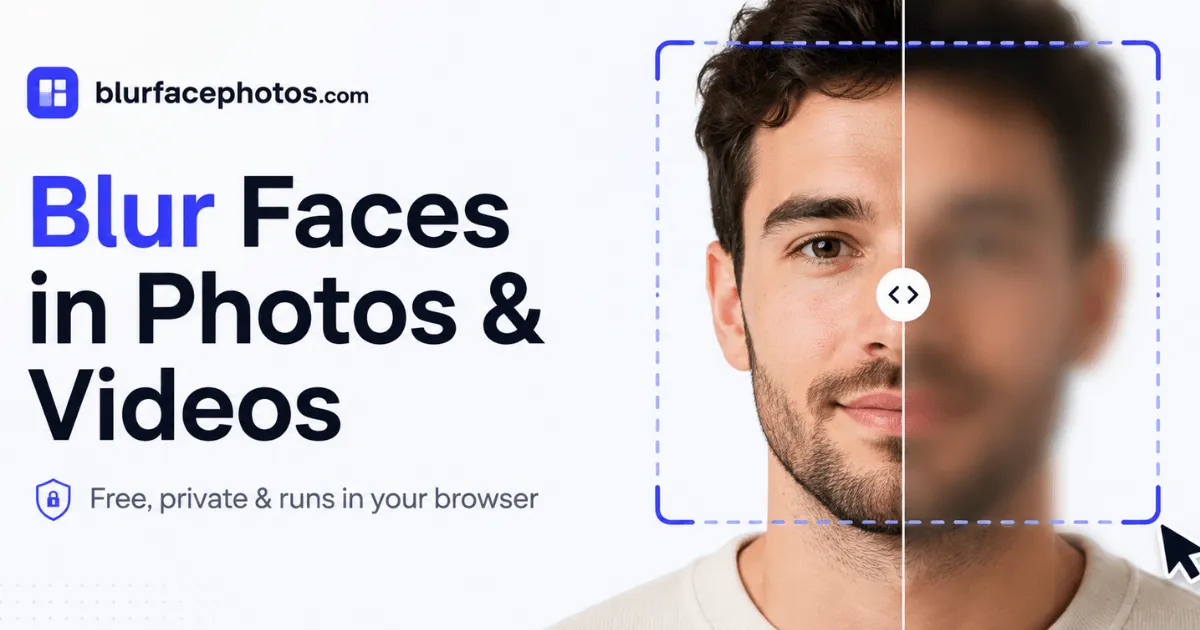
BlurFacePhotos is a free, private face blur tool that runs entirely in your browser, so you can blur, pixelate, or censor faces in photos and video without any uploads.
Overview
BlurFacePhotos is a browser-based identity redaction tool designed to hide faces in photographs, video files, and live camera feeds. The product occupies a distinct niche in the crowded image-editing space by committing to a zero-upload architecture: all face detection, tracking, and blurring happen inside the user's browser, using WebAssembly and client-side machine learning models. No image, clip, or snapshot is ever transmitted to a remote server, making the tool inherently aligned with privacy regulations such as GDPR and suitable for handling sensitive editorial or HR material.
The market for face blurring has grown as public awareness of surveillance and consent has risen, but most online tools still require uploading photos to a cloud service, which introduces a level of trust and risk that many users find uncomfortable. BlurFacePhotos removes that friction entirely. A visitor can drop a photo into the drop zone, see faces detected automatically, select an area and an effect, and download the redacted result in seconds, without creating an account or sharing a single byte with the website beyond the initial page load. This frictionless workflow is a deliberate design choice, reinforcing the message that privacy should not be a barrier to privacy protection.
Compared to server-side tools that charge per image or per minute of footage, the free tier offers a more attractive value proposition for low-volume users. Some competing tools also require creating an account or provide only a single blur style, making BlurFacePhotos the more flexible choice. The absence of a watermark on free exports is also a positive, as it means the output is immediately usable for professional projects.
The tool supports a wide range of effects and areas: blur, pixelate, black bar, white bar, noise, color invert, and emoji stickers; these can be applied to the eyes, mouth, or the whole face. Video redaction is handled in a similar manner, with automatic face tracking across frames. A live camera mode lets users blur faces in real time, which is helpful for video calls, streaming, or on-site recording. The free tier covers unlimited photo redaction with up to five faces per image, batch processing of up to five photos, and no watermark. Premium plans add video export, unlimited batches, and full HD or 4K resolution, alongside an ad-free experience.
With a clean, fast interface and an API in the works, BlurFacePhotos is targeting both casual users and enterprise workflows. Its main competitors are server-side face blurring services, which typically charge per image or per minute of video, and traditional video editors, which are overkill for simple redaction tasks. By focusing exclusively on the redaction use case and running everything locally, the platform carves out a defensible position. For a detailed breakdown of what the tool can and cannot do, the features page provides an exhaustive list.
Key Features
Browser-Local Processing with WebAssembly : The core promise of BlurFacePhotos is that no photo or video ever leaves the device. The detection model is delivered as a static asset and executed in the browser via WebAssembly. This approach eliminates upload time, reduces latency for local operations, and prevents any accidental exposure of sensitive media. For users with older hardware, the main trade-off is speed: a high-resolution 4K video may take longer to process than it would on a dedicated server, but the privacy benefit typically outweighs this inconvenience.
Extensive Redaction Effect Library : Instead of offering just a single blur filter, the editor provides several distinct styles. The blur effect creates a smooth, soft mask; pixelation turns the region into a blocky mosaic; black and white bars create a classic censor bar; noise adds a static-like overlay; color inversion flips the pixels to an unnatural shade; and emoji stickers cover the face with a playful image. Each effect can be applied to a specified facial area, giving users the ability to customize the output to suit the context. A journalist may prefer a black bar for a legal notice, while a family sharing a birthday party video might choose a smiley emoji to keep the mood light.
Granular Area Selection : The tool allows the redaction to target the eyes, the mouth, or the whole face. The eyes are the most identifying feature in human perception, and hiding just the eyes is often enough to make a person unrecognizable while preserving the overall expression. The mouth can be masked separately for speech-related contexts, such as anonymizing a conversation where lip movements are sensitive. Whole-face masking is the most thorough option. This flexibility is uncommon in free tools, which often apply a single rectangular blur to the entire face or head.
Automatic Video Face Tracking : Video redaction is a demanding task, but BlurFacePhotos handles it automatically. The user uploads an MP4, MOV, or WebM file; the system scans every frame, identifies distinct faces, and tracks them as they move across the scene. The chosen effect and area are applied consistently frame by frame. This eliminates the need to manually keyframe masks in software like Premiere Pro or CapCut. The output is exported in WebM format, which is widely supported by web browsers and many video players, though not by all editing suites.
Live Camera Privacy Mode : The Camera tab provides real-time face blurring using the device’s webcam. Once permission is granted, the feed appears with any detected face automatically obscured by the selected effect. This is useful for making a video call anonymous, streaming an event without revealing bystanders, or simply testing the detection speed. The same engine powers this mode, meaning the on-device model is fast enough to maintain a real-time frame rate on typical laptops.
Batch Processing for Efficiency : The ability to anonymize multiple images at once saves a significant amount of time for users dealing with large photo sets. The free tier permits batch redaction of up to five photos, while premium subscribers can process an unlimited number of images and video clips. When batch mode is activated, the same area and effect settings are applied to all files, and each result is downloaded separately. This is ideal for event photographers, social media managers, or anyone who needs to redact a bulk collection before publication.
Export Options with No Watermark : Anonymized photos are delivered as PNG files, which maintain full quality and support transparent backgrounds. Videos are exported as WebM, an open standard that is now supported by all major web browsers. The free plan does not impose a watermark, a generous policy that makes the tool suitable for professional use even at no cost. Premium users gain access to full HD and 4K video export, which is essential for broadcast-quality output.
Planned API for Business Integration : While the API is not yet fully launched, the pricing page lists a “coming soon” API & Business tier at $49 per month. This suggests the roadmap includes a REST interface that would allow developers to integrate face redaction into custom pipelines, processing large volumes of images and videos programmatically. Early adopters should watch for the public API documentation, which will likely be a key selling point for enterprise clients.
How It Works
The user experience is deliberately minimal. On the homepage, the main call-to-action opens the editor, which presents a clear drop zone. Dragging a photo onto the page immediately loads it into the browser memory, and the face detector starts scanning. Within a fraction of a second, each face is outlined with a bounding box, and the interface displays thumbnails of the detected faces. The user then selects an area from a preset list: eyes, mouth, or entire face. Next, the effect is chosen from a gallery of options. As soon as both are selected, the preview shows the anonymized version, and the original can be toggled for comparison.
Once the settings are confirmed, a single click on the download button exports a PNG file. The entire sequence takes less than ten seconds for a typical photo and requires no sign-up, no email, and no payment. The site does not inject any metadata that would reveal the original file, and because the processing is local, the user’s internet connection only needs to load the static application files.
For video, the flow is slightly longer. The user selects the Video tab and drops an MP4 or WebM file. The video is loaded into a local buffer, and a face tracking pass begins. During this phase, the user sees a progress indicator while the system maps the faces over the video’s duration. After analysis, the chosen effect is applied across the entire timeline, and the final video is rendered in WebM. The rendering time scales with resolution and length; a 1080p clip of a few minutes could take a couple of minutes on a mid-range laptop.
The live camera mode is even simpler: after granting camera access, the video feed is displayed with the selected redaction overlaid in real time. The user can record a short segment or simply use the anonymized feed directly for streaming. This mode demonstrates the low latency of the underlying AI model, as the effect tracks faces with minimal perceptible lag.
The technical stack leverages modern web standards such as WebAssembly and the MediaStream API. Face detection is performed by a convolutional neural network that runs entirely in the browser session. The model is delivered as a static file, and all computation occurs on the CPU/GPU of the user's device. This design not only preserves privacy but also reduces the hosting bandwidth required for a SaaS application.
A notable aspect of the workflow is the absence of any forced account creation. Even premium users can access their subscription benefits after logging in, but the free photo editor is fully functional without authentication. This lowers the barrier to entry and aligns with the product’s philosophy of privacy-first convenience.
Use Cases
Journalistic Redaction : A reporter covering a demonstration might capture a wide shot of the crowd. Using the tool, they can apply whole-face pixelation to every person in the image, making it impossible for authorities to identify individuals from the published photo. Because the image is never uploaded, the journalist also avoids leaving a digital trail of the raw file, an important consideration in hostile surveillance environments.
Marketing and Social Media Compliance : Brands often receive user-generated content that includes identifiable individuals without their consent. A social media manager can use batch processing to anonymize dozens of uploaded event photos, applying an eye-blur effect to preserve a natural look while protecting identities. The no-watermark policy ensures that the resulting images are polished enough for official brand channels.
HR and Legal Documentation : Companies dealing with workplace investigations or legal proceedings frequently need to share video footage with lawyers or internal boards. The black bar effect is a standard way to obscure the identity of parties involved. Since BlurFacePhotos runs locally, HR can process the footage without sending sensitive material to an outside tool, reducing legal exposure. Video clips can be anonymized and exported in WebM, which can then be securely shared through internal channels.
Education and Course Creation : Educators who record classroom sessions must often protect the privacy of minors. By uploading a recording and applying a blur to faces, a teacher can share a lesson with parents or on a learning management system while respecting consent rules. The live camera mode also enables real-time obscuring during virtual classes, ensuring that any child who appears on camera is automatically anonymized.
Everyday Personal Privacy : A parent sharing a birthday party photo on Facebook may want to hide the faces of children whose parents haven’t given permission. Instead of manually blurring with an image editor, the parent drops the photo into BlurFacePhotos, selects “eyes” and “blur,” and downloads the result in seconds. The free tier handles this flawlessly, making privacy protection a one-click habit rather than a time-consuming chore.
Pricing & Value
The pricing structure is transparent and competitive. The Free plan includes unlimited photo redaction, up to five faces per image, batch processing of five photos, and every effect and area option. Advertisements appear on the website, but exports are clean and watermark-free. For hobbyists and occasional users, this is a complete solution that requires no financial commitment.
Premium costs $4.99 per month when billed annually or $8.99 month to month. It removes ads, unlocks video face blurring, enables unlimited batch processing, and raises video export resolution to full HD and 4K. A commercial-use license is also included, making it easier for freelancers and agencies to bill clients for redaction work. When compared to alternatives like server-based redaction APIs that charge per image or per minute of footage, the flat subscription fee represents good value for power users.
The planned API & Business tier, priced at $49 per month, is a strategic addition for enterprises. It promises a REST API with pay-as-you-go credits, bulk processing, and commercial licensing. This could appeal to companies that need to integrate redaction into their own software pipelines. However, as of the time of writing, the API details are still in development, and the pricing page is the authoritative source for updates.
There are some trade-offs to consider. The free tier’s five-face cap means large group photos will require a premium plan, and video is entirely a premium feature. The WebM export format, while broadly compatible, may need conversion for Apple-centric workflows. For anyone who only ever blurs a few photos a month, the free plan is excellent; for professionals handling video, the $4.99 entry price is a reasonable investment. The pricing page offers the latest details and any promotional offers.
Final Verdict
BlurFacePhotos succeeds at what it sets out to do: provide a genuinely private, easy-to-use face redaction tool that runs in the browser. The local processing is a significant differentiator, and the interface is polished enough that a non-technical user can grasp it immediately. The range of effects and area selections gives it an edge over single-purpose blur tools, and the free tier is functional without feeling crippled.
The main limitations lie in the free plan’s face cap and the premium-only video features. While the pricing is reasonable, users with occasional video needs may find the subscription cost hard to justify if they only process a couple of clips per year. Additionally, video output is restricted to WebM, which can be inconvenient for users who need MP4 for certain platforms. On-device processing also means performance is tied to the user’s hardware; a very old laptop may struggle with 4K video.
Despite these caveats, BlurFacePhotos is arguably one of the best tools of its kind for privacy-conscious individuals and organizations. Journalists, HR teams, educators, and everyday users will find it valuable. The upcoming API could broaden its appeal to developers, and the commitment to zero-upload processing sets a positive example for the industry. Before adopting it for mission-critical workflows, users should read the full FAQ to understand format limitations and edge cases.
Pros & Cons
The Good
- All face detection and redaction run entirely in the browser, so photos and videos never leave the device, addressing privacy and GDPR concerns.
- The free tier offers unlimited photo blurring with no watermark and no sign-up, making basic redaction accessible to everyone.
- Users can choose from blur, pixelate, black bar, noise, color invert, and emoji effects, providing flexible anonymization options.
- Automatic face tracking in video mode removes the need for manual frame-by-frame editing in professional software.
- Batch photo processing on the free tier, plus a live camera mode, extends the tool's utility beyond simple one-off blurring.
The Bad
- Video blurring, unlimited batch processing, and full HD/4K exports are locked behind the Premium subscription.
- The free plan only detects up to five faces per image, which may be insufficient for large group photos.
- Video export is limited to WebM format, which may require conversion for some platforms.