aipdfreader
aipdfreader is a page-by-page AI reading tutor that helps users understand dense PDFs through interactive dialogue and voice.
Overview
aipdfreader is a web-based AI reading companion designed to help users work through dense PDF documents one page at a time. Unlike conventional summarization tools that provide a quick overview, aipdfreader positions itself as a Socratic tutor that walks readers through each page, asks questions, and checks understanding. The product targets students, researchers, and professionals who need to deeply comprehend complex materials such as academic papers, textbooks, technical specifications, and legal contracts.
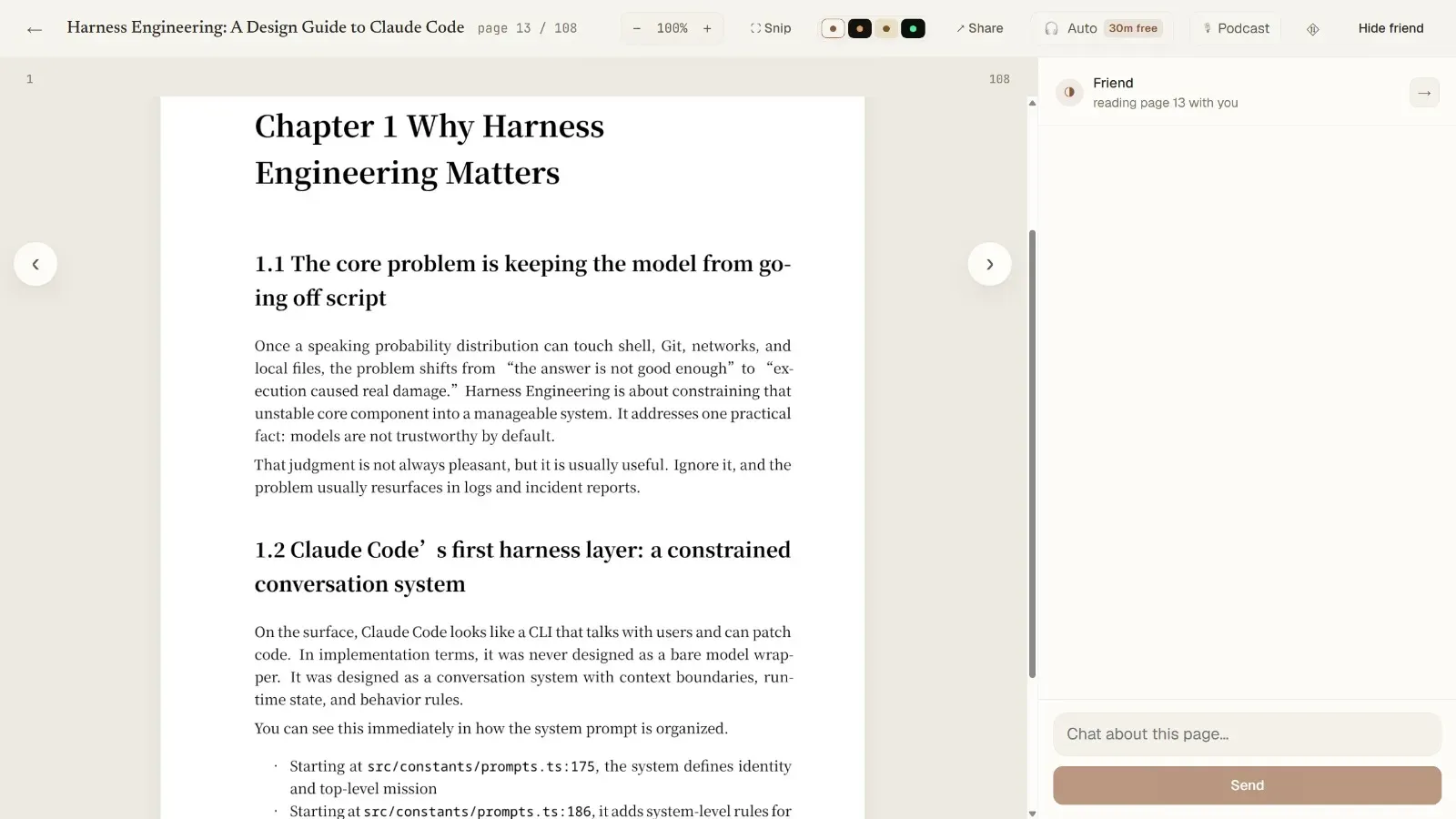
The platform renders each PDF page as an image, preserving equations, figures, and multi-column layouts, and then uses a vision model to read the page exactly as the user sees it. This approach avoids the common pitfalls of text extraction from PDFs, such as garbled math or missing formatting. The core interaction is a back-and-forth dialogue: the AI explains the current page, the user responds by typing or speaking, and the AI provides feedback or asks follow-up questions. This loop is designed to ensure active engagement rather than passive consumption.
aipdfreader offers two modes: Tutor mode, which quizzes the user and marks pages as understood, and Buddy mode, which reads and discusses each page without quizzing, suitable for leisurely reading or language learning. The product is currently in early access with a free tier of 50 pages and a subscription model for unlimited use.
Key Features
Page-by-Page AI Tutoring: The AI reads the actual rendered page image and provides a plain-language explanation of the content. It does not generate a summary of the entire document but instead focuses on the current page, allowing users to progress at their own pace. The AI can answer questions about specific symbols, equations, or paragraphs, and it remembers what the user has understood to circle back later.
Full-Duplex Voice Interaction: Users can speak their responses and questions using voice input, and the AI responds audibly. The system supports interruption and natural conversation flow, making it possible to think out loud while reading. This feature is particularly useful for hands-free reading or for users who prefer verbal explanation over typing.
Snipping Tool for Specific Regions: Users can draw a box around any part of the page, such as an equation, figure, or footnote, and ask the AI to explain just that region. This granular control allows for targeted clarification without losing context.
Autoplay Walkthrough: For users who want to be guided through a document without active participation, the autoplay mode reads each page aloud and moves to the next automatically. This is useful for initial overviews or when the user simply wants to listen.
Multiple Reading Themes: The interface supports light, dark, sepia, and a green-on-black terminal mode, catering to different reading preferences and reducing eye strain during long sessions.
Progress Tracking: The AI keeps track of which pages the user has understood (marked as "good" or "skip") and which remain unseen. This visual progress bar helps users monitor their advancement through the document.
No Setup Required: Users do not need to configure API keys or manage AI models. The platform handles all backend processing, making it as simple as signing up and uploading a PDF.
How It Works
The user journey begins by signing up for a free account, which requires no credit card. After logging in, the user uploads a PDF document. The platform renders each page as a high-resolution image, preserving all visual elements including math notation, figures, and tables.
Once a document is loaded, the user starts reading page by page. The AI, referred to as "Friend," reads the current page and provides a friendly explanation. The user can then respond by typing or speaking. In Tutor mode, the AI asks questions to check understanding; if the user answers correctly, the page is marked as understood. In Buddy mode, the AI simply discusses the page without quizzing.
Users can ask follow-up questions at any time, drill deeper into specific concepts, or use the snipping tool to select a region for focused explanation. The AI maintains context across pages, so it can reference earlier content. The interface includes a progress bar showing which pages are completed, skipped, or still unseen. Users can also jump to any page using the navigation.
For those who prefer a passive experience, the autoplay feature reads through the document hands-free. The entire experience is designed to be calm and pressure-free, with the AI acting as a patient companion rather than a strict evaluator.
Use Cases
Graduate Student Studying Machine Learning Papers: A PhD student working through a paper on flow matching can upload the PDF and use Tutor mode to ensure they understand each equation. The AI can explain the derivation of equation (7) and ask the student to explain it back, reinforcing learning.
Professional Reading Legal Contracts: A lawyer reviewing a dense contract can use Buddy mode to have the AI explain each clause in plain language. The snipping tool allows focusing on specific paragraphs or definitions, and voice interaction enables hands-free review.
Language Learner Reading Foreign Textbooks: A student learning a new language can upload a textbook in that language and use Buddy mode to have the AI translate and explain each page. The AI can also discuss cultural context or grammar points.
Researcher Keeping Up with Literature: A researcher with a backlog of papers can use autoplay mode to quickly get through multiple papers, listening to explanations while multitasking. The progress tracking helps manage reading lists.
Undergraduate Studying for Exams: A student preparing for a final exam can upload course notes or textbook chapters and use Tutor mode to test their knowledge. The AI can identify weak areas and revisit them.
Pricing & Value
aipdfreader offers a free tier that includes the first 50 pages with no credit card required. After that, users must subscribe to continue reading. The exact subscription pricing is not publicly listed on the website, but the product emphasizes that it is a simple subscription with no per-token fees or API keys to manage. The platform runs and funds the AI models behind the scenes, so users do not incur additional costs.
For users who regularly need to understand complex documents, the value proposition is strong: instead of spending hours struggling through dense material, aipdfreader can reduce comprehension time and improve retention. The free tier allows users to test the product thoroughly before committing. However, the lack of transparent pricing may be a barrier for some potential customers. The product is currently in early access, so pricing may evolve.
Final Verdict
aipdfreader is a thoughtfully designed tool that addresses a genuine pain point: the difficulty of reading and understanding dense PDFs alone. Its page-by-page approach, combined with interactive dialogue and voice support, sets it apart from passive summarization tools. The use of vision models to read rendered pages ensures accurate handling of complex layouts and math.
The product excels in educational and professional contexts where deep comprehension is required. The free tier is generous enough to evaluate its effectiveness. However, the lack of transparent pricing and the early-stage nature of the product may give some users pause. Additionally, the reliance on AI vision models means that very poor quality scans or handwritten notes may not be handled well.
Overall, aipdfreader is a promising tool for anyone who needs to truly understand difficult documents. It is best suited for students, researchers, and professionals who value active learning over passive consumption. For those who simply need quick summaries, other tools may be more appropriate. But for those who want to read with a friend, aipdfreader delivers on its promise.
Pros & Cons
The Good
- Page-by-page AI tutoring with vision-based reading preserves equations and figures accurately.
- Full-duplex voice interaction allows hands-free reading and natural conversation.
- Snipping tool enables targeted questions on specific regions of a page.
- Two modes (Tutor and Buddy) cater to both active learning and casual reading.
- No API keys or setup required; the platform manages all AI models.
The Bad
- Pricing is not transparently displayed on the website, requiring users to sign up to see costs.
- The product is in early access, so features and stability may change.
- Relies on AI vision models, which may struggle with poor quality scans or handwritten documents.