xyOps
xyOps is a next-generation open source workflow automation system with job scheduling, monitoring, alerting, and ticketing built in for DevOps teams.

Overview
xyOps is a next-generation open source workflow automation system designed to orchestrate entire infrastructure fleets. It combines job scheduling, server monitoring, smart alerting, and an integrated ticketing system into a single platform. Built for DevOps teams, system administrators, and IT operations, xyOps replaces the need for multiple disparate tools by offering a unified solution that is both developer-friendly and scalable. The platform is 100% free and open source under the BSD 3-Clause license, with optional paid support plans for professional and enterprise users.
Key Features
-
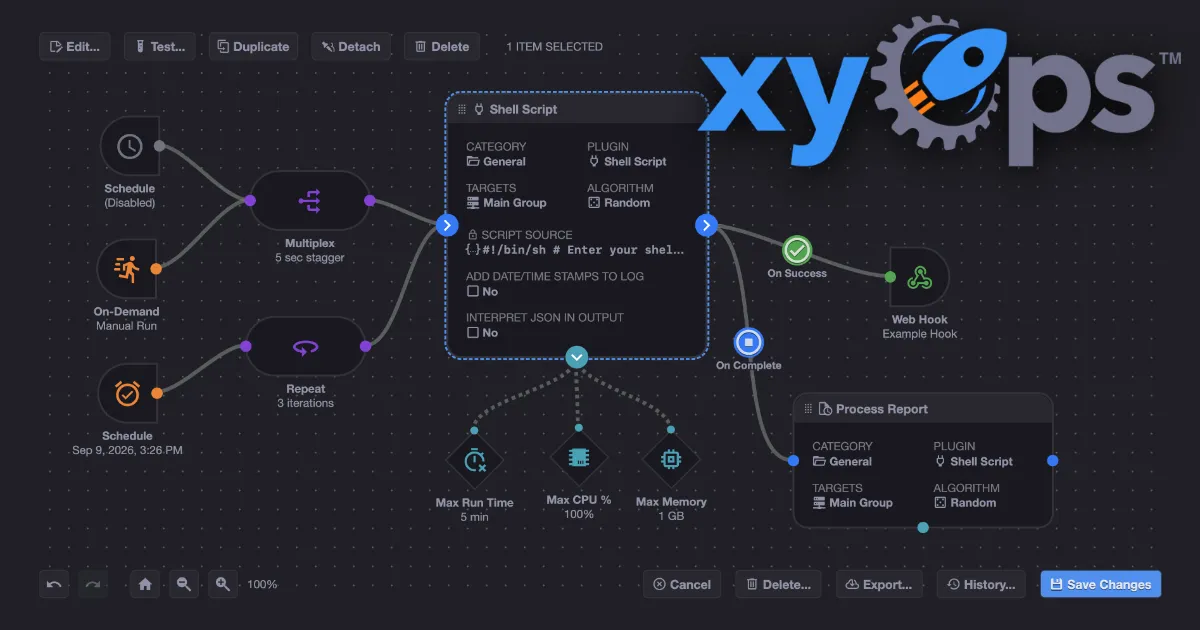
Visual Workflow Builder: xyOps includes a graphical workflow editor that allows users to chain multiple jobs with conditional logic. Data and files can be passed between workflow steps, and actions such as notifications or webhooks can be assigned to events. Limiters like timeouts, memory caps, and log size caps can be attached to each step. Jobs can run in parallel or be placed in custom queues.
-
Flexible Job Scheduler: The scheduler goes far beyond traditional cron. Users can target individual servers or groups, set multiple schedules per event, define blackout ranges for holidays or downtime, and import existing crontabs. One-time jobs (single-shot) are supported, and plugin-based scheduler extensions allow for custom scheduling logic.
-
Active Job Tracking: Real-time progress updates with time remaining are displayed for every running job. Users can set maximum parallel limits and queue up the rest. CPU and memory usage limits can be enforced per job, and jobs can emit their own progress and stats. Custom actions can be triggered based on job results.
-
Server Monitoring: xyOps provides server and group-level dashboards with historical performance graphs ranging from hourly to yearly. Users can add custom monitors and alerts, track CPU, memory, network, disk, and log usage per job, and run custom commands to grab custom metrics.
-
Smart Alerts: Alerting is highly customizable with trigger expressions and flexible rules. Notifications can be sent via email, webhook, or custom channels. Each alert includes a snapshot of the server at the time of the alert. Alerts can automatically create tickets or run jobs, and active alerts can prevent new jobs from launching.
-
Integrated Ticketing System: A built-in ticketing system supports incident response workflows. Alerts and failed jobs can automatically create tickets. Tickets can attach files and run jobs for CI/CD systems. The entire system is scriptable via API.
-
Plugin Marketplace: xyOps supports plugins written in any language using a simple JSON over STDIO Plugin API. No SDK is required. Users can define custom parameters with UI form fields. The marketplace offers both official and community plugins, including integrations with Atlassian, AWS S3, Discord, GitHub, Google Sheets, Linear, Notion, OpenAI, Slack, Telegram, and more.
-
Scalability and Redundancy: The platform supports multiple hot backups that can take over on power loss without interrupting jobs. It scales to thousands of worker servers in a cluster. Servers can be grouped manually or automatically based on hostname. Agents can be installed on macOS, Linux, and Windows.
How It Works
After installing the xyOps server (self-hosted), users access the web-based dashboard. The first step is to add servers by installing the xyOps agent on each machine. Agents communicate with the server over a secure connection. Users then create workflows using the visual editor, dragging and dropping triggers, actions, and monitors. Jobs can be scheduled using the flexible scheduler or triggered by events. The dashboard provides real-time visibility into job execution, server health, and alerts. When an alert fires, it can automatically create a ticket in the integrated ticketing system. The entire platform is managed through a single interface, eliminating the need to switch between multiple tools.
Use Cases
-
A DevOps engineer at a mid-size SaaS company needs to schedule database backups across 50 servers, monitor disk usage, and get alerted if any backup fails. With xyOps, they can create a workflow that runs the backup job, monitors disk space, and sends a Slack notification on failure, all within one platform.
-
An IT operations manager at an e-commerce company wants to automate server patching across a fleet of 200 servers. They can use xyOps to schedule patching jobs, monitor CPU and memory during the process, and automatically create a ticket if a server goes offline.
-
A solo founder running a B2B SaaS needs a simple way to run cron jobs, monitor uptime, and get alerts without paying for multiple services. xyOps provides all of this for free, with a simple setup that takes minutes.
-
A platform engineering team building internal developer tools can use xyOps as the orchestration layer for CI/CD pipelines. The ticketing system can be used to track deployment requests, and the plugin API allows custom integrations with internal tools.
Who It's For
xyOps is designed for DevOps engineers, system administrators, SREs, and IT operations teams who manage server fleets of any size. It is particularly well-suited for organizations that want to consolidate job scheduling, monitoring, alerting, and ticketing into a single open source platform. Compared to tools like Jenkins (focused on CI/CD), Nagios (focused on monitoring), and Jira (focused on ticketing), xyOps offers a unified solution with a visual workflow builder and a plugin marketplace. The BSD license makes it attractive for companies that need maximum flexibility without licensing restrictions. The free tier includes all features, making it accessible to individuals and small teams, while paid support plans cater to professional and enterprise users who require guaranteed response times and SSO support.
Pros & Cons
The Good
- All core features including job scheduling, monitoring, alerting, and ticketing are available in the free open source version.
- The visual workflow builder allows chaining jobs with conditional logic and passing data between steps.
- Supports plugins written in any language via a simple JSON over STDIO API, with a growing marketplace of integrations.
- Scalable architecture supports thousands of worker servers with hot backup failover and no job interruption.
- BSD 3-Clause license ensures the software remains free and open source forever with no restrictive terms.
The Bad
- Self-hosted installation requires technical expertise to set up and maintain the server infrastructure.
- The platform is relatively new with a smaller community compared to established tools like Jenkins or Nagios.
- Paid support plans are required for features like SSO, air-gapped installation, and guaranteed ticket response times.