shadcn/ui Pro
shadcn/ui Pro bundles 439 React blocks, a 1:1 Figma kit, 18 themes, an MCP server and 10 Agent Skills for Cursor and Claude Code, from $9 per month.
Overview
shadcn/ui Pro is a paid commercial layer built on top of shadcn/ui, the open-source React component collection that pairs Tailwind CSS with accessible primitives. Where the free library stops at individual components such as buttons, dialogs and data tables, this product supplies the assembled output: 439 prebuilt sections and app screens, a Figma kit covering all 56 shadcn/ui components, 18 curated themes with a live builder, an MCP server and 10 Agent Skills for AI coding editors. The vendor is Shadcn Sp. z o.o., and the product has attracted more than 13,000 designers and developers according to its own customer count.
The problem it addresses is a gap familiar to anyone who has shipped with shadcn/ui. Components arrive as source files that get copied into a project, which is excellent for ownership and terrible for assembly speed. Every marketing hero, pricing table, checkout flow and settings dashboard still has to be composed, styled for light and dark mode, made responsive and kept consistent with the design file. shadcn/ui Pro sells that assembly work as a registry of finished blocks installed through the shadcn CLI, so the code lands in the repository as ordinary React and Tailwind source with no runtime package and no license check.
Market position matters here. The product is not competing with free community kits on price, and it is not a component library in the traditional npm sense. It occupies the space between a design system and a template marketplace, with an unusual emphasis on parity: designers work in a Figma file that mirrors the code, developers install the matching block, and AI agents in Cursor, Claude Code or VS Code can search the same catalogue through the Model Context Protocol. That three-way alignment, rather than raw component count, is the actual proposition.
Key Features
439 blocks across 61 categories installed by CLI. The catalogue spans marketing sections such as hero, pricing, testimonials, FAQ and footer, application screens such as AI chat, command menu, dashboard, dialogs, onboarding, sidebar and sign-up, and ecommerce surfaces such as checkout, filters, product details and order summary. Each block installs with a single command, for example npx shadcn@latest add @shadcnpro/pricing-01, and arrives as editable source rather than a compiled dependency. Responsiveness, accessibility, light and dark variants and theme tokens are handled by the block itself.
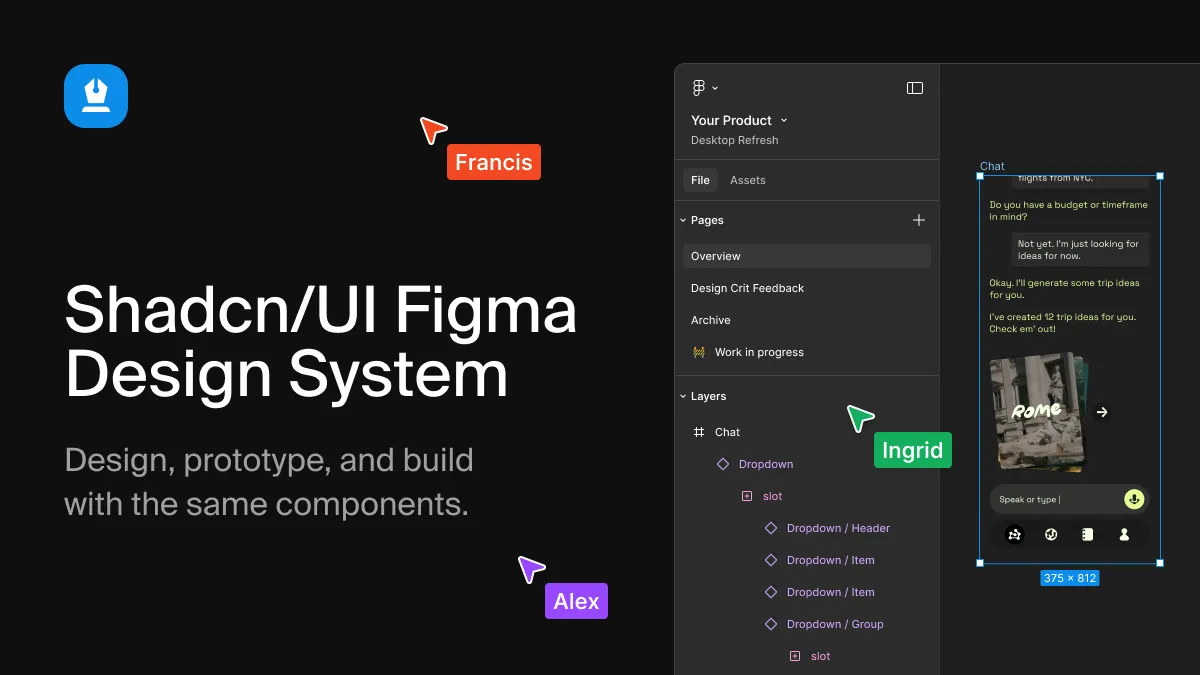
A Figma kit that matches the code one to one. The design file carries 56 components with every variant, size and state, built on variables, auto layout and Figma Slots rather than older workarounds. It includes light and dark modes, eight styles and five icon libraries. The parity claim is the point: a designer picking a button variant in Figma is picking the same variant the developer will install, which removes the usual translation step and the drift that follows it.
18 curated themes plus a live builder. Themes can be applied from a ready-made set or shaped in a browser-based builder that exposes base colour, radius and other tokens, then exported as CSS or installed with a CLI command. A split view compares stock shadcn/ui against a branded variant in real time. Because every theme works with every block and with the Figma kit, brand changes propagate rather than fragmenting the catalogue.
MCP server covering 20 AI clients. The Model Context Protocol integration lets an agent search 439 blocks, plan a page and install the real code with the correct commands, themes and Figma references. Setup is a single claude mcp add style command with a license key header. Documented clients include Claude Code, Cursor, VS Code, Gemini CLI, Windsurf, Codex and others, and the agent returns block identifiers rather than inventing markup.
10 Agent Skills for Figma-to-code work. The skills package teaches an AI editor whole jobs rather than snippets: generating a React component from a Figma frame, importing Figma variables into a global stylesheet, designing screens inside Figma using the kit, creating a full page from blocks with shared navigation and footers, and applying a brand across a project. Install runs through the shadcn CLI. The skills are designed to check both light and dark mode as part of the workflow.
Owned source with no runtime dependency. Installed blocks live in the repository as files that can be edited, refactored or deleted. There is no runtime package, no license check inside the application and no lock-in at deployment. Access to updates requires an active plan, but code already installed continues to work if a subscription lapses, which is a meaningful distinction from hosted builder products.
Support for Radix UI, Base UI and React Aria. The block catalogue is documented as compatible with three different underlying primitives libraries, alongside React and Tailwind CSS as the framework layer. That gives teams an escape hatch if they have standardised on Base UI or React Aria rather than Radix, a flexibility most shadcn-adjacent kits do not offer.
How It Works
The journey starts with a free trial rather than a download. Monthly and yearly plans open with a seven day trial that requires a card at checkout but charges nothing until the period ends. Access to the block registry, the MCP server and the skills package is immediate; the Figma kit is the one resource deliberately held back until the first payment clears, a policy the vendor states openly.
On the project side, the requirement is an existing shadcn/ui setup, meaning a components.json file at the repository root. Projects without one run npx shadcn@latest init first. Connecting a project to the Pro registry is a one-time configuration described in the installation documentation. From there, adding a block follows the same pattern as adding a stock shadcn component, with a scoped name such as @shadcnpro/pricing-01.
The third step is optional but increasingly central: wiring an AI agent. Adding the MCP server to Claude Code, Cursor or another supported client takes one command with a license key as a bearer header. Once connected, a request in natural language, such as asking for a three-tier pricing section, produces a search across the catalogue, a plan, and then a real install that writes a file into the project. The agent is not generating markup from a prompt; it is resolving a request to a maintained block.
Daily use settles into a rhythm. Designers build screens in the Figma kit using the same component names as the code. Developers install matching blocks and adjust copy and data. Teams using Agent Skills can hand a Figma frame or a page brief to the editor and let it assemble the result, then review the diff. Because everything is plain React and Tailwind, the review process is identical to reviewing hand-written code.
Use Cases
A freelance developer building a client landing page can start from the marketing category and install a hero, feature grid, pricing table, testimonial row and footer in under an hour, then swap copy and brand tokens. The outcome is a production page in the client's own repository rather than a subscription-hosted site, which matters when the engagement ends.
A two-person product team shipping a SaaS dashboard can pull the application blocks: a sidebar shell, a dashboard layout with metric cards, dialogs for destructive actions and a sign-up flow. Because the blocks share theme tokens, the dashboard and the marketing site look like one product instead of two projects with different radius values and greys.
A design lead handing work to engineering can build screens inside the Figma kit and let the parity do the translation. Instead of redlining spacing and colour, the handoff becomes a component reference. Teams using Agent Skills can go further and generate the component from the frame directly, with the variables written into the global stylesheet.
An agency maintaining several client brands can lean on the theme builder and the 18 themed presets to keep a consistent structural system while varying colour, radius and typography per client. Unlimited commercial projects are included on every tier, including the entry plan, which is unusually generous for this category.
A small commerce operation can assemble a storefront from the ecommerce blocks: product list, product category, filters, product details, cart, order summary and checkout. The vendor counts 83 ecommerce blocks in total, enough to cover a standard purchase path without inventing layout.
The block catalogue itself is worth browsing before committing, since 62 blocks are installable without a plan and their code is public on the block pages.
Pricing & Value
Three monthly tiers exist: Freelancer at $9 per month for one user, Agency at $19 per month for up to five users, and Enterprise at $79 per month for unlimited users. Yearly billing drops those to $72, $144 and $588 respectively. Lifetime licences are offered as one-time payments of $99, $199 and $799. Every tier includes the full catalogue, so the difference is seats and support responsiveness rather than feature gating, which is a cleaner structure than the usual tiered feature maze.
Value depends on how the purchase is framed. At $9 per month the entry plan costs less than an hour of most freelance rates, and it replaces work that would otherwise be spent composing responsive sections and auditing dark mode. The lifetime option at $99 pays back in roughly eleven months against the monthly plan and removes renewal anxiety, which suits developers who expect to keep using shadcn/ui for years.
The honest caveat is that the Figma kit only unlocks after the first payment, so triallists cannot evaluate the design half of the system during the free week. Buyers who care mostly about the design file are effectively making a judgement call on screenshots. A comparison of the tiers lives on the pricing page for anyone weighing seats against support response times.
Final Verdict
shadcn/ui Pro is a well-scoped answer to a real friction point. The strongest argument is not the block count, although 439 sections across marketing, application and ecommerce categories is substantial. It is the alignment between the Figma kit, the installable code and the agent context. Teams that have already committed to shadcn/ui will recognise the assembly work being sold, and the CLI-first, source-owned delivery model means there is no lock-in after purchase.
There are trade-offs worth stating plainly. The product is only useful inside the shadcn/ui ecosystem, so projects on other component systems get nothing from it. The Figma kit being withheld during the trial makes the design value harder to verify up front. And the pricing tiers differ mainly by seat count, which will feel thin for a solo buyer comparing the $9 plan against generous free community alternatives, even if those alternatives lack parity, agent support and maintenance guarantees.
For freelancers building client sites, agencies maintaining multiple brands, and product teams already using Cursor or Claude Code with shadcn/ui, the bundle is easy to justify. The MCP server in particular changes the workflow rather than merely accelerating it. Designers who want a Figma file that genuinely reflects the code, without interpretation, are the audience the product was clearly built for.
Pros & Cons
The Good
- Blocks install as editable React and Tailwind source through the shadcn CLI, with no runtime package or license check left in the application.
- The Figma kit mirrors the code one to one across 56 components with every variant, size and state, built on variables, auto layout and Figma Slots.
- An MCP server lets 20 supported AI clients search 439 blocks and install real code instead of inventing markup from a prompt.
- Every pricing tier includes the full catalogue, so plans differ only by seat count and support rather than by feature gating.
- 62 of the 439 blocks are installable free without a plan, and their code is published openly on the block pages for evaluation.
The Bad
- The Figma kit only unlocks after the first payment, so the design half of the system cannot be assessed during the seven day trial.
- The product is strictly bound to the shadcn/ui ecosystem and offers little value to projects built on other component frameworks.
- Tiers differentiate almost entirely by user seats, which makes the higher plans hard to justify for small teams that do not need extra logins.