IraVoice
IraVoice offers private, on-device AI dictation for Apple Silicon Macs, turning speech into polished text or structured Markdown without cloud processing.
Overview
IraVoice is a private, on-device dictation application designed exclusively for Apple Silicon Macs running macOS 26 or later. In a market where most speech-to-text solutions rely on cloud servers to process audio, IraVoice takes a different approach by keeping everything local. The app uses Core ML speech recognition models and Apple’s on-device formatting to convert spoken language into clean text or structured Markdown briefs. It positions itself as a privacy-first alternative to services like Otter.ai or Google’s voice typing, particularly for users who handle sensitive information or simply prefer not to send their voice data across the internet. IraVoice is a one-time purchase product with a three-day free trial, no account creation required, and no subscription model. It serves two primary workflows: a straightforward dictation mode that inserts polished text into any focused text field, and a more advanced Voice-to-Spec mode that transforms spoken requirements into agent-ready specifications for AI coding assistants like Codex or Claude Code. The app is currently in version 0.7.2 and is available as a notarized download via DMG or Homebrew.
Key Features
On-Device Speech Recognition – IraVoice processes all speech locally using Core ML models that download on first use. There is no audio upload, no cloud transcript, and no telemetry back to IraVoice servers. The app respects microphone permissions and only listens when the user holds the designated shortcut key (Right Option for Dictate, Globe for Voice-to-Spec). This architecture ensures that sensitive conversations, proprietary code discussions, or personal notes never leave the Mac.
Dual Workflow Modes – The app offers two distinct interaction paths. Dictate mode focuses on producing clean, punctuation-rich text that can be inserted directly into emails, documents, or notes. Voice-to-Spec mode captures spoken requirements and formats them into structured Markdown outline, suitable for use as prompts for AI coding agents. Users can switch between modes with a simple toggle in the app interface.
Apple Intelligence Integration – For polished formatting, IraVoice relies on Apple’s on-device formatting model, available when Apple Intelligence is enabled on the Mac. This provides features like filler word removal, capitalization, punctuation, and paragraph breaks. Without Apple Intelligence, the app falls back to raw transcription, which still captures words accurately but lacks formatting refinement.
Zero Account System – The app does not require any user account or registration to operate. License activation is handled via Gumroad, with the license key stored in the Mac Keychain. There is no product telemetry, no usage tracking, and no cloud transcript history. This stands in stark contrast to many competitors that require account creation and store transcripts on their servers.
One-Time Purchase Pricing – IraVoice is priced at $50 for a perpetual license. This is a single payment with no subscription fees or recurring charges. A three-day free trial is available without requiring a credit card or account, allowing users to evaluate every feature before committing. The purchase is backed by a 30-day refund guarantee through Gumroad.
Published Performance Benchmarks – The developer provides transparent, auditable performance data. A published benchmark on an undisclosed Mac shows a 1.98% Word Error Rate (WER) using Apple’s SpeechAnalyzer and 4.28% WER using whisper.cpp small.en model. The results include checksums, raw clip outputs, and a public verifier for reproducibility. While not a universal ranking, this transparency is rare among dictation tools.
Direct Agent Handoff – Voice-to-Spec can optionally route the generated Markdown specification directly to AI coding agents such as OpenAI Codex or Anthropic’s Claude Code. This handoff is explicit and visible in a Terminal session. The app sends only the finished specification, not the raw audio or any intermediate text. Users who prefer full control can keep the specification in the focused app for manual pasting.
How It Works
The user journey begins with downloading the notarized DMG from IraVoice’s website or installing via Homebrew (brew install --cask mvplab-ai/tap/iravoice). After dragging the app to the Applications folder and opening it, macOS prompts for Microphone and Accessibility permissions. Granting these is necessary for the app to capture audio and insert text into other applications.
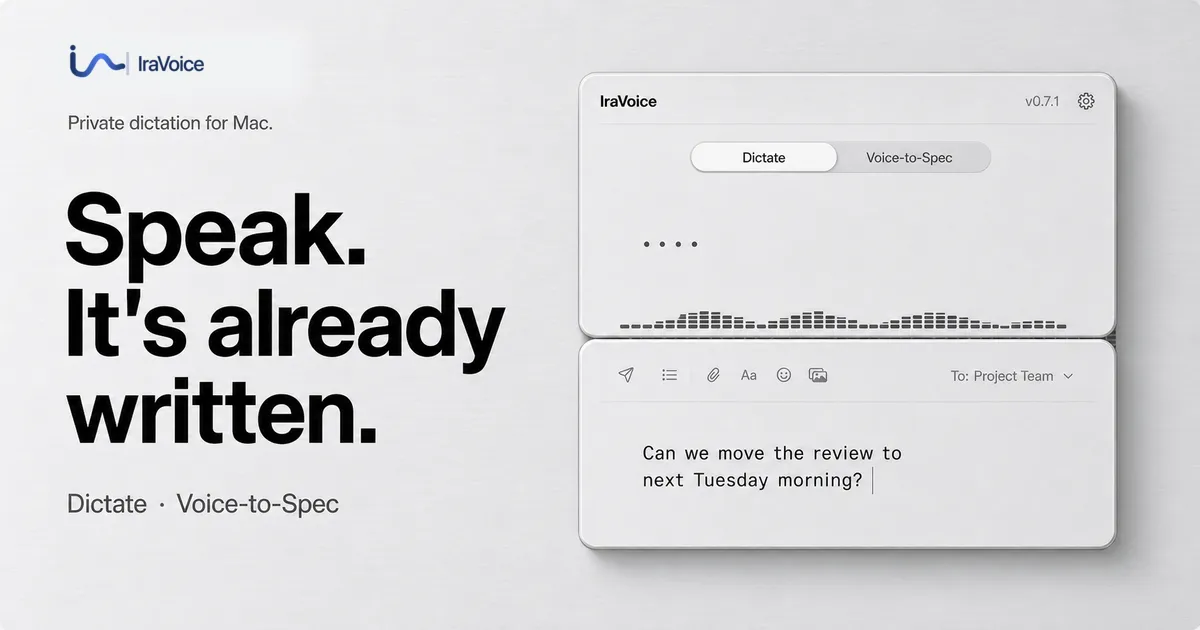
On first launch, IraVoice downloads the speech recognition models (a one-time process). The app interface shows a simple toolbar with a toggle between Dictate and Voice-to-Spec modes, and a visual input level meter. To begin dictating, the user places the cursor in any editable text field (e.g., Mail, Notes, VS Code) and holds the Right Option key. As the user speaks, transcribed text appears in real time in the app window. Upon releasing the key, the finished text is inserted at the cursor location. The app removes filler words like “um” and “like” and adds appropriate punctuation.
For Voice-to-Spec, the user holds the Globe key. Instead of raw text, the app listens for structured requirements and outputs a formatted Markdown brief. This can be used within the focused application or handed off to an AI agent. The handoff option must be explicitly chosen each time, and the Terminal session is visible throughout. IraVoice does not automatically send data to any third party without user action.
License activation is straightforward. After the three-day trial expires, the user can purchase a license key from the IraVoice website via Gumroad. The key is entered in the app and verified once. After verification, the app continues to work indefinitely. The license is stored in the Mac Keychain and is tied to the machine.
Use Cases
Publishing and Media Professionals – A journalist needing to transcribe interview notes quickly can use Dictate mode to speak directly into a text editor. The on-device processing ensures that interview content remains confidential, which is critical when sources request anonymity. The low WER reduces post-transcription cleanup time.
Software Developers – A developer brainstorming a new feature can use Voice-to-Spec to verbally outline requirements, edge cases, and acceptance criteria. The resulting Markdown can be pasted directly into an issue tracker or handed off to Claude Code for generating boilerplate code. This speeds up the early planning phase without breaking focus.
Remote Workers – Someone composing emails or Slack messages while working from home can dictate hands-free. IraVoice’s ability to insert text directly into the active field minimizes context switching. The privacy guarantee means personal or proprietary business discussions are not recorded on external servers.
Security-Conscious Users – Analysts or legal professionals who handle sensitive data can use IraVoice without fear of audio leaks. The app’s lack of telemetry and account system means no metadata is generated. The published privacy matrix allows users to independently verify the app’s data flows against other dictation tools.
AI Power Users – Those who frequently use AI coding agents can streamline the prompt creation process by speaking their instructions. Voice-to-Spec structures the input in a way that agents understand, reducing the back-and-forth needed to clarify ambiguous requirements. The direct handoff, when used, saves a copy-paste step.
Pricing & Value
IraVoice is priced at a flat $50 one-time payment, which includes all current and future updates for the licensed version. This is significantly lower than subscription-based competitors like Otter.ai (starting at $16.99/month) or Dragon Professional (over $300 one-time). The three-day free trial is generous by industry standards—many competitors offer only 14-day trials but require registration and credit card. The fact that IraVoice requires no account and no card for the trial lowers the barrier to entry.
For developers who only need basic dictation occasionally, or for professionals who value privacy, the $50 price point is compelling. However, users with older Intel Macs or those not running macOS 26 cannot use the app at all, which limits the addressable market. Additionally, the reliance on Apple Intelligence for formatting means that users who disable this feature will get only raw transcription. Overall, IraVoice offers excellent value for its target audience: Apple Silicon Mac users who prioritize privacy and want a no-nonsense dictation tool without ongoing costs.
Final Verdict
IraVoice excels in its niche: private, on-device dictation for Apple Silicon Macs. Its dual-mode approach covers both general text input and developer-specific spec generation, and the transparency around performance and privacy is commendable. The lack of telemetry, account system, and cloud storage aligns with the growing demand for local-first software. The $50 one-time price is fair and competitive against subscription alternatives.
That said, the app is limited by platform restrictions—Intel Macs are left out, and macOS 26 is a high bar. The formatting quality depends on Apple Intelligence, which may not be available in all regions or to all users. Voice-to-Spec is a powerful feature but requires some familiarity with AI agent workflows to use effectively. For the right user, however, IraVoice is a polished, respectful tool that puts control back in the hands of the customer.
The website provides extensive guides for getting started and a privacy page detailing data flows. Users can also explore the dictation speed test to compare performance. For anyone seeking a truly private dictation solution on modern Macs, IraVoice is a strong contender.
Pros & Cons
The Good
- On-device speech recognition ensures audio and transcripts never leave the Mac, offering strong privacy.
- Dual workflow modes: Dictate for polished text and Voice-to-Spec for structured Markdown briefs for AI agents.
- Low word error rate (1.98% with Apple SpeechAnalyzer) per published benchmarks.
- Simple one-time purchase pricing ($50) with a 3-day free trial, no subscription or account required.
- Supports both everyday writing and developer-specific tasks like creating agent-ready specifications.
The Bad
- Limited to Apple Silicon Macs running macOS 26 or later, excluding older Intel Macs.
- Requires Apple Intelligence for polished formatting; basic dictation falls back to unformatted transcripts without it.
- Voice-to-Spec direct handoff to Codex or Claude Code is opt-in but may raise privacy concerns for users sensitive to third-party agent terms.