HuddleMate
HuddleMate is a real-time AI meeting assistant that listens to calls and surfaces instant, personalized answers for interviews, sales calls, and meetings.
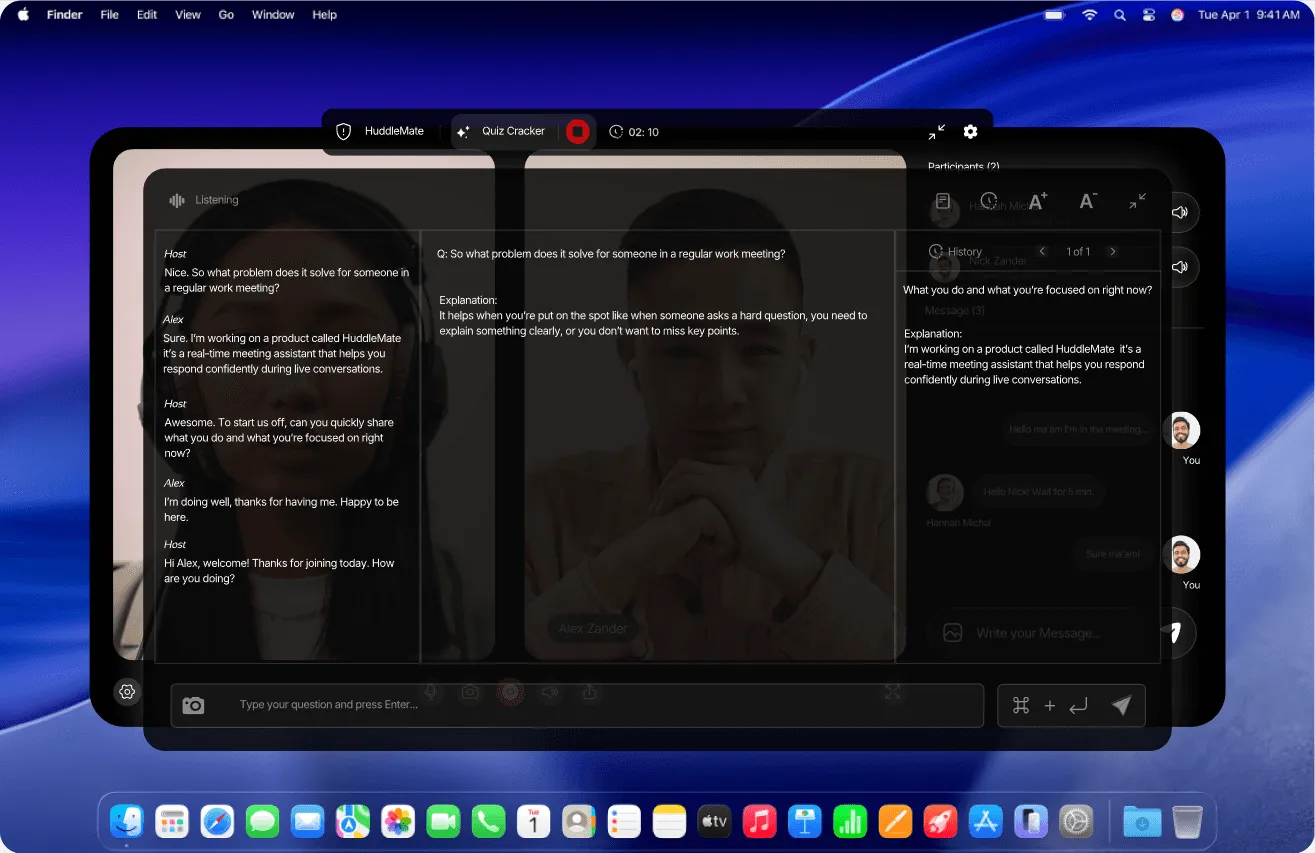
Overview
HuddleMate is a real-time AI assistant built to support people during live conversations, with a primary focus on job interviews, sales calls, and team meetings. The product listens to call audio, analyzes the user's screen when permission is granted, and produces suggested responses that appear on the display within seconds. Rather than functioning as a post-call summarizer or a passive note-taking tool, HuddleMate positions itself as an in-the-moment copilot that helps users answer difficult questions without long pauses or visible preparation.
The platform serves anyone who regularly faces high-stakes verbal exchanges, including job candidates, sales representatives, recruiters, consultants, and remote workers who want to stay composed during unpredictable discussion. It runs privately on the user's device, does not join calls as a visible participant, and stays hidden during screen sharing. HuddleMate offers a free tier with five free minutes per hour, alongside a usage-based paid package priced at $9.99 per hour of active assist time.
Key Features
- Real-time transcription and listening — HuddleMate processes the full conversation as it happens instead of waiting for a meeting to end. It captures both the user's own answers and the follow-up questions that arrive afterward, sustaining context across an entire session.
- Instant on-screen responses — Generated replies appear on the user's display within seconds and are formatted for speaking out loud. The mechanism is designed to eliminate the awkward silence that follows an unanticipated question.
- Screen analysis — Beyond audio, HuddleMate can read the user's screen to interpret shared documents, code, dashboards, or slide content, then factor that visual context into its suggestions.
- Multiple response formats — Users can switch between output styles depending on the situation. A short mode delivers a concise reply, while structured frameworks such as STAR (Situation, Task, Action, Result) generate longer narrative responses suited to behavioral interviews.
- Custom knowledge support — Documents such as resumes, job descriptions, product briefs, and talking points can be uploaded so that answers reference the user's actual background and specifics rather than generic templates.
- Invisible operation — The assistant does not appear as a bot or participant in the call and remains hidden when a screen is shared. Meeting apps continue to register only the user, which removes detection risk.
- Usage-based pricing — Instead of a flat monthly subscription, HuddleMate charges only for active assist minutes. Purchased minute balances do not expire, and a free allowance of five minutes per hour lets new users test the product without a credit card.
- Broad platform coverage — The company states that HuddleMate works across all major meeting applications and offers a mobile version for calls held away from a desktop.
How It Works
Setup follows a short three-step path. The user first selects a copilot profile based on the type of meeting, choosing between interview, trivia, or a custom assistant. Each profile changes how answers are structured, so an interview profile prioritizes professional framing while a trivia profile optimizes for fast, direct facts.
Second, the user uploads background material. A resume, job description, set of product notes, or any reference document can be added to the knowledge base. The assistant then draws on this material so that responses reflect the user's own experience and figures instead of generic phrasing.
Third, the user starts the session and joins the meeting through whatever platform is being used. HuddleMate listens in the background, keeps a running transcript, and surfaces suggested answers whenever a question is detected. Response formats can be switched mid-conversation if a shorter or longer style is needed. Minutes are consumed only while the assistant is actively engaged, which keeps unused time off the bill.
Use Cases
Job interviews form the primary scenario. A candidate preparing for a behavioral round can load a resume and the target job description, then rely on STAR output when asked about conflict resolution or a past failure. When an unexpected question lands, the candidate sees a structured outline within seconds and answers without freezing.
Sales calls represent a second core audience. A representative handling a pricing objection or a competitor comparison can receive a calm, direct suggested reply while the prospect is still speaking, which helps maintain conversational momentum and reduces the risk of a stalled deal.
Team meetings and internal reviews suit users who must recall figures or project details on demand. If a manager asks for a specific metric that was prepared days earlier, the assistant can surface it from the uploaded documents rather than forcing a search through notes.
Technical and coding sessions use the screen analysis capability. When shared code or a dashboard is visible, the assistant can interpret the on-screen content and generate an explanation or fix suggestion grounded in what both parties are viewing.
Trivia and casual competition appear as a lighter use case, where fast factual recall matters more than structured narrative.
Who It's For
HuddleMate targets professionals whose work depends on answering well in the moment: job seekers, sales and customer-facing teams, recruiters, consultants, and remote employees in interview-heavy or pitch-heavy roles. It also suits teams that want to avoid recurring subscription costs, since the pay-per-minute model scales with actual usage. Alternatives such as Final Round AI, Cluely, Parakeet AI, and Verve AI occupy the same space, but HuddleMate differentiates through screen awareness, invisible operation, and a no-expiry credit system. The main trade-off is that the product depends on real-time audio capture, so users in noisy environments or on restricted corporate networks may see reduced accuracy.
Pros & Cons
The Good
- Real-time answer generation surfaces suggested responses on screen within seconds of a question being asked.
- Screen analysis reads shared documents, code, and dashboards to ground replies in visible context.
- Fully invisible operation with no bot participant and no overlay appearing during screen sharing.
- Usage-based pricing at $9.99 per hour with non-expiring minutes and a free five-minute-per-hour allowance.
- Multiple response formats, including short mode and structured STAR templates, can be switched within a single session.
The Bad
- Accuracy depends on real-time audio capture, so crowded or noisy environments can reduce the reliability of suggested answers.
- Assistance relies on consistent microphone and network access, which may conflict with locked-down corporate devices.
- The free tier is capped at five minutes per hour, so evaluating the product on longer calls requires purchasing credits.