ButterKit
ButterKit is a macOS App Store screenshot studio that lets developers capture from Xcode, frame in 3D, auto-translate, and bulk-export screenshots for all 50 App Store languages.
Overview
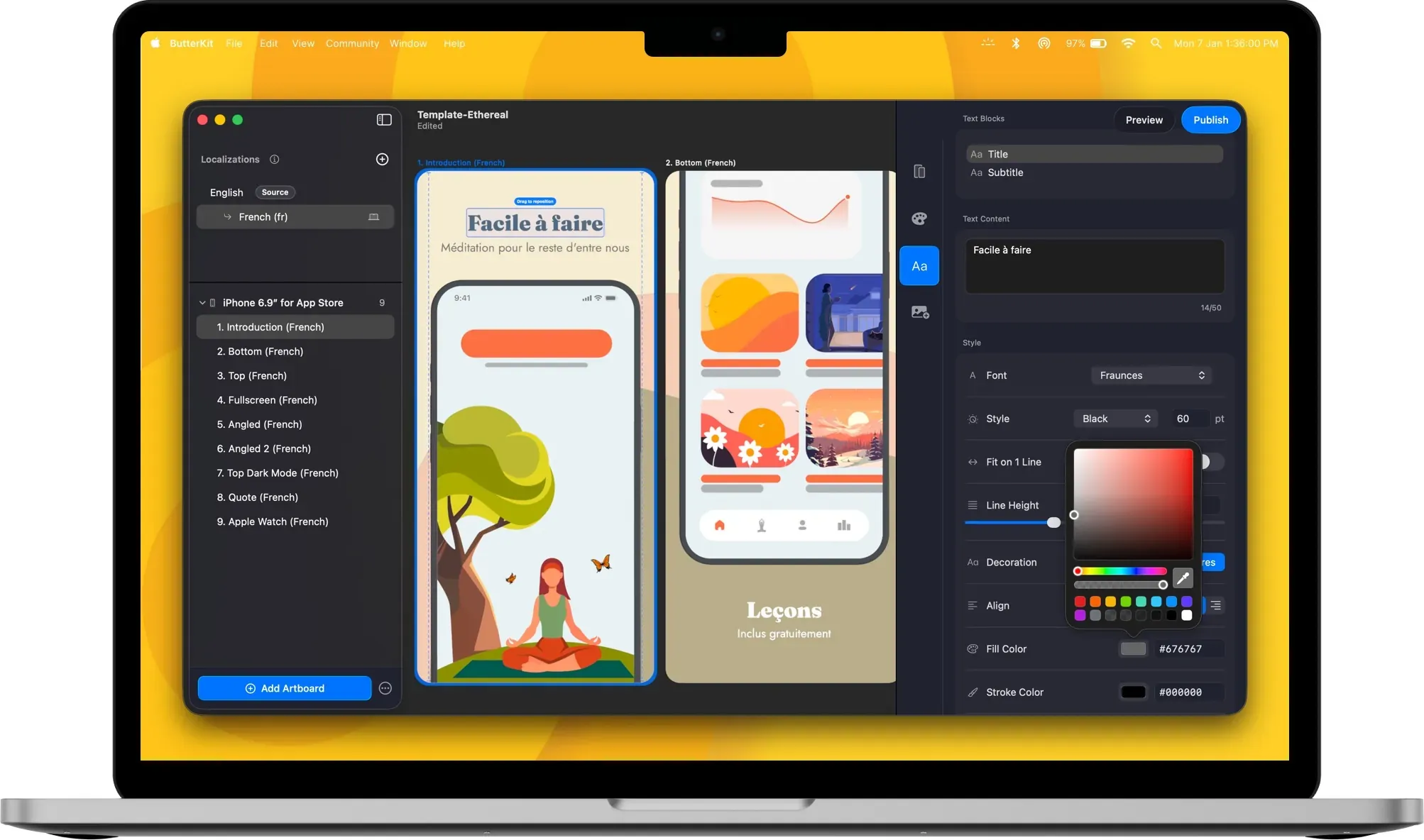
ButterKit is a macOS-native App Store screenshot studio designed to streamline the entire process of creating, localizing, and publishing app store screenshots. Built by design engineer Zach Spitulski, this tool addresses the pain point of manually producing polished screenshots for multiple devices and languages. It integrates directly with Xcode Simulator, supports Fastlane folder linking, and offers real 3D device mockups rendered on Metal for up to 120fps performance. The primary audience includes indie developers, design studios, and marketing agencies who need to produce high-conversion screenshots efficiently.
Key Features
- Capture from Xcode Simulator: ButterKit integrates directly with Xcode and Simulator to capture screenshots with one click. This eliminates the need for manual screenshotting and file management, allowing rapid iteration to achieve the desired design.
- Link Fastlane or Image Folders: Users can link an entire folder of images, such as those generated by Fastlane or Xcode UI tests. ButterKit automatically updates designs when new captures are added, making it ideal for automated workflows.
- Real 3D Device Mockups: Screenshots can be placed onto photorealistic 3D devices that are fully adjustable. The rendering engine is built on Metal, providing smooth editing at up to 120fps. Users can span devices across multiple artboards and create seamless panoramic backgrounds.
- Pro Editing Tools: The app includes professional design tools such as font, gradient, and background editing controls. Users can stylize screenshots with templates from a growing marketplace or create custom designs from scratch.
- Instant Translation: ButterKit offers two translation engines. On-device translation supports 18 languages offline with no API key required. Cloud translation (Pro feature) covers all 50 App Store languages using the user's own API key. Designs stay synced across languages.
- Upload to App Store Connect: Screenshots and translated metadata (description, what's new, promotional text) can be uploaded directly to App Store Connect via the official API. This eliminates manual browser uploads and ensures correct ordering.
- AI Agent Automation (MCP): ButterKit includes a built-in Model Context Protocol (MCP) server that allows AI coding agents like Claude Code, Cursor, and Codex to automate screenshot generation, translation, and publishing.
How It Works
After downloading ButterKit for macOS (requires macOS 15.6+ and Apple Silicon or Intel), users start by capturing or importing screenshots. They can drag and drop PNG or JPG images onto 3D devices, capture directly from Xcode Simulator, or link a Fastlane folder. The design phase involves selecting a template or building a custom layout with 3D devices, backgrounds, and text. Translation is triggered with a single click, choosing between on-device (18 languages) or cloud (50 languages) engines. Finally, users can batch export images or upload directly to App Store Connect. The entire workflow is offline-capable except for cloud translation and uploads.
Use Cases
- Indie Developer Launching a New App: A solo founder can capture screenshots from Xcode Simulator, apply a template, translate to 10 languages, and upload to App Store Connect in under an hour, significantly reducing the time spent on store listing preparation.
- Marketing Agency Managing Multiple Clients: An agency handling 20+ apps can use Fastlane integration to automate screenshot generation from UI tests, then use ButterKit's bulk translation and upload features to maintain consistent branding across all client apps.
- Design Studio Creating Custom Mockups: A design team can leverage the 3D device mockups and pro editing tools to create unique, high-conversion screenshots for clients, then export them in various resolutions for different App Store requirements.
- Enterprise Team Localizing for Global Markets: A product team at a large company can use the cloud translation engine to localize screenshots and metadata into all 50 App Store languages, ensuring a consistent global presence without manual translation work.
Who It's For
ButterKit is built for iOS, iPadOS, macOS, watchOS, and visionOS developers of all sizes, from solo indie developers to enterprise teams. It competes with tools like AppLaunchpad, AppScreens, and Helm, but differentiates itself through native macOS integration, real 3D rendering, and direct Xcode Simulator capture. The target user is technically proficient (comfortable with Xcode and Fastlane) but values design quality and efficiency. The app offers a free tier with a watermark and a Pro subscription that removes the watermark and unlocks metadata syncing. A one-time purchase option is also available.
Pros & Cons
The Good
- Direct integration with Xcode Simulator for one-click screenshot capture.
- Real 3D device mockups rendered on Metal for smooth, high-fidelity editing.
- Built-in translation engine supporting 18 languages offline and 50 languages via cloud.
- Direct upload to App Store Connect via official API, eliminating manual browser steps.
- MCP server support enables AI agent automation for screenshot generation and publishing.
The Bad
- Requires macOS 15.6+ and is limited to Apple platforms, excluding Windows and Linux users.
- Cloud translation for all 50 languages requires a Pro subscription and a separate API key.
- The free version adds a watermark to exported screenshots, which may not suit professional use.