VidLoader
VidLoader lets users download and archive video from any website, including YouTube and TikTok, as MP4 or MP3 on Mac, Windows, or Linux.
Overview
VidLoader positions itself as a universal video downloading solution for desktop users. Developed by Deluxe Technologies FZC, the application addresses a common need: saving online video content for offline access without reliance on streaming quality or internet connectivity. Unlike platform-specific downloaders that only work with YouTube or TikTok, VidLoader claims compatibility with any website, leveraging a combination of desktop software and a browser extension. This approach makes it a versatile tool for content creators, researchers, and casual users alike.
The market for video downloaders is crowded, with tools like 4K Video Downloader, yt-dlp, and cloud-based alternatives. VidLoader differentiates by emphasizing privacy (no data collection) and cross-platform support across Mac, Windows, and Linux. Its auto-monitoring feature for channels and playlists adds a layer of automation that power users appreciate. However, the lack of a mobile app limits on-the-go use, and the reliance on a desktop app may deter users seeking lightweight solutions. Overall, VidLoader targets those who need a reliable, all-in-one downloader with minimal fuss.
Key Features
Cross-Platform Desktop App
VidLoader runs natively on macOS, Windows, and Linux, providing a consistent experience across operating systems. This is a significant advantage for teams or individuals who work on multiple machines. The app is lightweight and integrates smoothly with each OS, using system-level notifications and file management.
Universal Site Support
The tool can extract video and audio from any website, not just major platforms. Whether it's a niche streaming site, educational platform, or social media feed, VidLoader parses the page to identify media sources. This eliminates the need for separate tools for different sites.
Auto-Monitor Channels and Playlists
Users can subscribe to YouTube channels or TikTok profiles, and VidLoader automatically downloads new videos as they are published. Playlist monitoring works similarly, making it ideal for archiving entire series or regular content from specific creators. The feature runs in the background without manual intervention.
Browser Extension for One-Click Downloads
A companion browser extension for Chrome (and likely other browsers) adds a download button directly on web pages. When browsing, users can click the extension icon or a floating button to instantly queue the video for download. This streamlines the workflow without needing to copy and paste URLs.
High-Quality MP4 and MP3 Output
VidLoader supports downloading in multiple resolutions, including up to 4K where available, and can extract audio in MP3 format. Users can choose quality presets before downloading. The app also offers options for subtitles and metadata embedding, though this is not fully detailed on the homepage.
Batch Downloads and Queue Management
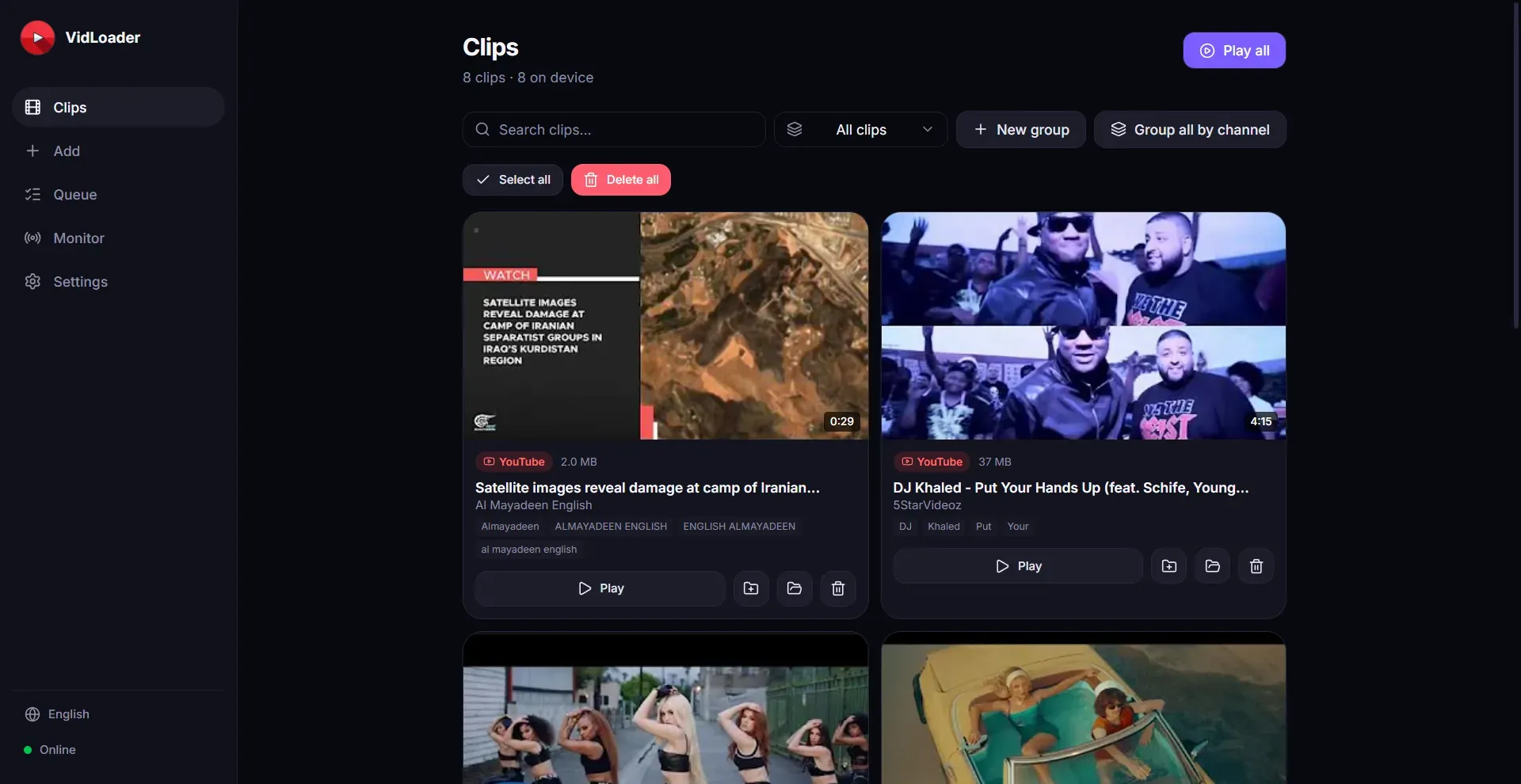
Multiple videos can be added to a download queue, and the app processes them sequentially or in parallel based on user settings. This is useful for downloading entire playlists or multiple videos from a single browsing session. The queue persists across app restarts.
Privacy-Focused and Ad-Free
VidLoader does not collect user data or display advertisements. The application operates locally on the user's machine, ensuring that downloaded content and browsing habits remain private. This is a selling point for users concerned about surveillance or data mining by free downloaders.
How It Works
Getting started with VidLoader requires downloading and installing the desktop app from the official website. The installation process is straightforward, with installer packages for each supported operating system. After launching the app, users are greeted with a clean interface featuring a URL input field and a download queue.
To download a video, users can either copy and paste a URL into the app or use the browser extension while surfing the web. The extension adds a dedicated button that, when clicked, sends the video URL to the desktop app automatically. Users then select the desired output format (MP4 or MP3) and quality. The download begins immediately, with progress shown in the queue.
For automated workflows, users can set up monitoring by pasting a channel or playlist URL and configuring how often the app checks for new content. Once configured, VidLoader runs in the background, downloading new videos as they appear. Downloaded files are saved to a user-specified folder, organized by source or date.
Daily use involves installing the extension, browsing normally, and clicking the download button when a video is needed. The app can be minimized to the system tray and will continue processing downloads. Updates are handled through the app's built-in update checker.
Use Cases
Content Creators Archiving Their Own Work
A YouTuber who uploads weekly videos can use VidLoader to automatically download each new upload as a local backup. This ensures that even if a video is taken down from the platform, the creator retains a high-quality copy. The auto-monitor feature eliminates manual download tasks.
Researchers Collecting Educational Material
A university student researching online courses can download lecture videos from multiple platforms into a single folder. The batch download and queue management allow for overnight downloading of entire playlists, saving time and ensuring offline access during travel.
Musicians Extracting Audio for Remixes
A music producer can use VidLoader to download the audio track from any video as MP3, then import it into digital audio workstation software. The high-quality output preserves fidelity, and the universal site support means tracks from obscure corners of the web are accessible.
Journalists Monitoring News Sources
A media monitor tracking political speeches or press conferences can set up monitoring on specific YouTube channels. VidLoader will automatically download new videos, which can then be transcribed or analyzed without manual intervention.
Travelers Building Offline Entertainment
Before a long flight without Wi-Fi, a traveler can use the browser extension to quickly queue up movies, shows, or vlogs from various sites. The app downloads everything to a local folder, which can be transferred to a tablet or phone for viewing.
Pricing & Value
VidLoader offers a freemium model with a free tier that includes basic downloads with limitations on quality or concurrent downloads. The exact pricing is not prominently displayed on the homepage, but typical video downloaders range from $10 to $30 for a lifetime license or $3 to $10 per month for subscriptions. Given the feature set, a fair price would be around $19.99 for a perpetual license with updates. The free tier is sufficient for occasional use, but power users will need to upgrade for 4K support and unlimited monitoring. Competitors like 4K Video Downloader charge $15 for a one-year license, so VidLoader must be competitive to win market share. The value proposition is strong for users who need universal site support and automation, as few alternatives bundle all these features in a single cross-platform app. A free trial is likely available, allowing users to test before committing.
Final Verdict
VidLoader is a solid choice for anyone who regularly downloads video from multiple sources and wants a unified, cross-platform tool. Its strengths lie in universal site support, auto-monitoring, and the convenience of a browser extension. The app performs reliably for common platforms like YouTube and TikTok, and the privacy focus is a nice touch. However, the lack of a mobile app and the absence of visible pricing on the homepage are drawbacks. The interface, while functional, could benefit from a more modern design. Users who only download from a single platform may find simpler alternatives, but for those needing a versatile downloader with automation, VidLoader delivers. It is best suited for content creators, researchers, and media archivists who work on desktops.
For more details, check out their pricing or read the documentation. You can also visit the official site to download the app.
Pros & Cons
The Good
- Supports downloading from virtually any website, not just popular platforms like YouTube and TikTok.
- Offers cross-platform compatibility for Mac, Windows, and Linux users, ensuring a consistent experience.
- Includes a browser extension for one-click downloads directly from web pages.
- Enables auto-monitoring of channels and playlists for automatic download of new content.
- Outputs both MP4 and MP3 formats with high-quality options including up to 4K.
The Bad
- No mobile app for iOS or Android, limiting on-the-go downloads.
- Pricing information is not clearly displayed on the homepage, requiring users to search.
- The desktop app may be heavier than lightweight tools for simple download tasks.