
Tagada
Tagada is a Gmail extension that parses emails into clickable sentences, letting users highlight, tag, and organize key phrases locally for faster, clearer replies.
Overview
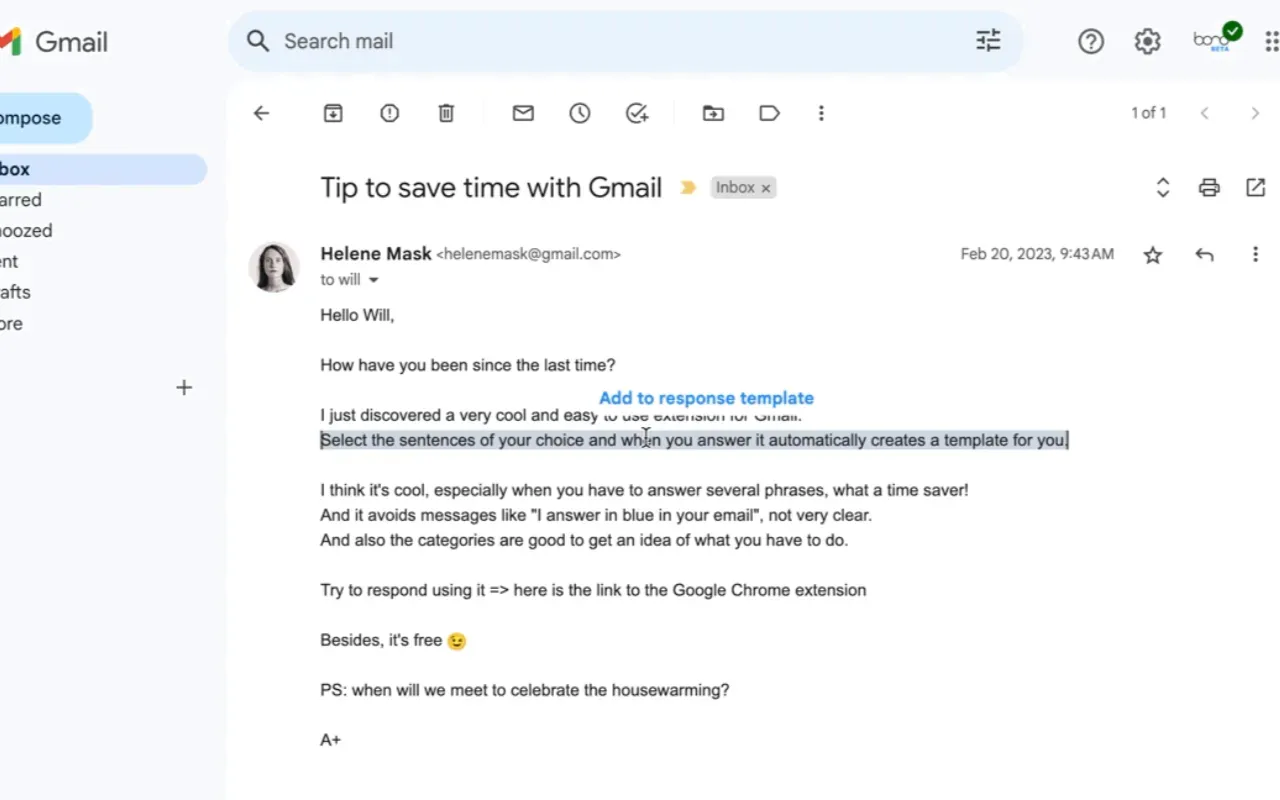
Tagada is a browser extension for Gmail that transforms email reading and replying by parsing messages into individual clickable sentences. Instead of scrolling through long threads or manually copying text, users can highlight, tag, and organize key phrases directly within the Gmail interface. The extension operates entirely on the user's device, ensuring no email data is sent to external servers. Designed for professionals who handle high volumes of email, Tagada aims to reduce response time and improve clarity by making it easy to extract and respond to important points.
Key Features
-
Sentence Parsing: Tagada automatically breaks down Gmail messages into individual sentences, each clickable and selectable. This allows users to quickly identify and interact with specific parts of an email without reading the entire message repeatedly.
-
Highlighting and Tagging: Users can highlight important sentences and assign them to custom categories (tags). This helps organize information by topic, priority, or action required. The extension provides a simple interface for one-click tagging, making it easy to categorize key points before crafting a reply.
-
Reply Template Generation: After selecting and tagging relevant sentences, Tagada generates a reply template that includes the highlighted content. This speeds up response writing by providing a structured draft that addresses the key points, reducing the need to switch between tabs or copy-paste manually.
-
100% Local Processing: All parsing, highlighting, and tagging happens on the user's computer. No email content is sent to Tagada's servers or any third party. This ensures privacy and data security, as emails remain within Gmail's infrastructure.
-
Gmail Integration: The extension works directly within the Gmail web interface, adding a sidebar or overlay for sentence selection and tagging. Users do not need to switch to a separate application or learn a new workflow. The extension is available for Chrome and other Chromium-based browsers.
-
Free Tier with Paid Upgrade: Tagada offers a free version with basic functionality, but users are limited in features. A paid license unlocks the full set of capabilities, including unlimited tagging and advanced template options. Pricing details are available on the website.
How It Works
To get started, users install the Tagada browser extension from the Chrome Web Store. Once installed, the extension adds a panel to the Gmail interface. When viewing an email, Tagada automatically parses the message into sentences, each displayed as a clickable element. Users can click on sentences to highlight them and assign tags from a predefined or custom list. After selecting the relevant sentences, a reply template is generated that includes the highlighted content, which users can then edit and send. The entire process is local, with no data leaving the browser. The extension also includes a settings panel for managing tags and preferences.
Use Cases
-
Busy Professionals: A project manager receiving dozens of emails daily can use Tagada to quickly extract action items, deadlines, and questions from each message, then generate a reply that addresses each point without missing details.
-
Customer Support Agents: Support teams handling repetitive inquiries can highlight key issues from customer emails and use the generated template to craft consistent, thorough responses, reducing average handling time.
-
Freelancers and Consultants: Independent workers who communicate with multiple clients can tag emails by project or priority, ensuring that important requests are not overlooked and responses are organized.
-
Sales Representatives: Salespeople can parse prospect emails to identify objections, requirements, and next steps, then generate replies that directly address each point, improving conversion rates.
-
Remote Teams: Distributed teams collaborating via email can use Tagada to ensure that all members understand key points from long threads, reducing miscommunication and follow-up questions.
Who It's For
Tagada is built for anyone who relies on Gmail for professional communication and wants to streamline their email workflow. It is particularly useful for knowledge workers, managers, support teams, and sales professionals who handle a high volume of emails daily. The extension is easy to use and requires no technical setup beyond installation. Compared to full-featured email clients like Superhuman or SaneBox, Tagada focuses specifically on parsing and tagging within Gmail, offering a lightweight, privacy-focused alternative. It is also distinct from AI-powered email assistants like Grammarly or Boomerang, as it does not use cloud processing or machine learning, instead relying on local sentence parsing.
Pros & Cons
The Good
- Operates entirely locally, ensuring email data never leaves the user's device.
- Parses emails into clickable sentences for quick selection and tagging.
- Generates reply templates from highlighted content to speed up responses.
- Integrates directly into Gmail without requiring a separate app or workflow change.
- Offers a free tier with basic functionality for users to try before buying.
The Bad
- Limited to Gmail web interface; no support for other email clients or mobile apps.
- Free version has restricted features, requiring a paid license for full use.
- Some complex email formats may not parse correctly, requiring manual intervention.