Serena
Serena is an AI productivity assistant that creates realistic daily plans from tasks, notes, and deadlines.
Overview
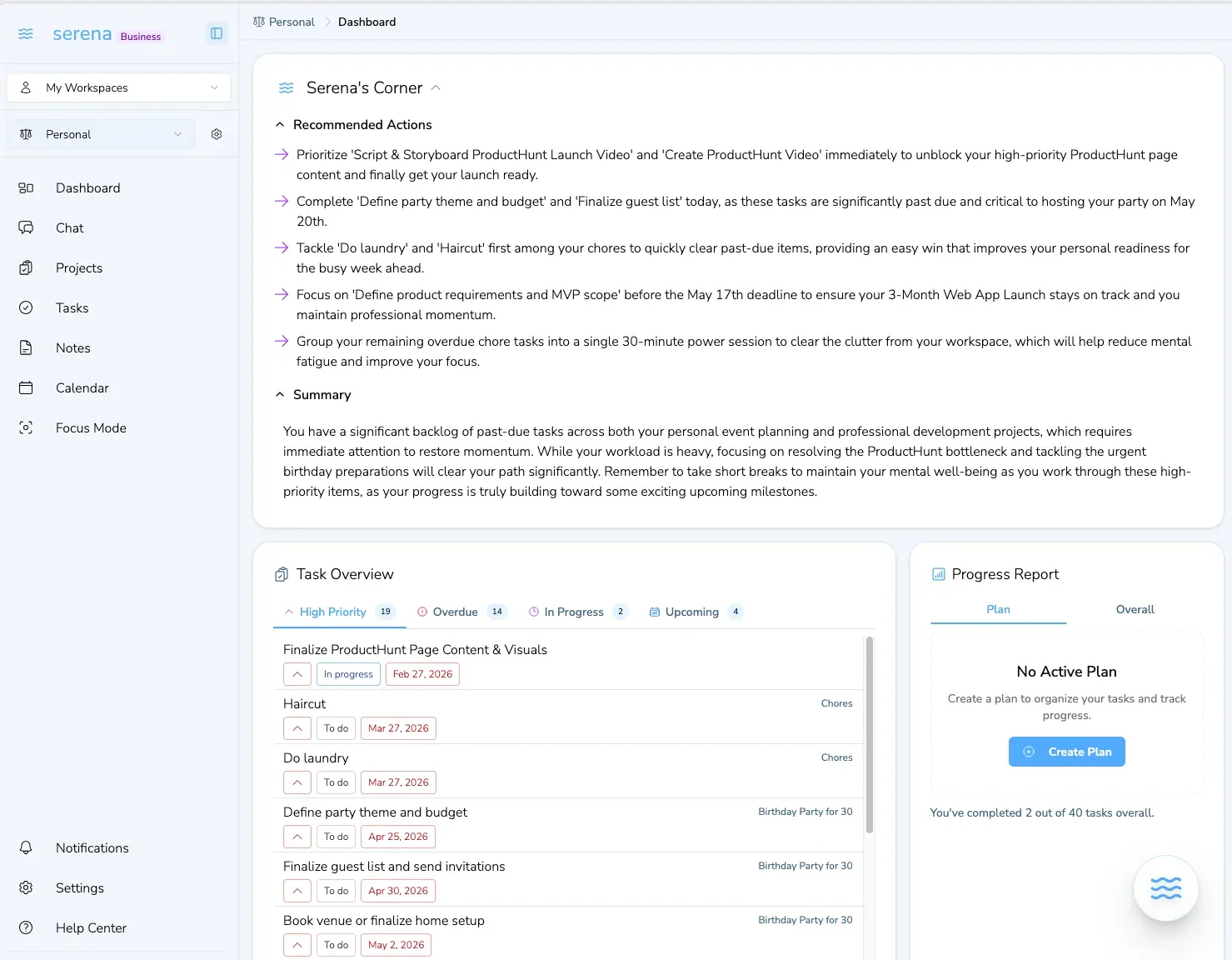
Serena is an AI-powered productivity assistant designed to consolidate tasks, notes, and deadlines into a single, realistic daily plan. Positioned as an alternative to juggling multiple tools like Notion, Jira, Asana, and Google Calendar, Serena aims to reduce the cognitive load of manual replanning. The product targets professionals, freelancers, and teams who struggle with scattered workflows and need a unified system for capturing work, prioritizing tasks, and adapting to shifting schedules. By leveraging AI to generate next steps and rebalance weekly plans, Serena differentiates itself from traditional project management tools that require constant manual updates. The platform is built for daily clarity, offering features like capture once, get today's plan, reschedule fast, and get unblocked. Serena is developed by Mind Flow Technologies Inc. and is available as a web application with a free tier to start.
Key Features
Capture Once – Users can input goals, notes, and loose tasks into a single repository, eliminating the need to maintain separate lists across different apps. This feature centralizes all work items, reducing the friction of context switching and ensuring nothing falls through the cracks.
Get Today's Plan – Serena automatically generates a daily plan based on priorities, deadlines, and existing workload. The AI considers the user's commitments and creates a realistic schedule, helping users focus on execution rather than planning.
Reschedule Fast – When priorities shift, users can ask Serena to rebalance the week instead of manually reorganizing tasks. This dynamic adjustment saves time and keeps the plan aligned with changing requirements.
Get Unblocked – If users encounter obstacles, Serena can clarify the next step, break down complex tasks, or suggest alternative approaches. This feature provides on-demand guidance to maintain momentum.
AI-Generated Next Steps – When creating a project, Serena produces actionable next steps automatically. Users can choose to receive updates via the app, email, or both, ensuring they stay informed without constant checking.
Integration with Multiple Tools – Serena connects with popular productivity apps like Notion, Jira, Asana, Monday, Google Calendar, Todoist, Trello, and others, allowing users to import existing tasks and notes seamlessly.
Personalized Guidance – The AI learns from user behavior over time, improving its recommendations and plan accuracy. This personalization makes the tool more effective as usage continues.
How It Works
New users start by signing up for a free account at Serena's sign-up page. After onboarding, they can connect their existing tools (e.g., Notion, Jira, Google Calendar) to import tasks and deadlines. Serena then analyzes the data and presents a daily plan that prioritizes urgent and important items. Users can review the plan, make adjustments, and ask Serena to reschedule if needed. Throughout the day, the AI provides reminders and suggestions for next steps. Weekly reviews are also generated, summarizing accomplishments and highlighting upcoming priorities. The interface is designed to be minimal and focused, with a workspace that combines tasks, notes, and calendar views. Users can also interact with Serena via natural language commands, such as "reschedule my meeting to tomorrow" or "what should I work on next?"
Use Cases
Freelancer Managing Multiple Projects – A freelance designer juggles client work, personal projects, and administrative tasks. By connecting Serena to their project management tools, they get a unified daily plan that balances deadlines and priorities. When a client requests an urgent change, Serena reschedules the week automatically, preventing overcommitment.
Remote Team Lead Coordinating Sprints – A team lead uses Serena to aggregate tasks from Jira and Asana, then assigns daily plans to team members. The AI identifies bottlenecks and suggests reallocation of resources, improving sprint velocity.
Student Balancing Coursework and Extracurriculars – A university student imports deadlines from Google Calendar and notes from Evernote. Serena creates a study schedule that allocates time for assignments, exams, and club activities, reducing last-minute cramming.
Small Business Owner Streamlining Operations – An entrepreneur uses Serena to capture ideas, tasks, and meeting notes in one place. The AI generates a weekly review that highlights completed tasks and upcoming priorities, helping the owner stay organized without a dedicated assistant.
Content Creator Planning Editorial Calendar – A YouTuber connects Serena to Trello and Google Docs. The AI suggests content topics based on deadlines and trends, then schedules filming and editing sessions, ensuring consistent uploads.
Pricing & Value
Serena offers a free tier that allows users to start without commitment. For advanced features, paid plans are available, though specific pricing details are not prominently displayed on the homepage. The pricing page likely outlines tiered options based on usage limits, integrations, and team collaboration. Given the AI capabilities and integrations, Serena provides good value for professionals who spend significant time on task management. The free tier is generous enough to evaluate the core functionality, while paid plans are suitable for power users and teams. Compared to competitors like Motion or Akiflow, Serena's pricing is competitive, though exact numbers should be verified on the website.
Final Verdict
Serena effectively addresses the pain point of fragmented productivity tools by offering a unified AI-driven planning experience. Its strengths include automatic daily plan generation, dynamic rescheduling, and integration with popular apps. The AI's ability to unblock users with next-step suggestions is a standout feature. However, the product is relatively new, and some integrations may be limited compared to established players. Additionally, the reliance on AI for planning may not suit users who prefer full manual control. Overall, Serena is a strong choice for individuals and small teams seeking to reduce planning overhead and improve execution. For those interested, explore Serena's features to see if it fits their workflow.
Pros & Cons
The Good
- Automatically generates a realistic daily plan from imported tasks and deadlines, reducing manual planning time.
- Integrates with over a dozen popular tools like Notion, Jira, Asana, and Google Calendar for seamless data import.
- Dynamic rescheduling feature allows users to rebalance the entire week with a single request when priorities shift.
- AI provides actionable next steps and unblocking suggestions, helping users maintain momentum on complex tasks.
- Free tier available with core functionality, making it accessible for individuals to test before committing.
The Bad
- Limited information on pricing tiers and advanced features, requiring users to visit the pricing page for details.
- As a relatively new product, the integration ecosystem may not be as extensive as established competitors.
- AI-driven planning may not appeal to users who prefer granular manual control over their schedules.