Macy
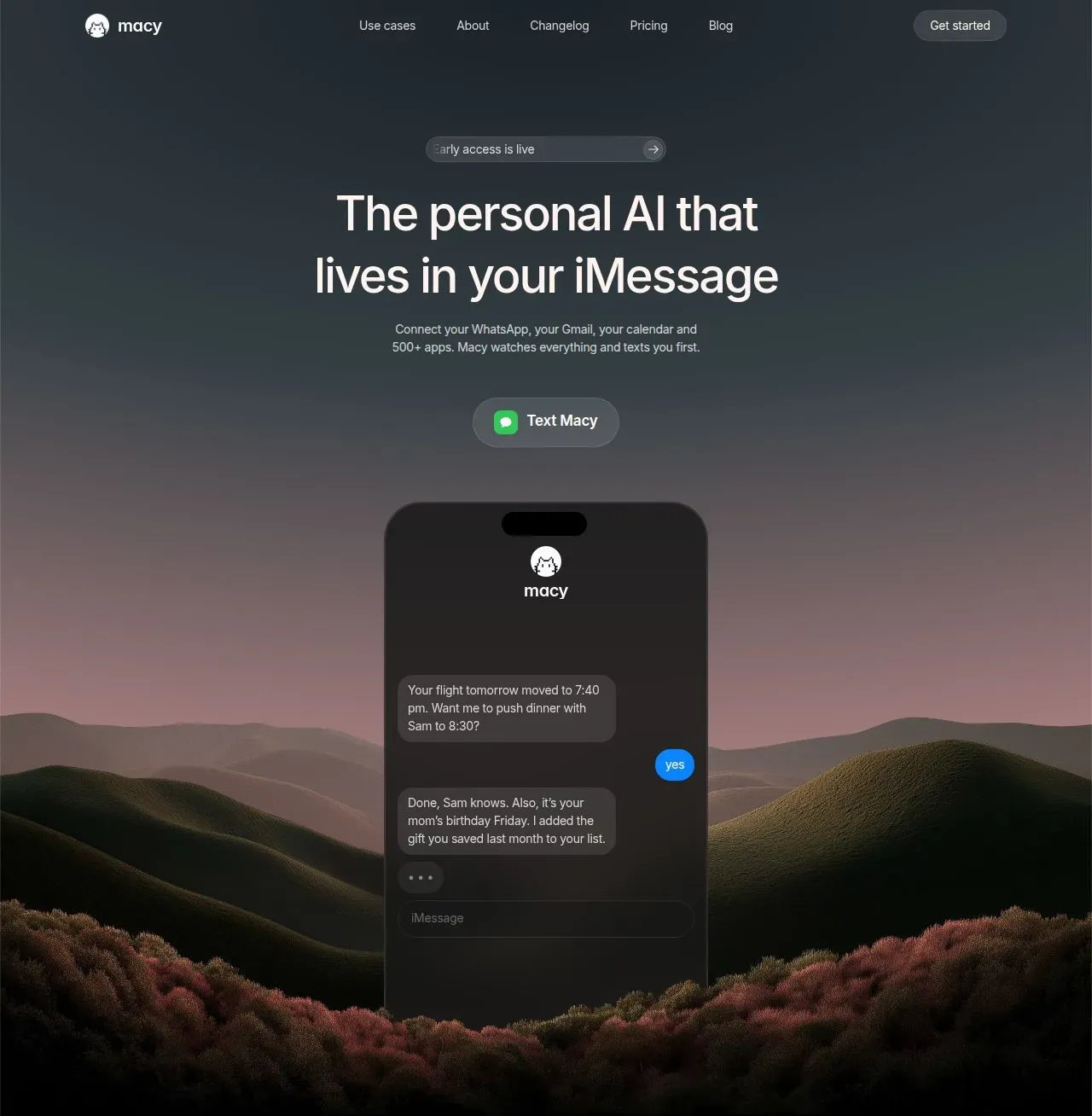
Macy is a personal AI that lives in iMessage, connecting apps and proactively texting you with reminders, alerts, and actions.
Overview
Macy is a personal artificial intelligence that operates entirely within Apple's iMessage platform, eliminating the need for a separate application. The product positions itself as a proactive digital assistant that monitors a user's connected services and initiates conversations when something requires attention. Rather than waiting for commands, Macy watches Gmail, Calendar, WhatsApp, Slack, Robinhood, and over 500 other integrations around the clock, then texts the user with relevant updates, proposed actions, or simple confirmations. This approach contrasts with conventional chatbots that require the user to open an app and type a request first.
The market for AI assistants has grown crowded, with products ranging from voice-based agents like Siri and Alexa to text-based tools like ChatGPT. Macy differentiates by embedding itself directly into the messaging interface users already check dozens of times per day. The product targets professionals, busy individuals, and anyone who feels overwhelmed by notifications across many apps. By consolidating alerts, reminders, document retrieval, and even trading proposals into a single iMessage thread, Macy aims to reduce context switching and mental overhead.
Key Features
Proactive notifications – Macy does not wait for the user to ask. She monitors connected services and sends a text message when a flight changes, a price alert triggers, a calendar event shifts, or an email requires action. This feature is designed to surface what matters without demanding attention until necessary.
500+ app integrations – Through the web dashboard, users link Gmail, Google Calendar, Google Drive, Slack, WhatsApp, Robinhood, and hundreds more services. Once connected, Macy can read, summarize, and act on data from these platforms. The integration list is extensive and covers productivity, finance, communication, and social media tools.
Confirmation gate – Before executing any sensitive action, Macy asks for explicit approval via a simple text reply. For example, she may propose a trade through Robinhood's agent API or draft a reply in WhatsApp, but nothing executes until the user types "yes." This safety mechanism ensures the user retains full control over financial transactions, sent messages, and data changes.
Standing orders – Users can set rules once, such as "alert me when NVDA drops below $120" or "remind me to buy a gift for Mom's birthday each year." Macy watches for these conditions around the clock and texts the user when they trigger. This transforms one-off commands into persistent background monitoring.
Memory and personalization – Macy remembers user preferences, past conversations, and saved documents. A user can say "remember I like the window seat" and she will apply that knowledge to future flight bookings. She can also retrieve files like a lease agreement saved months earlier with a single text.
Cross-app workflows – A single confirmation can trigger a chain of actions across multiple apps. For instance, Macy might catch an email, save an attachment to Drive, draft a reply in WhatsApp, and notify the user—all after one "yes." This automates multi-step tasks that would otherwise require switching between several tools.
Generative content – Macy can create images, stickers, short videos, or even generate language lessons directly in the chat. Users learning Spanish can receive daily quizzes, audio, and corrections on voice notes sent back. This feature turns the assistant into a versatile creative tool.
How It Works
Getting started with Macy requires no app download or account creation. The user simply texts the provided phone number (+1 (628) 358-6408) via iMessage. The first message opens a thread, and Macy immediately begins the onboarding process through the conversation itself.
From the web dashboard—accessible via a link sent in the chat—the user connects their desired services. This includes authorizing Gmail, Google Calendar, Drive, Slack, WhatsApp, Robinhood, and hundreds of others via OAuth. Once connected, Macy begins monitoring these accounts in the background.
Daily use revolves around the iMessage thread. Macy may text the user proactively about a price drop, a flight change, or a group chat summary from WhatsApp. The user replies naturally, and Macy interprets the intent. For actions like sending a WhatsApp response or executing a trade, Macy drafts the proposition and asks for confirmation. The user types "yes" to approve.
Users can also ask questions directly: "What's on my calendar today?", "Find the lease I saved on March 9", or "Remember I like the window seat." Macy retrieves information from connected apps or her memory and responds in the thread. Standing orders are set through natural language: "Watch NVDA and my flight on Thursday" creates two persistent monitors.
The entire system is event-driven. Macy does not continuously poll; she watches for changes via webhooks and API subscriptions. This keeps her responsive without draining battery or data.
Use Cases
Travel management – A user texts "Watch my flight to London on Thursday." When the airline changes the departure time, Macy texts an alert and asks if she should push back a dinner reservation. The user replies "yes" and Macy updates the calendar and texts the contact via WhatsApp.
Financial monitoring – A user sets a standing order: "Alert me if NVDA drops below $120." When the threshold is hit, Macy texts the current price and a short analysis, then asks if she should propose a buy order through Robinhood. The user can approve with a single word.
Group chat summarization – A family WhatsApp group has 200 unread messages. The user texts "Catch me up on the family chat." Macy reads the thread, summarizes key decisions and questions, and flags any messages that require a direct reply. The user can then dictate a reply that Macy sends into the group.
Document retrieval – The user asks "Find the lease I saved on March 9." Macy searches the user's Google Drive or her internal storage and returns the file. This eliminates the need to browse through folders or email threads.
Language learning – A user says "Teach me Spanish." Macy begins sending daily vocabulary lessons, pronunciation audio, and quizzes. When the user sends a voice note in Spanish, Macy corrects it and provides feedback—all within the iMessage thread.
Pricing & Value
Macy is currently free during early access. Users who sign up now can use all features without any cost. The company has announced that after the early access period, the price will be approximately $19 per month. This is not yet locked, and early users will be notified before any changes take effect.
At $19/month, Macy positions itself competitively against other AI assistants. ChatGPT Plus costs $20/month, and many productivity AI tools charge similar or higher rates. However, Macy's value lies in its proactive, integration-rich experience rather than a general-purpose chat interface. The ability to connect 500+ apps and execute cross-app workflows with a single confirmation is a significant differentiator.
The early access period offers a risk-free opportunity to evaluate the product. Users can explore all integrations and capabilities before committing to a subscription. The pricing page is available for more details.
Final Verdict
Macy successfully reimagines the AI assistant as a proactive text message rather than a reactive app. Its decision to live inside iMessage is clever and reduces friction, making it feel more like a helpful contact than a piece of software. The confirmation gate is a standout safety feature that builds trust, especially for financial and communication actions.
The product's reliance on iMessage currently limits it to Apple users, excluding a large Android audience. Additionally, the breadth of integrations, while impressive, means that Macy's reliability depends on the stability of third-party APIs. Some users may also find the $19/month hypothetical price point worth evaluating against free alternatives that offer similar but more limited features.
For busy professionals, frequent travelers, and anyone juggling multiple apps, Macy offers a compelling shortcut. It replaces the need to check dozens of services by bringing the important information into one thread. The team's focus on proactivity and simplicity is evident, and early access is an excellent time to test whether an iMessage-based AI fits into one's workflow.
Pros & Cons
The Good
- Proactively texts users with important alerts and reminders without requiring any app to open, reducing notification fatigue.
- Integrates with over 500 third-party services including Gmail, Calendar, Slack, WhatsApp, and Robinhood for comprehensive monitoring.
- Employs a confirmation gate that ensures no sensitive action is executed without the user's explicit approval via a simple text reply.
- Operates 24/7 through background jobs that watch markets, inboxes, and calendars, keeping users informed even while they sleep.
- Maintains a persistent memory of user preferences and past interactions, enabling personalized responses and automated standing orders.
The Bad
- Currently limited to Apple's iMessage platform, excluding potential Android users who cannot access the service.
- Future pricing of $19 per month may be considered steep for users who primarily need basic reminder and notification features.
- Heavily depends on third-party API availability and stability, which could lead to temporary disruptions in monitoring or actions.