
Akita Apps
Akita Apps offers minimal focus tools like a site blocker and note-taking extension, designed to eliminate distractions without subscriptions.
Overview
Akita Apps is a small, purpose-driven suite of browser extensions that tackles two of the most common digital productivity problems: endless distraction and fleeting ideas. The product positions itself as a minimalist alternative to feature-heavy productivity suites, emphasizing speed, simplicity, and zero subscription fees. In a market crowded with complex tools that often create more overhead than they solve, Akita Apps strips away everything except the core functions: blocking distracting websites and capturing thoughts instantly.
The suite consists of two Chrome extensions: Dopamine Destroyer and Hayaku Notes. Dopamine Destroyer lets users block specific websites with a single toggle, while Hayaku Notes provides a one-click method to jot down ideas before they vanish. Both tools share a common philosophy: no bloat, no monthly payments, and no learning curve. The website’s tone and design reflect this focus, with a clean interface and straightforward messaging that appeals to freelancers, students, remote workers, and anyone struggling with attention management.
Akita Apps enters a competitive space alongside established blockers like Freedom and Cold Turkey, as well as note-taking apps like Notion and Evernote. However, its deliberate lack of features and commitment to being free (no subscription hints anywhere on the site) carve out a niche for users who want the absolute minimum friction in their workflow. The product does not attempt to be an all-in-one solution, which is both its strongest differentiator and its most obvious limitation.
The website itself is a single-page marketing site with links to each extension, a contact page, and a sitemap. There is no blog, no documentation, and no pricing page, as the extensions appear to be free. This simplicity extends to the user experience, but it also means less context for potential users evaluating the tools. Nonetheless, for those who value speed and minimalism, Akita Apps offers a refreshing alternative.
Key Features
One-Toggle Site Blocking with Dopamine Destroyer
Dopamine Destroyer is a Chrome extension designed to block distracting websites instantly. Users enable or disable the blocker with a single toggle, which removes the need for complex schedule configurations or whitelist management. The extension claims to be the fastest site blocker for Chrome, emphasizing a near-instant response when toggled. This simplicity reduces the friction that often leads users to disable more complicated blockers.
Instant Thought Capture with Hayaku Notes
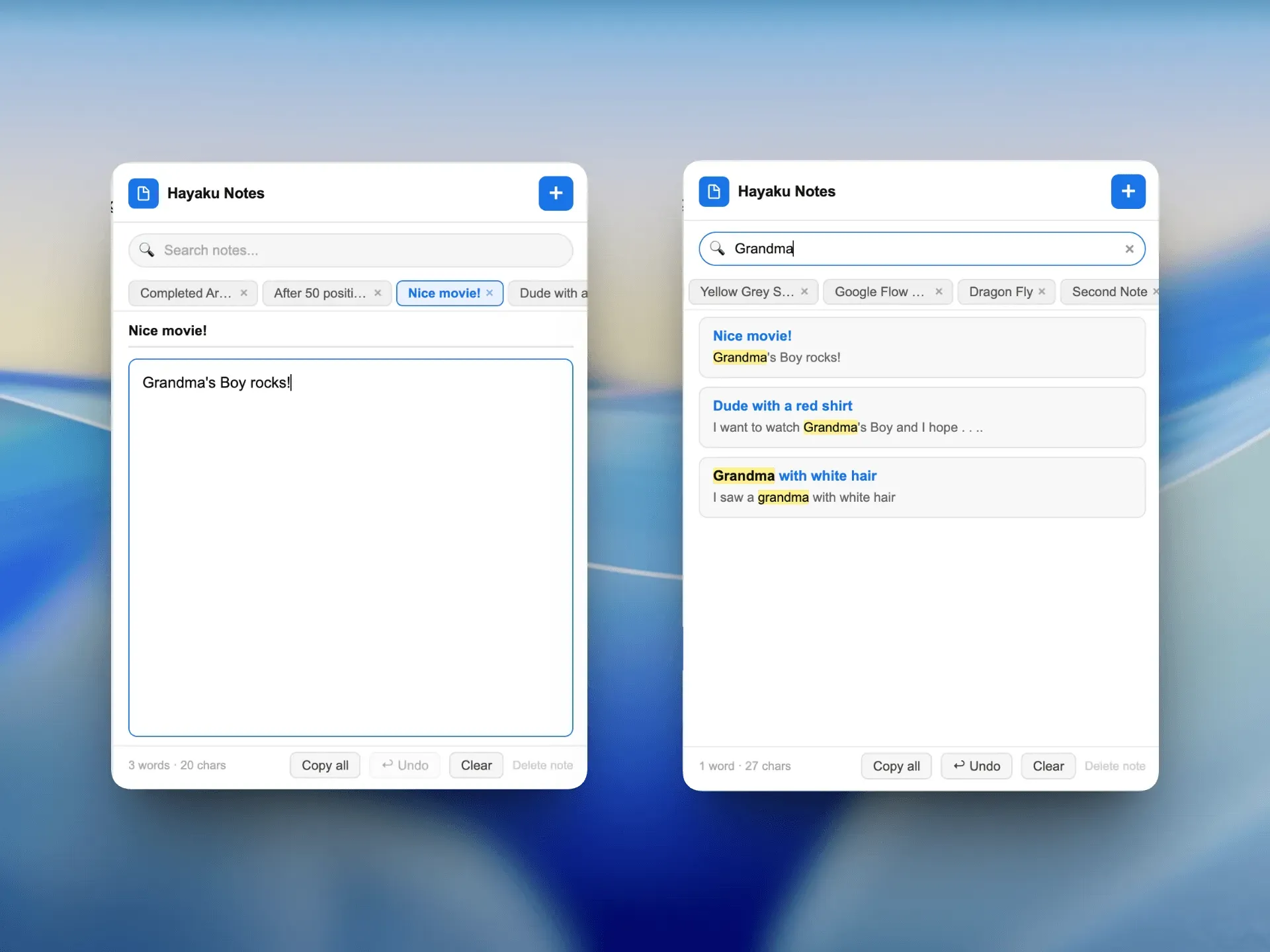
Hayaku Notes is a note-taking extension optimized for speed. With one click, users can open a small input box, type an idea, and close it, with the note saved automatically. The design prioritizes capturing fleeting thoughts without switching windows or opening a separate application. The extension’s name, derived from the Japanese word for “fast,” reflects its core promise: a tool that lets users jot down ideas before they disappear.
No Subscription Model
Both extensions are offered without any subscription fees. The website explicitly states “no subscriptions” and “no monthly fees,” positioning the tools as a permanent, cost-free solution. This is a notable departure from many productivity tools that rely on recurring revenue, and it removes a significant barrier for users hesitant to commit financially.
Minimal User Interface
The entire product aesthetic is built around minimalism. The website uses a clean, monochrome design with subtle accent colors, and the extensions themselves mirror that simplicity. Each toolbar interface is reduced to its essential elements, reducing cognitive load and keeping the user focused on the task at hand, whether blocking distractions or capturing notes.
Cross-Plugin Consistency
Although Dopamine Destroyer and Hayaku Notes serve different purposes, they share a consistent design language and interaction pattern. Both extensions can be accessed easily from the browser toolbar, and their simple on/off or click-to-capture mechanisms mean users do not need to learn separate workflows. This consistency lowers the learning curve and creates a cohesive toolset.
Fast Performance Optimization
The website and presumably the extensions are built with speed as a priority. Dopamine Destroyer is marketed as the fastest site blocker, and Hayaku Notes as the fastest thought-capture tool. While detailed performance metrics are not provided, the emphasis on speed is a recurring theme in the product’s positioning.
No Account Required (Implied)
Since there is no pricing or login prompt on the site, it is reasonable to infer that the extensions do not require user accounts or sign-ups to function. This eliminates friction associated with registration and ensures privacy, as data is likely stored locally in the browser rather than on external servers.
How It Works
The user journey for Akita Apps begins by visiting the website and clicking on either of the two extension links. For example, a user interested in blocking distractions would go to the Dopamine Destroyer page and click the Chrome Web Store link to install the extension. No account creation or payment is needed. Once installed, a small icon appears in the Chrome toolbar.
With Dopamine Destroyer, the user clicks the icon to open a simple popup. The popup contains a single toggle switch, a list of websites to block (likely pre-configured with common distractors like social media), and an option to add custom URLs. Flipping the toggle to “on” immediately starts blocking those sites. When the user tries to visit a blocked site, they may see a redirect or a blank page. To unblock, the user simply toggles the switch back to “off.” There are no schedules, no timing constraints, and no whitelist exceptions to manage.
Hayaku Notes works similarly. After installation, clicking its toolbar icon opens a small text input field that overlays the current page. The user types a note and presses Enter or clicks a save button. The note is stored locally in the browser’s storage and can be accessed later by opening the same popup, where a list of saved notes appears. The process is designed to take less than five seconds from thought to capture.
Both extensions operate entirely client-side, meaning no data is sent to external servers. This ensures offline functionality and privacy. The user does not need to log in, sync across devices, or manage any settings beyond the initial setup. The simplicity means the tools are ready to use immediately after installation, with no onboarding tutorial required.
For users who want to explore both tools, the Hayaku Notes page provides a separate installation path. The two extensions work independently, but their consistent design makes them a natural pair for users seeking both focus and capture capabilities. The website’s footer includes a contact form for questions, though no support documentation is provided.
Use Cases
Freelancer Avoiding Social Media During Work Hours
A freelance writer who tends to check Twitter every hour installs Dopamine Destroyer. They add Twitter and Facebook to the block list and toggle the blocker on at the start of their workday. The immediate feedback when trying to access these sites reinforces self-discipline. Over a month, the writer reports fewer distractions and a measurable increase in daily word count, all without paying a subscription fee.
Student Capturing Lecture Ideas
A student watching online lectures uses Hayaku Notes to quickly jot down questions or key points without losing the flow of the video. With one click, they type a note, and it is saved. Later, they review the list of notes to guide their study sessions. The elimination of context switching between the lecture window and a note-taking app helps maintain focus.
Remote Worker Blocking News Sites During Deep Work
A remote software developer uses Dopamine Destroyer to block news sites and Reddit during dedicated coding sprints. The toggle allows them to enable blocking when they start a Pomodoro session and disable it during breaks. The tool’s simplicity means it does not disrupt their existing workflow, and the lack of complex scheduling avoids setup friction.
Creative Professional Capturing Spontaneous Ideas
A graphic designer who frequently gets inspiration outside of design tools uses Hayaku Notes to capture descriptions, links, or images from the browser. The ability to store ideas in the context of the current page makes it easier to revisit and expand upon them later. Over time, the collection of notes becomes a personal idea bank.
Team Seeking a Simple Productivity Baseline
A small team of freelancers shares a recommendation to install both extensions. They find that the tools complement each other: Dopamine Destroyer keeps them off distractions during collaborative tasks, while Hayaku Notes captures meeting action items. Since no accounts or team features exist, they rely on their own discipline, but the shared toolset provides a consistent format for personal productivity.
Pricing & Value
The Akita Apps website does not list any pricing tiers or payment options. The homepage reads “No subscriptions. No bloat.” and each extension page reinforces “no monthly fees.” This strongly implies that both Dopamine Destroyer and Hayaku Notes are free to download and use indefinitely. There is no mention of a premium version, in-app purchases, or donation requests.
For users evaluating the value proposition, the absence of cost is a clear advantage. Competing site blockers like Freedom charge $6.99 per month, while note-taking apps like Evernote have paid tiers for advanced features. Akita Apps offers a fully functional alternative at no cost, albeit with fewer features. The trade-off is immediately apparent: users get exactly two focused tools with no frills, no syncing, and no customer support beyond a contact form.
Given that the products appear to be one-time downloads from the Chrome Web Store (the site likely links to those listings), the value is exceptional for anyone who needs the specific functions offered. The tools do not attempt to replace comprehensive project management or note-taking systems, but for their narrow scope, they deliver exactly what they promise. There is no risk in trying them, as they can be uninstalled in seconds.
For users who need cross-device sync or team collaboration, the free price point may not compensate for missing features. However, for individuals seeking a lightweight, cost-free solution to distraction and idea capture, Akita Apps provides significant value.
Final Verdict
Akita Apps succeeds in delivering exactly what it promises: minimal, fast, and free tools for blocking websites and capturing notes. The design philosophy of putting focus first resonates with users tired of bloated software and subscription fatigue. The extensions are easy to install, intuitive to use, and require no ongoing commitment. The lack of a pricing barrier makes them accessible to anyone with a Chrome browser.
However, the product’s simplicity is also its biggest limitation. There are only two tools, no cross-platform support, and no advanced features like analytics, scheduling, or sync. Users who need more than the basics will quickly outgrow these extensions. Additionally, the absence of any documentation or troubleshooting resources could frustrate users encountering issues. The contact page is the only support channel, and response times are unknown.
Akita Apps is best suited for individuals who want a no-fuss, no-cost solution to specific productivity pain points. It is not a replacement for comprehensive tools like RescueTime or Notion, but it serves a valuable niche for those who value speed and minimalism. For freelancers, students, and remote workers looking to cut distractions and capture ideas without overhead, Akita Apps is worth a trial. The product’s honest positioning and execution make it a refreshing entry in the productivity space.
Pros & Cons
The Good
- Completely free with no subscriptions or hidden fees, removing financial barriers to entry.
- One-toggle site blocker offers the simplest possible interface for reducing digital distractions.
- Hayaku Notes captures ideas in under five seconds, minimizing disruption to the current workflow.
- Both extensions share a consistent, minimalist design that reduces cognitive load and learning time.
- No account registration required, preserving user privacy and enabling instant offline use.
The Bad
- Only available on Chrome, excluding users of Firefox, Safari, and other major browsers.
- Limited feature set with only two tools, lacking advanced options like scheduling, analytics, or team collaboration.
- No official documentation or support resources beyond a contact form, potentially frustrating troubleshooting.