
TDEE Calculator
Use our free TDEE calculator to estimate your Total Daily Energy Expenditure, maintenance calories, weight loss or gain targets, and macro splits.
Overview
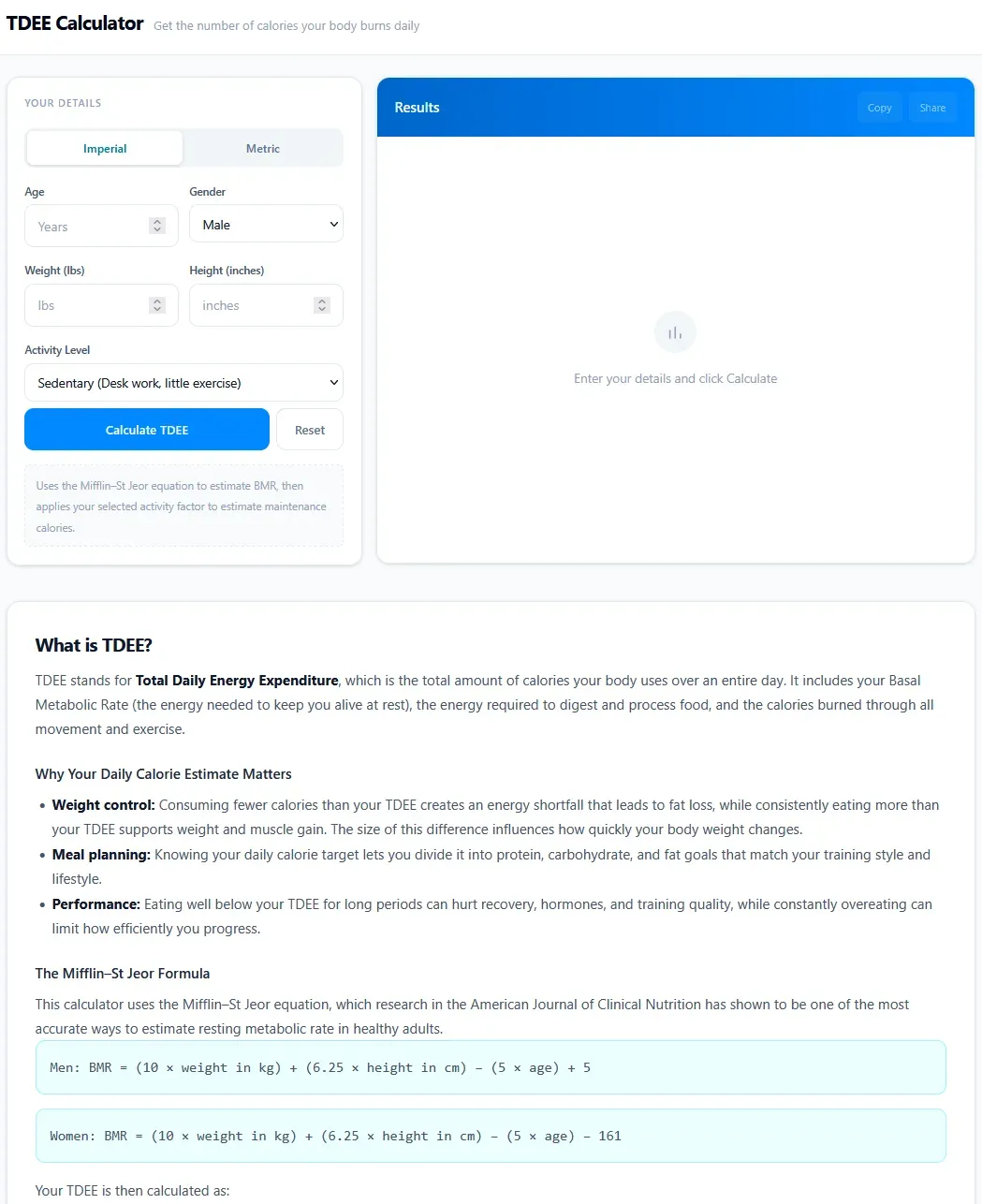
The TDEE Calculator is a free online tool that estimates a person's Total Daily Energy Expenditure (TDEE), the number of calories burned daily. It solves the problem of determining maintenance calories for weight management, whether the goal is fat loss, muscle gain, or weight maintenance. Built for fitness enthusiasts, dieters, athletes, and anyone tracking their nutrition, the calculator uses the Mifflin-St Jeor equation to compute Basal Metabolic Rate (BMR) and then applies an activity factor to estimate TDEE. The tool is available at tdee.io and provides a simple, ad-free interface for quick calculations.
Key Features
- Mifflin-St Jeor Equation: The calculator uses the Mifflin-St Jeor formula, which research in the American Journal of Clinical Nutrition has shown to be one of the most accurate methods for estimating resting metabolic rate in healthy adults. The formula differs for men and women: for men, BMR = (10 × weight in kg) + (6.25 × height in cm) - (5 × age) + 5; for women, BMR = (10 × weight in kg) + (6.25 × height in cm) - (5 × age) - 161.
- Activity Level Selection: Users choose from five activity levels: Sedentary (1.2), Light Exercise (1.375), Moderate Exercise (1.55), Heavy Exercise (1.725), and Athlete (1.9). Each level includes a brief description, such as "Desk work, little exercise" for Sedentary or "Twice-daily training or very active work" for Athlete. The activity factor multiplies the BMR to estimate TDEE.
- Imperial and Metric Units: The interface allows switching between Imperial (pounds, inches) and Metric (kilograms, centimeters) units via toggle buttons. This accommodates users from different regions without manual conversion.
- Age, Gender, Weight, and Height Inputs: Users enter their age (15-100 years), gender (male or female), weight, and height. The form includes placeholder text and step increments for precise input. Gender selection affects the BMR formula used.
- Calculate and Reset Buttons: A prominent "Calculate TDEE" button triggers the computation, while a "Reset" button clears all fields. The results section displays the estimated TDEE, and users can copy or share the result via buttons that become active after calculation.
- Educational Content: The page includes a detailed section explaining what TDEE is, why it matters, how to use the estimate, and frequently asked questions. It also provides the Mifflin-St Jeor formula and activity level definitions, making the tool educational as well as functional.
- Responsive Design: The website is built with Next.js and features a clean, mobile-friendly layout. The header includes the site name and tagline, and the footer contains links to About, Contact, Privacy Policy, and Terms of Use pages.
How It Works
A user lands on the homepage and sees a form under "Your Details." They first select their preferred unit system (Imperial or Metric). Then they enter their age, gender, weight, and height. After selecting an activity level from the dropdown, they click "Calculate TDEE." The tool computes BMR using the Mifflin-St Jeor equation based on the entered data and gender, then multiplies by the chosen activity factor to produce the TDEE estimate. The result appears in a results panel, where the user can copy the number to clipboard or share it. The page also provides context on how to interpret the number, such as using a 250-500 calorie deficit for fat loss or a 200-350 calorie surplus for muscle gain. No account creation or signup is required; the tool is fully functional on first visit.
Use Cases
- A fitness enthusiast aiming for fat loss: A 30-year-old male who exercises moderately 4 days a week can calculate his TDEE and then subtract 300-500 calories to set a daily calorie target for steady weight loss. He can monitor his weight over 2-3 weeks and adjust as needed.
- A strength athlete planning a bulk: A 25-year-old female athlete training twice daily can estimate her TDEE using the Athlete activity level. She adds 200-350 calories to her maintenance number to support muscle gain while minimizing fat accumulation.
- A nutrition coach working with clients: A coach can use the calculator to provide initial calorie estimates for clients. The tool's reliance on the validated Mifflin-St Jeor equation adds credibility, and the coach can teach clients how to adjust based on real-world weight changes.
- A beginner starting a weight management journey: Someone new to calorie tracking can quickly get a baseline TDEE without complex formulas. The built-in FAQ answers common questions about BMR, accuracy, and when to recalculate, reducing the learning curve.
Who It's For
The TDEE Calculator is designed for individuals interested in weight management, fitness, or nutrition tracking. It suits beginners who need a simple starting point as well as experienced athletes who want a quick estimate. The tool is free and requires no registration, making it accessible to anyone with internet access. Alternatives include MyFitnessPal's calorie calculator, Calculator.net's TDEE calculator, and various fitness apps. What differentiates this tool is its focus on the Mifflin-St Jeor equation, a clean interface without ads, and educational content that explains the science behind the numbers. It is ideal for health-conscious individuals, personal trainers, dietitians, and anyone seeking a no-frills calorie estimator.
Pros & Cons
The Good
- Uses the validated Mifflin-St Jeor equation for BMR estimation.
- Supports both Imperial and Metric units with easy toggle.
- Provides five activity levels with clear descriptions.
- Includes educational content explaining TDEE, BMR, and how to use the results.
- No account or signup required; fully functional on first visit.
The Bad
- Does not offer macro or meal planning features beyond calorie estimation.
- Lacks integration with fitness apps or wearables for automatic activity tracking.
- No option to save or track historical calculations without manual recording.