KROCK.IO
Krock.io is video review software for creative teams, offering frame-accurate comments, version comparisons, and approvals with unlimited reviewers.
Overview
Krock.io positions itself as a dedicated video review and media collaboration platform built specifically for creative teams, including video production companies, advertising agencies, animation studios, digital agencies, and content creators. The core problem it addresses is the fragmented and inefficient feedback process that plagues most media projects, where comments get scattered across email threads, chat messages, and spreadsheets, making it difficult to track revisions, manage approvals, and maintain a single source of truth. By centralizing upload, review, and approval in one workspace, Krock.io aims to cut approval time by as much as 30% and reduce the number of versions required before final sign-off, as claimed by its customer testimonials.
The platform is marketed as a more accessible alternative to legacy tools like Frame.io, with a key differentiator being unlimited reviewers at no extra cost. While many competing services charge per reviewer, Krock.io allows teams to invite clients, stakeholders, and freelance collaborators without worrying about seat fees. The company reports that over 80,000 creative teams already use the platform, with notable names such as BBC Nordic, KRAFTON, Animade, and Hound appearing in its client logo carousel. This market traction suggests the tool has found a solid foothold among mid-sized agencies and production houses that need robust functionality without the budget blowout.
Krock.io also extends beyond simple video review. It includes tools for online proofing of images and PDFs, audio annotation, storyboard creation, AI-powered storyboard generation, and project management, positioning itself as a broader creative collaboration hub. This breadth of features is both a strength and a challenge, as the sheer number of tools may initially overwhelm smaller teams, but the integrated workflow pays off for those dealing with complex multimedia projects.
The platform is primarily cloud-based, with plugins that bridge into desktop editing software like Adobe Creative Cloud, Apple Final Cut Pro, and DaVinci Resolve Studio. This hybrid approach ensures that feedback captured in the web app can be pushed directly into the editing timeline, reducing friction for editors who live in these tools. In this review, we analyze the core capabilities, user experience, and value proposition of Krock.io based on the information presented on its official website.
Key Features
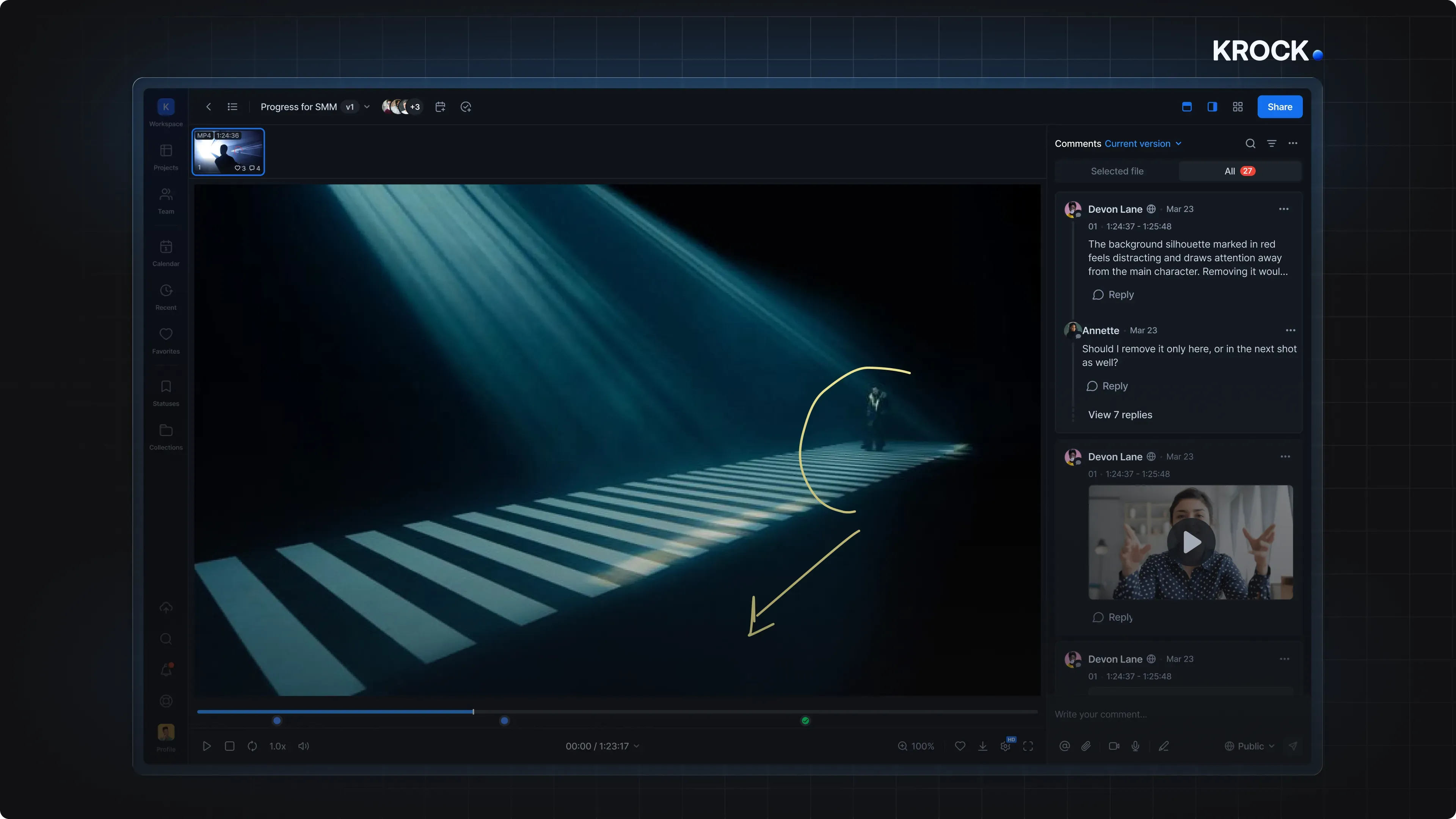
Frame-Accurate Video Commenting: At the heart of Krock.io is a commenting system that allows reviewers to pin feedback to specific frames of a video. Users can drop a comment at any point in the timeline, and the system attaches the exact timestamp, making it unambiguous which part of the footage the feedback refers to. Users can also draw freehand annotations on the frame, attach reference images, and even add audio notes. This precision eliminates the need for vague time references like "around the middle" and speeds up the revision cycle, as editors can jump directly to the relevant frame.
Version Comparison Tools: One of the most valuable features for iterative projects is the ability to compare different versions of the same media. Krock.io offers two comparison modes: overlay mode, where a splitter slider reveals differences between two frames; and auto-compare mode, which uses an algorithm to automatically detect visual changes and highlight them with color. This is particularly useful for color corrections, motion graphics tweaks, and other subtle changes that are hard to spot by eye. The comparison tools are accessible directly within the review interface, so no separate window or export is needed.
Unlimited Reviewers and No Per-User Fees: Unlike many competitors that charge per collaborator, Krock.io lets teams share projects with an unlimited number of reviewers across all paid plans. This is a huge advantage for agencies that need to bring in multiple client stakeholders, legal teams, or external consultants for a single project. The absence of per-seat pricing for reviewers means that the cost remains predictable, and there is no temptation to limit feedback to only a few people in order to save money. The website prominently markets this feature as "no per-user fees," a direct challenge to the industry standard.
Integrations with Editing Software: Krock.io provides dedicated plugins for popular editing tools, including Adobe Creative Cloud, Apple Final Cut Pro, and DaVinci Resolve Studio. These integrations go beyond simple upload and download: they enable two-way sync of comments and markers. For instance, an editor can import time-coded comments directly into their timeline, make the changes, and then export the updated version back to Krock.io for another round of review. There is also a "Sync Playhead" feature that aligns the editor's timeline with the exact frame a comment refers to. This tight integration minimizes context switching and helps keep the entire review loop within the editor's familiar environment.
Storyboard Creator and AI Tools: Recognising that pre-production is a critical phase, Krock.io includes a free storyboard creator that lets teams visually plan scenes and sequences. Users can create frames, arrange them in order, and even animate them into animatics. More impressively, the platform has introduced AI-powered storyboard generation, where users can input a prompt or script and receive a set of storyboard images in return. While the AI output may not be production-ready, it serves as an effective brainstorming tool that accelerates concept development. This feature is particularly appealing to small studios and freelance directors who want to visualise ideas quickly without hiring an illustrator.
Project Management and Board Tool: Beyond media review, Krock.io offers an interactive project management layer. Teams can create boards to organize tasks, track progress, and assign responsibilities. This integrates with the review workflow, so each feedback item can be turned into a task and assigned to a team member, with deadlines and statuses. The platform also supports role-based access control, allowing administrators to define who can view, comment, or approve content. For larger organizations, this level of control is essential to maintain security and ensure that only authorized people can see sensitive work-in-progress footage.
Security and Compliance Features: Media production often involves handling high-value, unreleased content, so security is a top priority. Krock.io states that it uses international security certificates to protect customer data. The platform offers role-based permissions, dedicated workspaces, and extensive storage options. While the website does not list specific compliance standards like SOC 2, it implies that data governance is taken seriously. This is reassuring for enterprise clients and agencies that need to sign confidentiality agreements with their clients.
How It Works
Getting started with Krock.io is straightforward. The platform offers a free trial that requires no credit card, and there is also a free plan for smaller projects. After signing up, users land in a dashboard where they can create a new project and upload media files. Supported file types include video, images, audio, and PDF documents, so most common review assets are covered.
The first step is to invite reviewers. Since there is no per-user fee, team members and clients can be added freely. Invitees receive an email link and can access the project without needing to create a paid account. This low-friction entry point is crucial for getting busy stakeholders to actually provide feedback.
Once the media is uploaded, reviewers can play the video and drop comments at any timestamp. The commenting interface is designed to be simple: click the comment button, pause the video, and type. Users can also draw on the frame, which is particularly useful for pointing out specific visual details. All comments are aggregated in a sidebar, where the whole team can see them, reply, and mark them as resolved.
After the review round is complete, the creative team makes the necessary changes and uploads a new version. The platform automatically links versions together, making it easy to navigate between them. Reviewers are notified about the update and can use the comparison tools to verify that their requested changes have been applied. If everything looks good, an approver can formally approve the project, which signals that it is ready for delivery.
For those using editing software, the workflow extends directly into the timeline. With the Adobe, Final Cut, or DaVinci Resolve plugin installed, comments from Krock.io are imported as markers on the timeline. Editors can work through them systematically, and once they are done, the revised footage can be uploaded back to the platform with a single click. This closed loop reduces the risk of missed feedback and cuts down on the administrative overhead of exporting files and manually tracking changes.
Use Cases
Post-Production Houses Reviewing Client Cuts: A video post-production company can upload a rough cut to Krock.io and invite their client's entire team, including the marketing director and product manager, to leave time-stamped comments. Because there is no reviewer limit, even a large client group can contribute without incurring extra costs. The auto-compare feature allows the client to see exactly what changed between versions, which helps align expectations and reduce unnecessary back-and-forth.
Advertising Agencies Managing Multiple Ad Variations: Agencies often need to produce several variations of a commercial for A/B testing. Krock.io makes it easy to organize these versions in a single project. The overlay mode is particularly handy for comparing two different cuts side by side, and the structured comment threads prevent feedback from getting lost. The ability to assign tasks directly from comments ensures that each revision request is acted on by the right team member.
Animation Studios and Storyboard Workflows: Animation projects rely heavily on storyboards and animatics as early previews of the final product. Krock.io's storyboard creator and AI tools allow animators to quickly generate visual sequences and share them for approval. The comments are pinned to individual frames, which is much more meaningful for animation than general video notes, because it identifies the exact frame that needs redrawing. This flow accelerates the pre-production phase and provides a clear audit trail of changes.
Remote and Distributed Teams: With teams scattered across different time zones, asynchronous collaboration is essential. Krock.io enables reviewers to leave comments whenever they want, and team members can respond at their convenience. The platform's web-based access means no heavy software is required to participate, and all data is synchronized in the cloud. This eliminates the need for lengthy conference calls to discuss changes and ensures that everyone stays on the same page, even if they never overlap in working hours.
Content Creators and YouTubers: Individual creators can also benefit from Krock.io when collaborating with editors, thumbnail designers, or sponsors. Rather than exchanging files over email, all versions and feedback exist in one place. The free plan provides enough storage for smaller projects, making this a cost-effective way for freelancers to manage client approvals. For creators who work with multiple freelancers, the platform offers a clean way to keep everything organized.
Pricing & Value
Krock.io's pricing structure is designed to be flexible, with options ranging from per-seat subscriptions to unlimited seats for larger organizations. The website promotes a free trial that doesn't require a credit card, as well as a free plan that includes basic features. For teams that need advanced functionality, paid tiers are available on a monthly or annual basis. The exact numbers are not disclosed on the homepage, but the pricing page provides detailed information.
The main value proposition is that adding reviewers is always free, even on the lowest paid tier. This is a significant departure from competitors like Frame.io, where reviewer seats can double the cost. For an agency with dozens of client contacts, this can save thousands of dollars per year. Additionally, the inclusion of project management and storyboard tools within the same subscription means that teams can replace two or three separate tools with a single platform, further improving the return on investment.
However, the paid plans can become expensive for very large teams, and the unlimited-seat option is tailored to enterprises with substantial budgets. The free plan likely has storage limits and only one active project, which may be sufficient for small tests but not for ongoing professional use. Overall, the pricing appears competitive for the scope of features offered, particularly when compared to the total cost of assembling a similar stack from dedicated proofing, project management, and storyboard tools.
Final Verdict
Krock.io is a compelling choice for creative teams that need a robust, all-in-one platform for video review and collaboration. Its standout strengths are the unlimited reviewer model, which is a genuine industry disruptor, and the deep integrations with popular editing tools. The version comparison and frame-accurate commenting features are well implemented and can significantly reduce the time spent on revisions. The inclusion of storyboard creation and project management tools makes it a competitive option for teams that want to consolidate their software stack.
On the downside, the sheer number of features can feel overwhelming for new users, and the interface might have a learning curve for those who are not tech-savvy. While the platform supports multiple media types, its focus is clearly on video and motion graphics, so teams primarily working with static print designs might find other proofing tools more suitable. Additionally, the advanced security and customization options are probably reserved for the higher pricing tiers, which could be a barrier for smaller studios.
Overall, Krock.io is best suited for video production companies, animation studios, advertising agencies, and any team that regularly manages video approvals with external stakeholders. It offers a balanced mix of power and affordability, and the integrations with Adobe and other tools make it a practical addition to a professional's workflow. For teams tired of chasing feedback in emails and juggling multiple review tools, Krock.io provides a coherent and effective solution. Explore the video proofing capabilities on their site to see if it fits your workflow.
Pros & Cons
The Good
- Unlimited reviewers on all paid plans, eliminating per-seat costs for clients and collaborators.
- Frame-accurate commenting with timecodes, drawing tools, and file attachments reduces ambiguity in feedback.
- Version comparison tools (overlay and auto-diff) make it easy to spot visual changes between cuts.
- Native integrations with Adobe Creative Cloud, Final Cut Pro, and DaVinci Resolve allow for a seamless editing workflow.
- The platform combines video review, project management, and storyboard creation in a single subscription, offering good value.
The Bad
- The extensive feature set may require a learning curve for new users or non-technical reviewers.
- Advanced security and customization options are likely reserved for higher-tier enterprise plans, limiting access for small studios.
- The platform is primarily video-oriented, so teams focused mainly on still-image or document proofing might find the tools less specialized.